

A software company committed to provide software that just works.
- Tweets566
- Following132
- Followers1.6K
- Likes292
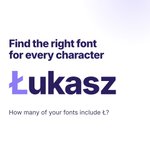






ALT Find the right font for every character. Carousel on a white background with purple accents and the PopChar logo. Slide 1 reads "Find the right font for every character" and shows the name Łukasz with the question "How many of your fonts include Ł?". Slide 2 shows Łukasz with the Ł set in a different font. Slide 3 shows PopChar 11 with Ł selected: one click on the flag button flags every font in the font list that contains Ł, 172 of 298 font families. Slide 4 shows the comparison view with Ł in each of these fonts. Slide 5 compares Ł in Arial and Apple Chancery with guides for baseline and x-height. The last slide shows a name badge reading Łukasz and "Try PopChar now".


ALT Typinator graphic on a dark blue background. Headline: "Your inbox is down. Typinator still types." Three abbreviations with their expansions: ";late" becomes "Sorry for the slow reply. My email took a day off.", ";move" becomes "Can we move yesterday's call? Our meeting app had other plans.", ";catchup" becomes "Back online. Working through my inbox now, you'll hear from me today." Footer: "Your abbreviations live on your computer, so they keep working when the cloud doesn't." typinator.com, Mac & Windows.

ALT Two-panel meme with stick figures on a light purple background. Top panel, “me, looking up 𝄞 for the fifth time this month”: a stressed stick figure at a laptop with many browser tabs open, like “how to type treble clef” and “treble clef copy paste”, next to a sheet of music titled “This week in classical”. Bottom panel, “me with PopChar”: a relaxed stick figure with a cup of tea, while PopChar shows the treble clef in its favorites and inserts it into the same text.

ALT PopChar 11 for Mac announcement on a purple background. Headline: “The right character, right where you need it.” Below, a text document reads “Choir rehearsal, Thursday” followed by a treble clef. Next to it, PopChar in compact mode shows a search field, favorite characters and recently used characters like é, ü, ½ and §. A keyboard shortcut, Control, Option, P, opens PopChar.


ALT "20 years on Mac. Now on Windows." Typinator app shown running on Windows, with an "Open beta" tag and the link ergonis.com/typinator/windows-beta.

ALT Four Gartner Digital Markets 2026 awards for Typinator: Capterra Best Ease of Use, Capterra Best Value, Software Advice Most Recommended, Best Customer Support.

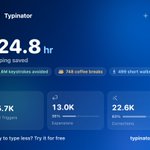
ALT Typinator Statistics dashboard showing 124.8 hours of typing saved, 1.6 million keystrokes avoided, 35,700 total triggers, 13,000 expansions (36%), and 22,600 corrections (63%).


ALT Typinator abbreviations and templates now work on iPhone, in every app, every keyboard, and every workflow.


ALT Typinator 10 for macOS and iOS


ALT Infographic titled “The keyboard is better than the mouse.” It claims an estimated 481,920 seconds saved in one year, equal to 17 workdays. A table lists common actions and the seconds saved using keyboard shortcuts: 5 seconds for selecting a word then cutting and pasting after the next word, 5 seconds for copy paste and removing formatting, and 2 seconds each for quitting an app, reopening the last closed tab, saving as a PDF, and selecting all then deleting.


ALT A layered screenshot showcasing the consistent design of three new software Help Centers: Typinator in the foreground (blue theme) with the header "How can we help you today?". In the background, partially visible, are the similar homepages for PopChar and KeyCue, demonstrating a unified, workflow-centric support structure across all three products.