

Snippety is a productivity tool for macOS & iOS that can boost your everyday tasks by providing quick access to snippets with smart placeholders ✨
Joined May 2022
- Tweets226
- Following0
- Followers355
- Likes96





Snippety is ready for iPhone Duo! 🎉
The app and keyboard are fully optimized for both open and closed modes, so you can enjoy your snippets on your new device from day one.
#iPhoneDuo
The new Snippety version for iOS has been released!
👉 Adjusted the app for iPhone Duo.
👉 Adjusted Snippety Keyboard for iPhone Duo.
👉 Added snippet version history - switch between up to 10 previous versions of a snippet.
👉 Improved snippet picker for Snippet Reference placeholder. You can now search snippets and browse them on the list.
👉 Added support for cursor placeholder allowing you to define where the cursor should be placed after snippet expansion.
👉 Added support for simulating Return and Tab keys allowing you to jump between form fields.
👉 Improved placeholder list allowing you to search and see the most recently used placeholders first.
The new version for macOS and iOS is now available!
Main changes:
👉 Snippet version history (macOS)
👉 More statistics (macOS)
👉 Improved Snippet Reference placeholder
👉 Improved performance when working with a large database
Full release notes:
snippety.app/help/release-no…
snippety.app/help/release-no…
The standalone version for macOS is already available, while the App Store version is still awaiting Apple's review. Unfortunately, App Store reviews have been taking longer than usual recently.
If you purchased the App Store version and would like to migrate to the standalone version to receive updates faster, please contact us by email. We'll provide you with the instructions for migrating.

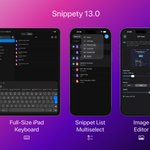
New iOS app update is out! 🚀
Features:
✨ Full-size iPad keyboard
✨ Multiselect for batch operations
✨ Image editor for resizing & optimizing images
Full release notes:
🔗 snippety.app/help/release-no…
Learn more:
🔗 snippety.app

Snippety is now fully compatible with iOS 27!
If you're running the latest iOS, make sure to update Snippety to the latest version too. 📲
The new iOS version is out! 🎉
Snippety Keyboard has improved a lot since the last update. You can now expand snippets while typing, so there's no need to manually switch between expansion and typing modes anymore.
Just type naturally, and let Snippety do the rest.
Here's what's new:
👉 Tap & hold a key to show diacritics and alternative characters.
👉 Tap & hold the spacebar, then slide your finger to move the cursor.
👉 Snippet Expander now expands while typing without needing to switch modes manually.
👉 You can now set a prefix to avoid accidentally expanding snippets while typing.
👉 Snippet Expander on iPhone is now more compact and easier to use.
👉 Pressing spacebar after punctuation or digits automatically changes the keyboard to letters.
👉 Added auto-capitalization.
👉 Improved typing experience.
👉 You can now undo an expansion.
👉 Keyboard settings are now also available inside the app.
#productivity
💡 Check out the new blog post to find out how to improve your macOS using command line scripts:
snippety.app/blog/create-new…
This article shows how to use snippets to create a new text file directly in the currently active Finder window.
The new version just dropped, bringing a bunch of quality-of-life improvements 🤩
Here are the highlights:
🖼️ New image editor with resize and compression controls
✨ Improved image compression quality
🔎 New search commands
⌨️ New format picker (⌘⇧ + F)
🤖 Configurable OpenAI models
Full release notes:
snippety.app/help/release-no…


Moving to Snippety just got easier ✨
You can now migrate your snippets from other apps to Snippety using our new migration tool.
Read more: snippety.app/help/migration/

Snippety has a fresh set of cool features to make your Monday a little easier :) 🚀
🔗 snippety.app/help/release-no…
1. App Rules - Configure app-specific sets to see only the snippets relevant to the app you're using.
2. Test Button - Test your snippets directly from the editor to make sure everything works as expected.
Check out the latest feature - Compact Snippety!
You can now set up a hotkey to instantly open a compact list of your snippets.
Customize it by choosing which collection or tag to display, making it faster to access your favorite snippets.
New features in Snippety 11.2:
🚀 Introducing Compact Snippety - a lightweight popup for quickly browsing and expanding your snippets.
⌨️ Added keyboard shortcuts for tags. Press ⌘T to switch the sidebar between collections and tags, and use ⌘0-9 to toggle tags while the tags list is visible.
👉 Added the ability to save snippets that contain only whitespace, such as spaces, tabs, or new lines.
✨ Added a "Require double suffix" option for triggers, so snippets expand only after typing the suffix twice.
🔍 Added the ability to escape search modifiers. Prefix a modifier with a backslash (e.g. \!Phrase) to search for it as plain text instead of filtering.
🐛 Fixed a crash that could occur on macOS 27 beta.
Snippety 11.1 has been released!
📂 Added the ability to hide collections from the "All" view. Right-click a collection and choose: Hide From "All".
🔎 Added search commands to quickly filter your snippets. Type "/quick" to show only snippets in the quick access menu, or "/unassigned" to show snippets without a collection.
⌨️ Added hot keys to repeat your last snippet. Instantly re-expand the previous snippet, or repeat it with new values. Check Preferences → Key Bindings.
👉 Added an option to disable clipboard restoration. Check Preferences → Behaviors.
👉 Added an option to enabled "Paste & match style" by default. Check Preferences → Behaviors.
👉 Added an option to use clipboard content when there is no selection. Check Preferences → Behaviors.
📢 Added an option to disable the What's New window. Check Preferences → General.
⚡ Optimized snippet loading for faster startup, less memory consumption, and smoother performance with large libraries.
🐛 Resolved an issue that could cause the app to quit unexpectedly when available disk space was low.
🎉 Big news! Today we're releasing Snippety v11 with the long-awaited Conditional Blocks! 🤩
Conditional Blocks let you create dynamic snippets that adapt based on your input. They're perfect for generating multiple variations of the same snippet without maintaining duplicates.
Available now on macOS and iOS. Check out the demo below! 👇
🔗 Conditional Blocks:
snippety.app/help/macos/cond…
📖 Full release notes:
snippety.app/help/release-no…
Snippety for Mac now supports drag & drop, making it easier to move snippets between collections and assign tags. Check out the video below! 👇
Snippety for Mobile also comes with plenty of improvements! 🚀
Alongside Conditional Blocks, snippet previews now display placeholders as colored tags - matching their appearance on macOS.
You can also customize the information shown below each snippet title and enjoy haptic feedback while using the Snippety Keyboard.
📖 Full release notes:
snippety.app/help/release-no…

If you're an early adopter running the macOS 27 beta, be aware of an ongoing system bug that can cause random crashes whenever an app presents a modal window.
The issue has been reproduced by multiple developers and reported to Apple. Until a fix is available, stay tuned for upcoming system updates.