

I post Unity tutorials. VP of XR Research & a Unity Certified Instructor & CEO @FalconXRInc. https://teapawt.org/t.co/EUvpysaOVz https://teapawt.org/t.co/ibkKzh3ob5
Canada
Joined July 2020
- Tweets1.7K
- Following69
- Followers11.7K
- Likes1.2K





Short: How to make an X-ray in Unity3D
#madewithunity #unity3d #unity #unitytutorial #tutorial #HowTo #gamedev
1
2
429


Leading a free workshop on ARFoundation! Come register fast! Its about to begin!
https://teapawt.org/t.co/QNQQwtRpNl
#Unityy3D #UnityCertifiedInstructor #AR #XR #ARFoundation #UnityTips #MadeWithUnity
What to create a VR game in Unity? Here are some instructions to set up a VR Rig using the interaction toolkit.
usmanmir.com/post/technical-…
#UnityTips #UnityCertifiedInstructor
FREE CHROMAKEY in @unity URP!
I was helping some students and this topic came up. Thought I'd share :)
Read the thread for how to create one yourself!
#UnityTips #UnityCertfiedInstructor

Thanks everyone for the support!
Here is another idea for it.
Replace color from your mobile camera feed.
usmanmir.com/post/color-swap…
3
Have been seeing a lot of AR concept videos out there. Thought I'd make one a reality :D
Using ARFoundation + A Depth Shader
#UnityCertifiedInstructor #MadeWithUnity


3) Make sure to set the graph to Unlit for bright video display and Transparent so the scene Color Node can work.

1

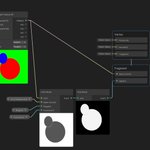
Here is the full Shader Graph.
We are basically putting a render Texture that renders the video through a replace color node to replace the Green part with "Scene Color" to make the green part essentially transparent. This can also work on any color and static Images.

5

Matrix just got an Instagram account! My wife will be posting his vids and photos there. Please give him some love! instagram.com/matrix_mir?utm…
#KITTY #cute

3


