

Replacing wireframes → mockups → build Turn real content into production-ready WordPress pages https://xitter.cf/t.co/nQsbfUwj4Z
Orlando, FL
Joined May 2009
- Tweets460
- Following399
- Followers552
- Likes1.2K




Pinned Tweet
Most people are looking at AI in WordPress as content generation
That’s not the real shift
The shift is connecting WordPress directly to something like Claude Desktop and letting it operate within a structured system
This video shows a different approach using the Promptless Connector with Claude Desktop.
The setup is simple:
- Connect WordPress to Claude using a scoped application password
- Claude can read a content brief directly from your desktop
- It maps that content to structured sections and deploys the page
- From there, updates happen in conversation
“Add testimonials after the stats”
“Refine this section”
No switching between tools. No rebuilding layouts.
Everything stays structured, theme-aware, and controlled.
The interesting part isn’t just AI generating a page
It’s being able to safely connect an application to Claude and let it operate within defined guardrails
That’s where this starts to become practical for real workflows
PromptlessWP.com
#WordPress #AI #WebDevelopment #Automation #ClaudeAI
The criticism that “AI makes mistakes” misses how AI-native development actually works.
You don’t give an AI one giant prompt and blindly ship whatever it produces.
You scope the project. Break it into phases. Establish guardrails. Manage context. Test continuously. Review outputs. Let the AI identify and correct failures. Then you guide the next iteration.
The developer is increasingly becoming the architect and orchestrator while AI handles more of the implementation.
That’s the shift I think people are underestimating.
The question is becoming less:
“Can AI write production-quality code?”
And more:
“Do you know how to orchestrate AI well enough to produce production-quality software?”
As implementation becomes cheaper and faster, judgment, architecture, problem solving, and orchestration become more valuable.
Most "AI builds a WordPress site" demos stop at a brochure site.
A few pages, a hero, some services. Useful, but that's not where the hard work in client projects lives.
The hard part is structured content: listings, directories, events, profiles. Content with fields, filters, templates and relationships.
So for this build, I had Claude go a step deeper.
Through the @PromptlessWP MCP connectors, Claude built Emberlarch Stays, a fictional Airbnb-style directory, one plain-English request at a time:
- a Stays post type with 12 custom fields: nightly price, type, town, guests, bedrooms, rating, amenities
• listing cards where every field has its place
- full listing pages with a photo header, gallery lightbox, room cards, amenity icons and a map
- visitor filters generated from the fields: price range, type pills, amenities, region and town search
- guided experiences as events, with dates, prices, spots booked and "add to calendar", where past ones drop off on their own
- host profiles that list each host's stays automatically, and a "Your host" card on every listing
And this isn't a static mockup or AI-generated HTML dumped onto a page.
It's ordinary WordPress content. Every listing, field, event and host is editable in wp-admin, by you or your client, long after Claude is done.
The structure keeps working after the build too:
- text contrast is corrected against each section's background
- alt text comes from headings when none is typed
- the lightbox and filters work by keyboard, and result counts are announced to screen readers
- event pages carry Schema.org markup
- the whole stack has been assessed criterion by criterion against WCAG 2.2 A and AA
That's the difference between generating pages and building a system. One is a demo. The other is something a client can actually run.
Promptless CPT Pages is free on WordPress.org.
Shout out to @alexjvasquez. I came across this post on building video workflows with Claude Code, and it was exactly what I needed to finally make walkthrough videos for @PromptlessWP. Here’s the first one: a full WordPress site, from a blank install to finished.

This is just getting ridiculous...ly good: "Yo, Claude, make me a how-to video for managing my client's custom blocks." Claude: Sure thing... this work? imgcaps.s3.us-west-1.amazona…
I think the role is evolving.
AI can write more of the code, but development is increasingly becoming about orchestration: managing context, setting guardrails, reducing drift, reviewing output and guiding multiple AI sessions toward a production-ready result.
The barrier to writing code is dropping. The value is shifting toward knowing what to build, how it should work, and whether the output is actually good.
Less code production. More orchestration and judgment.

AI is making it easier for developers to move between stacks.
WordPress. React. Astro. Webflow. Framer.
But knowing how to build something isn’t the same as knowing what should be built.
That’s where experience still matters.
The real skill is understanding the problem, choosing the right architecture, thinking through performance and maintainability, executing well, and handing off something that actually works for the client.
AI can help close knowledge gaps and accelerate execution.
It can’t replace the judgment required to connect:
Problem → Requirements → Architecture → Execution → QA → Handoff → Outcome
The platform isn’t the end goal.
Solving the problem is.
Cinematic scrolling is everywhere right now but I’m curious about the business side. Does it actually convert?
Has anyone seen solid A/B testing or conversion data showing cinematic scroll experiences outperforming simpler, conversion-focused layouts?
And does the answer change by industry?
I’d be interested to see the data behind the trend.
Breon Williams retweeted

“…the real strength of a CMS is that it automatically handles hundreds of small things you no longer have to think about.”
🫡

I migrated a website with 800+ articles from @WordPress to a fully static HTML site managed with Claude Code.
A few months later, I went back to WordPress.
At first, it felt like the obvious move.
Why keep a CMS if AI can manage the entire site?
On paper, the advantages were clear:
- Extreme performance (no database, no plugins)
- Full flexibility (edit HTML/CSS/JS directly)
- Better security (almost no attack surface)
- Claude could even suggest internal links using Search Console data
I genuinely thought I had found something better.
Then I started managing the site every day.
And the reality hit.
Want to change 2 lines in an article?
WordPress: open, edit and update. Done in 20 seconds.
Static + Claude: find the file, understand the context, make the change, check that nothing broke. Several minutes.
Same problem when deleting multiple articles or updating categories, pagination, sitemap, internal links, redirects…
The usual answer is: “Just build scripts and agents.”
True.
But the moment you start building all those automations, you’re basically rebuilding your own CMS.
So the real question is no longer:
“Can AI replace WordPress?”
It’s:
“Can it handle all the small daily operations quickly and reliably?”
On a small site : yes, static + AI is excellent.
On an editorial site with hundreds of articles that you update regularly : it’s a different story.
You end up managing HTML + categories + pagination + sitemap + search + redirects + internal linking + deployment + prompts…
Your website becomes a software project.
After several months living without WordPress, my conclusion is simple:
WordPress isn’t dead.
Because the real strength of a CMS is that it automatically handles hundreds of small things you no longer have to think about.
Anyone else tried going fully static with AI on a large content site?

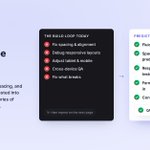
How much developer time are agencies spending fixing problems that could have been prevented by the system?
Think about a typical WordPress build.
- Build the pages.
- Fix spacing and alignment issues.
- Debug responsive layouts.
- Make adjustments for tablet and mobile.
- Test forms and integrations.
- Run cross-device QA.
- Fix what breaks.
- Repeat on the next page.
None of this means QA isn't necessary. It absolutely is.
But there's a difference between using QA to verify quality and using QA to repeatedly repair predictable problems.
Responsiveness is a good example.
If every new section requires a developer to manually determine how typography scales, how spacing changes, when columns stack, how content behaves on tablet, and what happens at smaller widths, responsiveness becomes something you continuously debug.
But what if those decisions have already been pressure-tested?
What if the design system already knows how spacing scales?
What if typography is fluid by default? This
What if common layout patterns already have predictable responsive behavior?
What if forms, accessibility, semantic structure, and conversion patterns are part of the system rather than things developers have to remember to account for afterward?
You still QA the website.
But QA becomes more about verification than repair.
That's an important distinction.
It's also a big part of why I built Promptless the way I did.
AI can make generating a page faster.
But if a developer then spends hours cleaning up the output, fixing responsive issues, correcting structure, wiring forms, and debugging layouts, how much time did the AI actually save?
I think the bigger opportunity for AI in web development isn't simply generating websites faster.
It's building better systems where entire categories of repetitive work become predictable by default.
Developers can spend less time fixing the same problems and more time solving the problems that actually require their expertise.
And for agencies, that creates something much more valuable than faster page generation:
More capacity without sacrificing quality.
#WordPress #WebDevelopment #DigitalAgency #WebDesign #AI

Planting seeds is part of the preparation process for what God has waiting for you. Every rep strengthens you, builds your capacity, and prepares you to carry the responsibility that comes with what you’ve been praying for.
Who says you have to choose between speed and quality?
Production-ready WordPress sites don’t have to take weeks, and shipping fast doesn’t have to mean cutting corners.
With the right workflow, AI becomes an accelerator, not a replacement.
@PromptlessWP handles the heavy lifting:
• Custom Post Types
• Custom Fields & Relationships
• Forms & Validation
• Dynamic Templates
• Navigation & Menus
• Search & Filtering
• Taxonomies
• Design Systems
• Accessibility
• Internal Linking
• Responsive Layouts
• SEO-ready structure
Developers aren’t paid to use a specific tool. We’re paid to solve problems. The best workflow is the one that consistently delivers production-ready websites faster without sacrificing quality.

Most people are looking at AI in WordPress as content generation
That’s not the real shift
The shift is connecting WordPress directly to something like Claude Desktop and letting it operate within a structured system
This video shows a different approach using the Promptless Connector with Claude Desktop.
The setup is simple:
- Connect WordPress to Claude using a scoped application password
- Claude can read a content brief directly from your desktop
- It maps that content to structured sections and deploys the page
- From there, updates happen in conversation
“Add testimonials after the stats”
“Refine this section”
No switching between tools. No rebuilding layouts.
Everything stays structured, theme-aware, and controlled.
The interesting part isn’t just AI generating a page
It’s being able to safely connect an application to Claude and let it operate within defined guardrails
That’s where this starts to become practical for real workflows
youtu.be/FiiSU1MDgx4
#WordPress #AI #WebDevelopment #Automation #ClaudeAI
Client brief in. Structured, theme-aware WordPress sections out. No copy-paste in between.
This is the part the "build a site from one prompt" demos never show, because it starts from your content, not an invented one.
youtube.com/watch?v=LQuOC-qu…
Agencies and freelancers don’t need AI to replace strategy.
They need better tooling to turn strategy into production-ready websites faster.
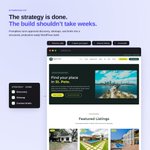
Once the discovery is done, the research is complete, the sitemap is defined, and the content briefs are finalized, why should building the actual site still take weeks of repetitive production work?
That’s the friction I’ve been working to eliminate with @PromptlessWP.
Not by generating a generic brochure site or dumping AI-generated HTML onto a page.
I’m talking about building real WordPress systems with:
• structured page composition
• reusable design systems and components
• dynamic custom post types and templates
• metadata and content relationships
• internal linking and site-wide content architecture
• semantic, accessible output
• configurable filtering and interactive functionality
• AI connectors that understand the structure of the entire site
The result is the ability to move from a properly planned and briefed website to a production-ready build in a fraction of the time traditional development would require.
And that matters because speed isn’t just about delivering one project faster.
It’s about capacity.
It’s about taking on more work without growing your team at the same rate. Reducing repetitive production work. Protecting margins. Iterating faster. And giving agencies and freelancers another tool they can use when the right project calls for it.
Not every project should use the same workflow or the same technology.
But if you’re running an agency or working independently, having systems that let you execute faster without sacrificing structure, accessibility, or maintainability is becoming a real competitive advantage.
The goal isn’t to replace the thinking behind great websites.
It’s to stop the production process from being slower than the strategy that created them.

Just tested something on a real production WordPress site that really showed me how much the client revision process can change with the right AI workflow.
After presenting the initial site, the client sent over the usual feedback. Content to restructure or rewrite, images to reconsider, and other updates across the site.
I gave the email directly to Claude.
Because of the system I’ve built with @PromptlessWP , it was able to assess the current state of the site, connect the feedback to the right pages and sections, make the updates, document what changed, and flag anything that needed clarification instead of making assumptions.
This is the part I’ve been working toward. Not just using AI to generate WordPress sites, but giving it enough context to actually understand, maintain, and evolve them.
Earlier this year I released @PromptlessWP a plugin to eliminate copy-pasting Google Docs into WordPress by hand.
Today it's live on Product Hunt, and it's evolved into something much bigger.
Most "AI + WordPress" tools stop after generating a page.
Promptless turns Claude into an orchestrator for an entire agency build:
• Structured marketing pages (schema-validated)
• Custom post types with real fields, directories, and search filters
• Theme-matched forms
• Workflow automations (Google Drive, email, CRM, and more)
All WordPress-native.
No raw HTML.
No rebuilding.
No AI-looking output.
The goal isn't another page generator.
It's letting Claude orchestrate the same systems agencies build manually—pages, post types, forms, filtered archives, and automations—all from one conversation.
If you've ever spent a week turning a brief into a production-ready WordPress site, this is what I built to solve.
🚀 Promptless is live on Product Hunt today, and I'd genuinely love your feedback.
What's the most time-consuming part of a WordPress build for you?


Happy to get into how the whole system works under the hood.
producthunt.com/products/pro…
Most AI tools stop at page generation. The harder problem is orchestrating the entire WordPress system.
That’s why @PromptlessWP has evolved into an orchestration layer for WordPress:
• interpreting structured content briefs into reusable page layouts
• generating dynamic custom post type systems with configurable templates
• creating metadata, taxonomies, and content relationships that drive dynamic experiences
• maintaining reusable design systems and visual consistency across the site
• enforcing semantic HTML and accessibility throughout the build process
• enabling AI connectors that understand the site’s architecture instead of just producing HTML
More recently, that workflow has expanded to include configurable event systems, dynamic content filtering, and relationship-driven rendering that all operate within the same architecture.
The goal isn’t to generate another landing page.
It’s to teach AI how to think like a senior WordPress architect instead of a page builder.
Once AI understands templates, relationships, metadata, design systems, and rendering rules—not just prompts—the conversation shifts from generating pages to orchestrating entire website ecosystems.


For the past few weeks I’ve been heads down pressure-testing @PromptlessWP.
The breakthrough wasn’t generating pages.
It was proving an agency-style workflow where Claude can create:
• Pages
• Forms
• Custom post types
• Metadata
• Internal linking
• Structured content relationships
And have it all deployed into a usable WordPress architecture.
Once content becomes structured data, the possibilities get interesting.
I’m now working on the next phase:
Events, dynamic content filtering, and making those systems configurable through the same workflow.
We’re getting much closer to generating entire website ecosystems instead of individual pages.