

https://teapawt.org/t.co/bEnyuf5Qmi
Joined August 2021
- Tweets1.5K
- Following205
- Followers1.7K
- Likes3.4K




Pinned Tweet
~$700 turns one PCIe slot into five full-bandwidth GPU connections.
That's roughly what the switch card, cables, and risers in this diagram cost (GPUs and drives not included). Here's what you get for it and why each part matters.
1⃣ PCIe switch card (the blue board)
Spec: x16 host interface, PCIe Gen4/Gen5, with a high-lane-count switch chip under the heatsink and fan. Roughly 96 lanes total: 16 up to the CPU, 80 down to devices.
Why it matters: It turns one motherboard slot into five full-width GPU connections without moving to a bigger, more expensive platform.
2⃣ High-density cable ports (SlimSAS / MCIO-style, x8 each)
Spec: 10 ports, each carrying 8 PCIe lanes.
Why it matters: GPUs can sit where cooling and space work best. Two x8 ports pair up to make one x16 link.
3⃣ Riser / adapter boards (under each GPU)
Spec: 2× x8 cable inputs → 1× full PCIe x16 slot, with auxiliary power.
Why it matters: Every GPU gets full x16 bandwidth, not a cut-down x4 or x8 link like many mining-style risers.
4⃣ Blower-style GPUs (dual-slot)
Spec: Rear-exhaust coolers that push hot air out of the chassis.
Why it matters: You can pack them side by side without them cooking each other.
5⃣ Enterprise U.2 SSDs (the Intel drives)
Spec: 2.5" data center solid-state drives, attachable through the same switch ports.
Why it matters: Large models and datasets load fast from storage right next to the compute.
Why the price matters
Multi-GPU workstation and server platforms with that many full x16 slots typically cost thousands before you buy a single GPU. Getting there for about $700 lets you reuse hardware you already own and scale as budget allows.
The trade-off
There are 80 lanes downstream and 16 back to the CPU, roughly 5:1 oversubscription. GPU-to-GPU traffic stays on the switch at full speed; traffic between the CPU and the GPUs shares one uplink. That's fine for inference and many fine-tuning jobs, but it's a bottleneck for heavy data movement between the host and the GPUs.
On-prem AI doesn't have to start with a six-figure server. Sometimes it starts with understanding the plumbing.
Would you build like this, or go with purpose-built GPU servers?
#AI #Infrastructure #LocalAI #PCIe #HomeLab #ITLeadership

teapawt.org/cavemtech/status/21247…
Part 2 we discuss power

Last post: 1 PCIe slot → 5 GPUs through a PEX88096 switch. 22K of you dug into lanes, bandwidth, and P2P.
But the real limit on local AI isn't PCIe. It's power. ⚡
🔢 The math
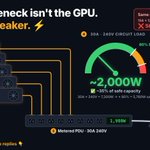
5 GPUs × 300W = 1,500W
CPU, board, drives, fans ≈ 300W
PSU losses (~90% efficient) ≈ 200W
≈ 2,000W at the wall, sustained, the entire time your model is serving.
📏 The 80% rule
Continuous loads should stay at 80% of the breaker rating. AI inference is a continuous load.
15A × 120V = 1,800W → 1,440W safe ❌ (560W over)
30A × 240V = 7,200W → 5,760W safe ✅ (~35% load)
🔌 The setup
GPUs → metered 30A 240V PDU (C13/C19 outlets) → L6-30P plug → L6-30R receptacle on a dedicated circuit.
The PDU meter shows real draw per outlet, so you see the load before the breaker does.
⚡ Why 240V
Half the amps for the same watts, and most PSUs run slightly more efficiently there. Nearly all ATX and server PSUs are 100–240V auto-ranging. Check the label.
⚠️ Switch-rig gotcha
Each x16 riser supplies up to 75W of slot power to its GPU. Power each riser from the same PSU as the GPU it feeds. Mixing PSUs on one card is asking for trouble.
🧠 Free headroom
LLM inference is memory-bandwidth bound, not compute bound. Cap each card with nvidia-smi -pl 250 and tokens/sec barely moves while power drops a lot.
Lanes get you the GPUs. Power keeps them running.
Have a licensed electrician install the circuit.
What's your AI rig running on: 15A, 20A, or 240V? 👇

1
43
Last post: 1 PCIe slot → 5 GPUs through a PEX88096 switch. 22K of you dug into lanes, bandwidth, and P2P.
But the real limit on local AI isn't PCIe. It's power. ⚡
🔢 The math
5 GPUs × 300W = 1,500W
CPU, board, drives, fans ≈ 300W
PSU losses (~90% efficient) ≈ 200W
≈ 2,000W at the wall, sustained, the entire time your model is serving.
📏 The 80% rule
Continuous loads should stay at 80% of the breaker rating. AI inference is a continuous load.
15A × 120V = 1,800W → 1,440W safe ❌ (560W over)
30A × 240V = 7,200W → 5,760W safe ✅ (~35% load)
🔌 The setup
GPUs → metered 30A 240V PDU (C13/C19 outlets) → L6-30P plug → L6-30R receptacle on a dedicated circuit.
The PDU meter shows real draw per outlet, so you see the load before the breaker does.
⚡ Why 240V
Half the amps for the same watts, and most PSUs run slightly more efficiently there. Nearly all ATX and server PSUs are 100–240V auto-ranging. Check the label.
⚠️ Switch-rig gotcha
Each x16 riser supplies up to 75W of slot power to its GPU. Power each riser from the same PSU as the GPU it feeds. Mixing PSUs on one card is asking for trouble.
🧠 Free headroom
LLM inference is memory-bandwidth bound, not compute bound. Cap each card with nvidia-smi -pl 250 and tokens/sec barely moves while power drops a lot.
Lanes get you the GPUs. Power keeps them running.
Have a licensed electrician install the circuit.
What's your AI rig running on: 15A, 20A, or 240V? 👇
Those interested in buying this product here is the link:
PLX88096 PCIe 4.0 X16 Expansion Card Free Splitting SFF8654 SlimSAS Adapter For NVMe SSD Multi GPU Workstation Server
s.click.aliexpress.com/e/_c3…

~$700 turns one PCIe slot into five full-bandwidth GPU connections.
That's roughly what the switch card, cables, and risers in this diagram cost (GPUs and drives not included). Here's what you get for it and why each part matters.
1⃣ PCIe switch card (the blue board)
Spec: x16 host interface, PCIe Gen4/Gen5, with a high-lane-count switch chip under the heatsink and fan. Roughly 96 lanes total: 16 up to the CPU, 80 down to devices.
Why it matters: It turns one motherboard slot into five full-width GPU connections without moving to a bigger, more expensive platform.
2⃣ High-density cable ports (SlimSAS / MCIO-style, x8 each)
Spec: 10 ports, each carrying 8 PCIe lanes.
Why it matters: GPUs can sit where cooling and space work best. Two x8 ports pair up to make one x16 link.
3⃣ Riser / adapter boards (under each GPU)
Spec: 2× x8 cable inputs → 1× full PCIe x16 slot, with auxiliary power.
Why it matters: Every GPU gets full x16 bandwidth, not a cut-down x4 or x8 link like many mining-style risers.
4⃣ Blower-style GPUs (dual-slot)
Spec: Rear-exhaust coolers that push hot air out of the chassis.
Why it matters: You can pack them side by side without them cooking each other.
5⃣ Enterprise U.2 SSDs (the Intel drives)
Spec: 2.5" data center solid-state drives, attachable through the same switch ports.
Why it matters: Large models and datasets load fast from storage right next to the compute.
Why the price matters
Multi-GPU workstation and server platforms with that many full x16 slots typically cost thousands before you buy a single GPU. Getting there for about $700 lets you reuse hardware you already own and scale as budget allows.
The trade-off
There are 80 lanes downstream and 16 back to the CPU, roughly 5:1 oversubscription. GPU-to-GPU traffic stays on the switch at full speed; traffic between the CPU and the GPUs shares one uplink. That's fine for inference and many fine-tuning jobs, but it's a bottleneck for heavy data movement between the host and the GPUs.
On-prem AI doesn't have to start with a six-figure server. Sometimes it starts with understanding the plumbing.
Would you build like this, or go with purpose-built GPU servers?
#AI #Infrastructure #LocalAI #PCIe #HomeLab #ITLeadership
Yes this is an affiliate link it helps me out if anyone is interested in buying the full products
s.click.aliexpress.com/e/_c3…

1
12
1,021
22K people saw this overnight. Top 3 questions 👇
Real x16? Per GPU, yes. All 5 share one link to the CPU, which is fine for local AI.
Storage? Yes, up to 20 U.2 drives off one slot.
Better than a server board? For training, no. For budget, yes.
Would you build it?
~$700 turns one PCIe slot into five full-bandwidth GPU connections.
That's roughly what the switch card, cables, and risers in this diagram cost (GPUs and drives not included). Here's what you get for it and why each part matters.
1⃣ PCIe switch card (the blue board)
Spec: x16 host interface, PCIe Gen4/Gen5, with a high-lane-count switch chip under the heatsink and fan. Roughly 96 lanes total: 16 up to the CPU, 80 down to devices.
Why it matters: It turns one motherboard slot into five full-width GPU connections without moving to a bigger, more expensive platform.
2⃣ High-density cable ports (SlimSAS / MCIO-style, x8 each)
Spec: 10 ports, each carrying 8 PCIe lanes.
Why it matters: GPUs can sit where cooling and space work best. Two x8 ports pair up to make one x16 link.
3⃣ Riser / adapter boards (under each GPU)
Spec: 2× x8 cable inputs → 1× full PCIe x16 slot, with auxiliary power.
Why it matters: Every GPU gets full x16 bandwidth, not a cut-down x4 or x8 link like many mining-style risers.
4⃣ Blower-style GPUs (dual-slot)
Spec: Rear-exhaust coolers that push hot air out of the chassis.
Why it matters: You can pack them side by side without them cooking each other.
5⃣ Enterprise U.2 SSDs (the Intel drives)
Spec: 2.5" data center solid-state drives, attachable through the same switch ports.
Why it matters: Large models and datasets load fast from storage right next to the compute.
Why the price matters
Multi-GPU workstation and server platforms with that many full x16 slots typically cost thousands before you buy a single GPU. Getting there for about $700 lets you reuse hardware you already own and scale as budget allows.
The trade-off
There are 80 lanes downstream and 16 back to the CPU, roughly 5:1 oversubscription. GPU-to-GPU traffic stays on the switch at full speed; traffic between the CPU and the GPUs shares one uplink. That's fine for inference and many fine-tuning jobs, but it's a bottleneck for heavy data movement between the host and the GPUs.
On-prem AI doesn't have to start with a six-figure server. Sometimes it starts with understanding the plumbing.
Would you build like this, or go with purpose-built GPU servers?
#AI #Infrastructure #LocalAI #PCIe #HomeLab #ITLeadership


Has anyone used one of these PCIe 4.0 PEX88096 GPU expansion backplanes (SFF-8654 SlimSAS, 1-to-5 x16) for local AI?
I'm looking at it for a multi-GPU home lab LLM build. How's stability, bandwidth/P2P between cards, and driver support? Worth ~$700 or skip it?


🚨 pearl-2:native MINERS: READ THIS BEFORE YOU BUY ANOTHER GPU 🚨
Pearl's planned FP8 fork (PIP-3) could wipe out most of the hardware mining it today.
As currently drafted, the new proof-of-work spec only defines two device types: NVIDIA Hopper and NVIDIA Blackwell.
Not in the spec:
❌ RTX 40 series (Ada)
❌ RTX 30 series / A-series (Ampere)
❌ RTX 20 series / Quadro RTX (Turing)
❌ CMP mining cards
❌ AMD
These keep mining normally until the fork activates. After that, as written, they can't produce valid work. Ada even has hardware FP8, but the draft has no profile for it.
And Blackwell isn't safe either: consumer RTX 50 cards reportedly drop to about HALF their hashrate at the same power. Pros and datacenter cards (RTX PRO, Hopper, Blackwell DC) reportedly keep full speed.
What we don't know yet:
No activation date or block has been set
PIP-3 is still a draft and could change
How far difficulty falls if most of the network drops off at once
If you're mining $PRL right now:
Think twice before buying cards just for Pearl.
Decide now whether you're stacking or selling as you go.
Watch for the activation date, because there may not be much warning.
Is this the end of home mining for Pearl, or the shakeout that makes it worth more for whoever is left? Are you holding, selling, or switching?

