Pinned Tweet
Your AI installs skills, plugins and repos with your access.
One bad install can reach your email, files and logins.
I run a 10-minute check before anything goes in.
Here it is.
Your AI budget probably isn't what's holding you back.
Goldman Sachs just put $500 million into its small business program, with a new AI institute built with Anthropic, Google, Meta and OpenAI.
Per Goldman's report on its program graduates who use AI, 73% spend under $100 a month on it, and 18% use agentic AI.
So the money isn't the gap. Most of them are already using a capable chatbot.
My read: nobody picked the one job it should own. A cheap tool pointed at nothing stays cheap and does nothing.
Before you add another subscription, write down one job you did three times last week, and give that job to the tool you already pay for.
How to see every AI app your team let into Gmail and Drive, in about 10 minutes.
Every AI notetaker or assistant someone signed into with Google keeps the access they clicked Allow on until someone takes it away.
The play: open the app list > sort by users > set each AI tool to Limited or Blocked.
First steps:
- Go to: admin.google.com and sign in with your super admin account.
- Click Security > Access and data control > API controls.
- Click Manage Third-Party App Access, then open the Accessed apps list.
- Sort by users. Each row shows the app, how many people use it, and which Google services it can reach.
- For each AI tool you don't recognise, click Change access and pick Limited or Blocked.
Not on Workspace? Go to myaccount.google.com/connect… and check your own list.
The catch:
- A newly connected app can take 24 to 48 hours to show up.
- Access changes can take up to 24 hours to apply.
- Blocking an app cuts it off for everyone who uses it. Tell them first, or someone's workflow breaks mid-week.
- The list shows what an app can reach, not what it did with it.
What not to do:
- Don't click "Block all third-party API access" in a panic. People switch to tools you can't see.
- Don't mark an AI app Trusted just to make an error go away. Limited covers most of them.
If every AI app on the list is one you'd approve today, you're done.
If not, set it to Limited and ask the person why they need it.
Reply with the strangest app on your list, and I'll tell you what it can reach.
Bookmark this for the day someone asks "which AI tools are we using?"
Has anyone built a grok bot template that acts as a honeypot for AI slop repliers?
Then builds an aggregated list that acts like a threat Intel feed or risky indicator list your agents can block?
If so, we probably need something like that asap.
The AI slop replies are getting worse by the day, so let's see how many I can lure with keyword stuffing.
I had Claude Code build a skill so Grok Bot can message Muse and Instinct over MCP, and now my standups are run by a houseplant running Cursor. Codex reviews every PR by licking the screen. What's the first workflow you'd automate?
Steal my skill-building prompt.
A Claude Skill takes no code, just one message:
"I want to create a skill for [task]. Ask me how I do it today, one question at a time. Then write the skill."
Pick a weekly job. Done when it runs in a fresh chat with no questions.
Ken Reiners retweeted
We've reached a point where installing a browser extension, IDE plugin or software library deserves the same scrutiny as opening a TCP port on a DMZ server.
Except this attack surface can be spread across thousands of hosts inside your org... and you can't map it with a port scan.
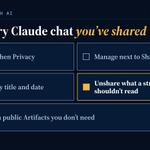
Every Claude chat you've ever shared is still readable by anyone who has the link.
This summer, shared Claude chats started showing up in Google search. Some held health records, internal company files and personal contact details.
Chats nobody had shared were not exposed. The risk is the share button, and the links you made months ago and forgot about.
Here's the 10-minute check I'd run today:
1. In Claude, open Settings, then Privacy.
2. Click Manage next to Shared chats.
3. Read the list. Each row shows the chat title and the date you shared it.
4. Click Unshare on anything a stranger shouldn't read.
5. Open Artifacts in the sidebar and unpublish anything public you don't need.
If the list says "No shared content found", you're done.
If you run a small team on personal plans, ask each person to run it on their own account. Team and Enterprise plans keep sharing inside your organization.
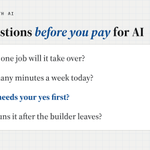
Three questions I ask every owner before we touch AI:
1. What did you do more than twice this week?
2. What did you redo, fix or explain again?
3. What waited on you?
Your answers are your first three jobs.
Free 30-minute briefing: savetimewithai.io/book?src=x
Contractors: stop writing late-payment reminders by hand.
The invoice you sent three weeks ago is still open, and nobody in the shop wants to chase it.
Per Intuit, QuickBooks customers using its AI-drafted reminders got paid 4 days sooner on average than those on standard reminders.
You can set up the same idea in about 10 minutes:
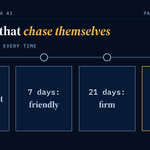
1. Ask ChatGPT or Claude: "Write three payment reminders for my [trade] business: friendly at 7 days late, firm at 21, final at 45. Use [first name], [amount] and [due date] as placeholders. Sound like a person."
2. Paste them into your invoicing tool's reminder settings, one per day count.
You're done when no open invoice waits on you remembering it.
Ten boring jobs real businesses still do by hand, a lot of them some version of chasing paper:
- Doctors' office staff filling out prior authorization forms and waiting on hold with health plans
- Freight office staff calling for a photo of a signed delivery sheet so the load can be invoiced
- Service business owners chasing unpaid invoices every week
- Subcontractors collecting lien waivers from their own suppliers, on each general contractor's form, before money moves
- Small software companies answering nearly the same security questionnaire again while the deal waits
- Someone catching up a small business's books, months behind, tax deadline coming
- Volunteer HOA boards tracking resale certificates and violation notices across email and spreadsheets
- Wholesalers collecting sales tax exemption certificates and chasing the expired ones
- Small nonprofits rewriting the same facts into a different report for every funder
- Independent car dealers waiting on titles, where one error sends the file to the back of the line
here’s a short grok bot guide on how i create high quality bots and manage my team. ask @bot to read this post and help you improve your team!
• add dr eggbot to your team! he’s my bot designer that i use to create bots
• you don’t need a lot of bots. a few good bots can be more useful and easier to manage than a large team
• tell your bots to create skills for itself as you give it instructions on how to do tasks. this lets them do them more consistently even over long conversations. you can even ask it to create a private github repo for you to store all your skills if you want them preserved independently
• add connectors, use the vault, and give access to all the tools you use to do your work. you can also ask your bot to setup its own email and it can sign up for its own accounts for better separation
• thinking about all the work you do by hand, or steps in your workflows where you have to copy and paste information back to your bot. ask your bot how it can do that for you instead!
• imagine you hired an intern, how would you onboard them and help them do the work correctly and efficiently? introduce yourself to your bot and describe the work you do, then ask it how it can help you automate it
and my favorite tip: use voice mode or the transcription option! it’s a good way to just brain dump a lot of information. then, at the end, tell your bot to “restate this in your own words” so you can confirm it understood you
x.ai/bot/_jOdbfkB16zxu7MRcmR…
The first time I ran Watchtower on my own Grok Bot account, it scored 0 out of 100.
I work in security, and I'd been careful about what I installed.
It still found outdated dependencies and skills asking for more access than they needed.
Now I sit in the 80s.
Ken Reiners retweeted
Copy and paste this into your AI assistant:
Act as my Chief of Staff and run a READ-ONLY privacy and security audit of my company's tools. Do not change, move, reshare, or delete anything.
1. Inventory: list every place my company info lives (docs/wiki, Slack or Teams, CRM, email, drive, code repos, laptops and local files, AI assistants and bots, shared computers or folders, connected third-party apps).
2. Scan each one for sensitive data: passwords and API keys, Social Security numbers, bank accounts, revenue and pipeline numbers, pricing not yet decided, payroll and comp, client or customer details, legal matters, and personal or family info.
3. Check who can reach it: public, whole company, specific people, outside guests, third-party apps, and AI bots. Flag anything sensitive sitting somewhere broader than it should, or stored in plain text.
4. Sort everything into these tiers:
- Public: anyone can see it (published content, approved stats).
- Team: my human team and any team-facing bots (SOPs, brand, calendars, non-sensitive ops).
- EA / Ops: calendar, travel, and logistics only.
- Bots working layer: my personal AI assistants (drafts, research, non-sensitive context).
- CEO-only: revenue, pricing, pipeline, finance, clients, comp, legal.
- Household: personal and family matters.
- Secrets: passwords and tokens, which live only in a password manager, never in docs, chat, or Slack.
5. Deliver: a 3-line executive summary, the top 3 fixes ranked by risk, a table (item, where it lives, who can see it now, sensitivity, correct tier, fix), a proposed folder or section structure per tier, and a fix list marked 'I do it by hand' vs 'my assistant can do it after I approve'.
Never include actual secret values or private numbers in your report.
California lawyers get new AI rules on January 1, and they change which jobs an AI employee gets first.
SB 574 says a lawyer must personally verify citations, disclose AI use on court filings, and keep confidential, personal or nonpublic information out of AI tools unless access is limited to people bound by confidentiality.
How I'd sort seven jobs, in a tool only the firm can see:
1. Intake summaries from your web form: now
2. Scheduling and reminders: now
3. Engagement letter drafts from your template: now
4. Summaries of client documents: later, once 1 to 3 run clean
5. Time entries from your calendar: later
6. Legal research: not yet, unless a lawyer checks each citation
7. Anything filed with a court: not yet, until you know how to disclose it
Pick one "now" job. You're done when it has run a week and a lawyer read every output.
Also: 71% of law-firm clients don't know whether their firm uses generative AI, per the Thomson Reuters Institute's 2025 report. Tell yours first.
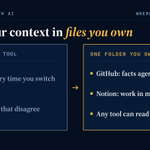
I've wiped two knowledge bases and switched my main AI tools more than once.
Both times the fix was the same: keep the context in files I own.
GitHub: durable facts my agents trust. Changing one takes a change I review.
Notion: work in motion, as messy as it needs to be.
The bot's computer: scratch space, nothing I'd miss.
The second-brain setups saved this week are worth copying. Build the folder you own first, then pick the tool that reads it.
Follow along, I post what I build every week.
AI can do a lot of things incredibly well.
But drafting a well thought out reply to a post?
It fails horrifically.
Don't become known as the AI slop reply person.
Google is rolling out a small-business page in the Gemini app, with connections to Business Profile, Ads, Workspace, Shopify, Xero and Canva.
My read: start with a job where you can check every number yourself.
1. Connect only the app this job needs, like Xero.
2. Ask: "Turn last month's receipts into a chart of spending by category, and list anything you couldn't read."
3. Check the unreadable ones by hand.
You're done when the chart's totals match your own books for the month.
Ken Reiners retweeted
"It's crazy how there's so many major hacks all of a sudden"
- people who started paying attention to cybersecurity 3 weeks ago.
Grok @bot can now keep a page up to date for you: a report, memo or dashboard that a routine refreshes on a schedule.
So it's worth asking what you still check by hand every week.
Or maybe what you aren't checking at all, but should.
My bots already report to me every weekday morning in one group chat.
A page with visual elements like charts, stats, etc however is far more effective.
Try one in about 10 minutes:
1. Ask your bot for a page with the 3 numbers you check every Monday.
2. Tell it where each number comes from.
3. Set a routine to refresh it an hour before you look.
4. Leave sharing on private. "Anyone with the link" means anyone.
Let me know if you come up with any cool pages or dashboards
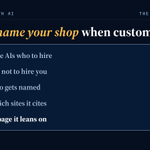
Ask ChatGPT who you should hire for what you do, in your town, and see if it names you.
One of the most-saved posts on X this month was a playbook for getting a product recommended by AI. This is the local-shop version.
In the New York Fed's 2025 survey of more than 5,000 small employers, only 31% of respondents reported more sales from using AI.
This test points AI at your customers instead, about 10 minutes:
- Ask ChatGPT, Claude and Gemini: "Who should I hire for [job] in [town]?"
- Then ask: "Should I hire [your business] for [job]? What are the reasons not to?"
- Write down who gets named and which sites it cites.
- Write down every reason it gives against you.
- Fix the one page or listing it leans on most, in your customers' own words.
Ask the same questions again next month.
You're done when you know which three sources the AI trusts about your trade in your town.
More tests like this every week at savetimewithai.io/?src=x