

@OGridPete
🇺🇸Account based in
About this account
- Account based in
- United States
- Connected via
- United States App Store
Account-level information from X, not a live location or the device used for a specific post.
Human, free speech & 2A advocate. Science/technology geek, Tesla & SpaceX fan. Off-grid communications & radio enthusiasts.
Florida, USA
Joined November 2022
- Tweets2.1K
- Following917
- Followers5.3K
- Likes109K



Pinned Tweet
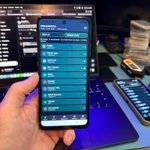
Took the KrakenSDR out for some fox hunting today and realized it’s time to turn my messy box of parts into a proper field RF kit for broader intelligence-gathering operations. To that end, I'll add additional SDRs, like the HackRF, to increase the spectrum coverage. The plan is to add waterproof pass-throughs for all the antennas and other ports to make everything more durable and field-ready.
What other useful tools and software would you suggest for this build?
#SDR #KrakenSDR #RFAnalysis #FoxHunting #hamradio #sigint

Fieldwatch 1.1.31 is out with two big additions.
Fieldwatch is a free, open-source Android app that identifies the devices around you, including what might be watching or following you: trackers, cameras, drones (it even decodes their Remote ID), body cams, and more. Over 250 devices, and you can add your own. It listens to nearby Wi-Fi and Bluetooth signals and matches them against a built-in signature database. It only receives, never transmits. No account, no ads, no back end, and it works fully offline.
What’s new:
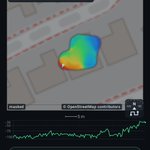
Hunt, rebuilt and more useful. Hunt now draws a heat map as you move. Hold the phone out in front of you and walk slowly around the area in a pattern, and the heat map fills in, running from blue where the signal is weak to red where it's strongest. The brightest patch is where the radio was loudest. GPS alone isn't precise enough for this, so Hunt also uses the phone's motion sensors to track your steps between GPS fixes.
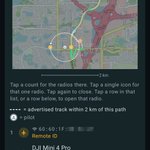
Live map on the Live screen. Tap the tune icon in the upper right to open Display Options, then turn on Show live path. The screen splits, with a map of your current path on top and your list view underneath, and you can slide the split to show as much map as you want. Alerted radios are plotted on the map. Double-tap to jump between a close-in view and the whole path, tap the compass to switch between north up and heading up, or pinch and drag to move around.
More maps. OpenStreetMap and USGS Imagery and Topo work out of the box. You can also add Esri, MapTiler, Stadia and Thunderforest with your own key, which most of them offer free for personal use. Your key stays on your phone and is left out of exported settings.
Also new: grid locations on the radio page, a cleaner live path that follows the road through turns, steadier top-bar counts, a crash report screen, and quieter scanning while Location is off.
Free and open source on Android.
github.com/OffGridPete/Field…


Fieldwatch 1.1.27 is out, and it's the biggest update yet.
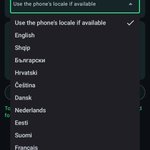
Fieldwatch now speaks 27 languages. Pick one in Settings, follow your phone's language or stay in English. Want a language that isn't included? Export the English template, translate it and import it back. Catalog notes stay in English for now, but menus, settings and screens now make sense to people who don't speak English natively.
Places watch. Fieldwatch now flags a stable tracker that this phone hears at two or more places in the last 7 days, plus one that comes back after a quiet stretch. You'll find it on that radio's page and in the sit report, which shows where you were and, if you turn on place names, the street. Stops from earlier days include the date, and each radio keeps its last 8 stops. A filter can narrow the current Live list to the ones you can hear right now.
Better TAK. Each install now gets its own marker, either Fieldwatch plus a short tag or a name you choose, so two phones on the same network no longer pile onto one pin.
Sit export levels up. Along with GPX and KML, you can now export GeoJSON or a full ATAK data package. That package includes your path, a point for each radio you heard, drone pins with short tracks, operator pins and GPS interference hits along your route.
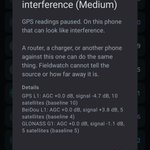
Raw GNSS recording. You can now record your phone's raw GPS measurements around an interference hit and share the latest recording. It's off until you turn it on.
A simpler app overall. Settings now opens as a list that shows each current choice. Path, Debrief, Sit export, Compare, Log export and Signature candidates each get their own page in Reports. Filters are simpler, and Live's view menu now has icons for each view.
Free, open source and offline, with no account and no backend. github.com/OffGridPete/Field…


Fieldwatch 1.1.26 is now available which includes two small updates:
Remote ID gets smarter. When a drone broadcasts its operator location, Fieldwatch now tells you what that point is: the takeoff spot, a live pilot GPS position, or a fixed point the aircraft declared. You'll also see the operator's altitude when it's known, whether the drone's height is above takeoff or above the ground, and the EU category and class when the drone reports an EU classification.
More control over your ATAK map. GNSS hits now drop a pin, or an ellipse that stretches along your path until the interference ends. Choose how long marks and radio spots stay: 1, 6, or 24 hours, or until deleted. Radio spots keep their names after the radio leaves.
Fieldwatch is free and open source. It works offline with no account, no ads, and no backend. It's receive-only on Android and can help identify the Wi-Fi and Bluetooth devices around you.
For those who are interested, I added some technical detail to the user manual on how GNSS interference and spoofing detection works.


Off Grid Pete retweeted

LO QUE ESTE TIPO SUBIÓ A GITHUB NO DEBERÍA SER GRATIS
una app que convierte tu móvil en un detector de vigilancia.
escucha las señales Wi-Fi y Bluetooth a tu alrededor y te dice qué hay cerca:
→ rastreadores escondidos
→ cámaras corporales de policía
→ drones, y dónde está el piloto
→ gafas inteligentes de Meta grabando
→ micrófonos de detección de disparos
reconoce hasta 242 tipos de dispositivos. y te avisa si alguno se mueve contigo.
sin cuenta. sin servidor. sin internet. código abierto.
os dejo el repo abajo.


Readers added context they thought people might want to know
Este texto es una copia casi literal de una publicación anterior de @CopyRebeldia sin atribución.
x.com/copyrebeldia/s…
x.com/liambraus/stat…
Interesting validation for Fieldwatch. 🛰️
In Feb 2025, the @AFResearchLab reportedly awarded a $1.74M contract to use ordinary phones' raw GNSS data to detect jamming and spoofing and send alerts into TAK. It's being field-tested in Ukraine and in US military exercises.
Fieldwatch 1.1.25 already does the core of that on your own phone. Its detection builds on published research from the University of Colorado Boulder, the European Commission's Joint Research Centre, and Politecnico di Torino, along with Google's Android GNSS guidance. That's likely the same body of work behind efforts like that one.
When it sees signs of interference or spoofing, Fieldwatch drops a mark on the ATAK map where you were. If the hit lasts while you're moving, the mark stretches into an oval along your path. With a few Fieldwatch phones on the same TAK network, your team's map starts to show where GNSS is affected, with no server needed.
The difference is that the funded project is a commercial SDK built around a central server. Fieldwatch runs entirely on the phone, works offline, and is free and open source.
github.com/OffGridPete/Field…

Fieldwatch is a free, open-source Android app that can help identify the devices around you, including what might be watching or following you: trackers, cameras, drones (it even decodes their Remote ID), body cams, and more. It can help identify almost 250 device types, and you can add your own. It listens to nearby Wi-Fi and Bluetooth signals and compares them to a built-in signature database. It only receives, never transmits. No account, no ads, no back end, and it works fully offline.
What's new:
Fieldwatch 1.1.22 adds GPS jamming and spoofing detection, using the receiver that's already in your phone. 🛰️
When your GPS suddenly changes, Fieldwatch lets you know right away:
* A popup with details of the interference
* A voice alert
* A red diamond on your path where it happened
* The details saved in your sit
* An optional note on your TAK marker
It needs a one-time calibration. Choose your sensitivity and you're set. For best performance, keep the phone in a dash holder, or on your chest rig when you're on foot.
Also in this build: weak pairing floods stay quiet while you're driving, and a real flood can leave a note on your TAK marker until it ends.
Easier setup: Live now shows a banner when Location is off, and Diagnostics opens with a "What to check" list that names the exact switch that's off.
The only official release is on my GitHub, link in bio. Each release lists the APK hash and signing certificate so you can check your build.
Coming next: a localization framework. I'm building a proper translation system for Fieldwatch, so translating the app will mean filling in a language file instead of forking the codebase and hand-editing text buried in the code. If you've offered to help translate, thank you, and please hold off for now. Once the framework lands, your work will be much easier and won't break with every update.


The new GNSS jamming and spoofing detection in 1.1.22 builds on published research from the University of Colorado Boulder, the European Commission's Joint Research Centre, and Politecnico di Torino, along with Google's Android GNSS guidance and Sean Barbeau's GPSTest. The full credits are in the user guide.
Fieldwatch 1.1.18 is out! Reports got a real overhaul, you can silence a radio that’s yours, and the app now spots basic Bluetooth and Wi-Fi floods before they wreck a sit.
Fieldwatch listens for nearby Wi-Fi and Bluetooth signals and identifies the devices sending them, such as tracker tags, body cameras, drones and in-car Wi-Fi. It does this using a list of device signatures you can edit in the app. You can get an alert when a specific device type or address shows up, and you can record a session in one place or along a drive, then compare it with later visits. Fieldwatch can also spot devices that seem to be moving with you and build reports from everything it picked up.
What’s New
Reports you can actually read. Debrief and Compare open with counts and bar charts instead of a wall of radios. By default you see what matters: Extra attention, a custom name, Mine, or a bookmark. Compare also flags a decoded value that changed. Full roster is still there: Reports → Sit report → Show all radios.
Mark it Mine. On a radio you can already name, Mine stops the beep, voice, flash, vibrate, and card for that one radio. Everything else of that signature still alerts. Reports file it under Marked mine and keep it out of the co-travel callouts. Hide my radios takes it off the live list. The sit and the log still keep it.
Floods don’t get to trash the data. Live warns when a burst of new Bluetooth pairing popups or names hits at about the same loudness, or when a pile of new Wi-Fi names shows up in one scan and is gone on the next. Thanks to GitHub user edwin042331-hue for the ideas behind this. Debrief keeps one Flood line instead of counting every address. Hide this burst pulls that burst off the live list and keeps alerts quiet until it would have faded on its own. The log still has them.
Catalog 90, more drones. Tello, Potensic, Holy Stone, Hubsan, Yuneec, SwellPro, Crazyflie, and Parrot (including Skycontroller). Bookmarked, no Extra attention. Remote ID also labels the French Direct Remote ID plate, and can name Freefly, BRINC, and Teal from the serial. The row stays Remote ID.


Looking for an inexpensive project phone? I picked up a Moto G, about $30, running Android 16 to test with Fieldwatch. Pulled the SIM, sideloaded Fieldwatch, and got it running. Thanks to @Radio_Russell for pointing me to this.
If you’re on an iPhone, this makes a decent project phone for Fieldwatch, ham radio apps, or a number of other good Android apps. Android 10 or newer works. Android 11 is slightly better, because it can read Wi-Fi beacon contents. It just needs working Wi-Fi and Bluetooth. No SIM or cell service required.

Fieldwatch 1.1.16 is out!
Fieldwatch listens for nearby Wi-Fi and Bluetooth signals and identifies the devices sending them, such as tracker tags, body cameras, drones and in-car Wi-Fi. It does this using a list of device signatures you can edit in the app. You can get an alert when a specific device type or address shows up, and you can record a session in one place or along a drive, then compare it with later visits. Fieldwatch can also spot devices that seem to be moving with you and build reports from everything it picked up.
What’s New
Trackers that stand out - DULT (Detecting Unwanted Location Trackers) is the industry spec Apple, Google, and tag makers use so accessories can advertise whether they're near their owner or separated. Fieldwatch now shows that on the live list as a quick visual. It's especially useful next to radios that look like they're moving with you: Separated vs Near owner is one more clue about whether that tag might be yours or someone else's. That covers Google Find Hub tags, newer Apple earbuds and other Find My accessories, Chipolo, Pebblebee, and other tags that speak the standard. Separated tags usually hold their MAC address longer before rotating, which makes them easier to follow across a sit.
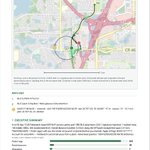
Drones and Remote ID - Remote ID works over BLE and Wi-Fi ASTM. Live status shows Undeclared, Ground, Airborne, Emergency, or RID failure. Reports → Path draws the advertised aircraft track as a dotted line, with the pilot as a person icon. Hits can still push to TAK/ATAK.
Reports cleanup - Path plots MAC alerts and signature alerts as class icons (once, at the strongest hear). Debrief and Compare PDFs get the same track treatment. Named sits now hold up to 6,000 unique radios.
Signature Catalog 88 - Flock Extra attention is tighter (real Flock poles, not every LiteOn/Ring radio). Penguin decode for Flock external batteries. Sit export CSV/JSON now lists matched signatures and Extra attention families.
Same pocket tool: receive-only Wi-Fi and BLE, on the phone, no server, free and open source.
github.com/OffGridPete/Field…


Fieldwatch 1.1.14 Update
Fieldwatch listens for nearby Wi-Fi and Bluetooth signals and identifies the devices sending them, such as tracker tags, body cameras, drones and in-car Wi-Fi. It does this using a list of device signatures you can edit in the app. You can get an alert when a specific device type or address shows up, and you can record a session in one place or along a drive, then compare it with later visits. Fieldwatch can also spot devices that seem to be moving with you and build reports from everything it picked up.
What’s new:
See where you’ve been. The Reports screen now draws your route as you drive, the last 15 minutes or a full session. Stops show as green, flagged devices as red, and bookmarks as blue. Each device gets one numbered marker at its strongest signal. With online maps on and Privacy mode off, the route sits on a street map. Otherwise it’s a plain line. Video (sped up) shows a path that updates every few seconds as you drive. It’s on the Reports tab.
Better PDF reports. Debrief and Compare PDFs now include that same map.
Sessions, explained. A session (a "sit" in the app) is a named stretch of time and the devices heard during it. Session export lists each device once. Log export is the full running record.
Drone detection. Fieldwatch now reads Remote ID, the digital license plate most drones broadcast, over Bluetooth and Wi-Fi (Android 11+ for Wi-Fi). In TAK mapping apps, each drone shows as one moving marker, with a second marker for the pilot. It works best when a drone hovers nearby.
More accurate identification. Google Find Hub trackers, readable tire pressure sensors (including Teslas while awake), Flock's battery pack and gunshot microphone, and Axon body cameras are all identified more reliably. Smart glasses from Meta, Snap and Vuzix are still flagged. You can update the device signature catelog from GitHub when you're online. Signature catalog 81 can now identify up to 242 types of devices.
Bug Fixed: A signal strength of 127 means Bluetooth couldn't measure it, not that the device is close, so hunting mode and shared reports now ignore it.
Fieldwatch listens to Wi-Fi and BLE and identifies radios around you from a signature catalog you manage in-app (tags, body-cams, drones, vehicle APs, etc.). Set alerts when a watched signature or MAC is heard. Work a sit to compare the same area or drive over time. Track radios moving with you and generate reports from that data.
Here is what’s new since my last update: Fieldwatch 1.1.8 is on GitHub. Signature catalog is now 75.
Name Wi-Fi the way you already name BLE: fleet cars, mesh, guest APs, and the locally administered BSSIDs that used to hide the pencil. If your local fire trucks trip the Compex signature, edit the Advertised name to “Fire Truck Station 51.” Works on any radio Fieldwatch treats as a non-rotating MAC. Manage named radios under Settings.
The Detail page now describes the radio from the signature match. A Raven on Wi-Fi Direct reads as a gunshot sensor.
New signatures for privacy awareness: Digital Ally and other body/in-car cameras, wearable recorders, camera glasses, and roadside names Fieldwatch can hear.
Since 1.1.4 you can refresh the stock catalog with Update stock catalog from GitHub under Settings.
Add observer notes to a radio: a short caption you write. It shows on Detail, as a chip on the Live list, and in every report.
Walk the ground, then see the walk. Path is a north-up trace of this phone for the sit you named. Red dots are Extra attention. Blue dots are radios you named. Dots mark where you were when you heard them — not a pin on the other radio. Works offline in Airplane mode. The same trace prints on Debrief and Compare PDFs.
Two rooms, two days, one question: what was only here? Compare sits is presence only — only in this window, only in the other, or in both. Kind plus MAC. Text, PDF, and a paste-ready AI addendum. Not a second inventory for a chatbot to reprint.
Export logs or sits as CSV, JSON Lines, GPX, KML, or WiGLE CSV.
Plus a lot of cleanup. If you haven’t pulled the latest APK in a while, this one is worth it. The user manual is updated to match.


Quick update: Just pushed 1.1.10 with some cleanup around Path functionality in Reports. Also, if the phone has an internet connection, a map is pulled in to better show the path. Unrelated to the path functionality, I added a few more TPMS sensors to the catalog — now 76 (you can update that through the app under Settings). See CHANGELOG.md for more details.
