Stix (@StixTweaks) header
Stix (@StixTweaks) profile picture

Certified A+ & A+ Network Technician - Founder of Stix Pc services - Push Power Limits With Direct Hardware Modifications - Worked with @ChicaLive @fhayuhh

Joined January 2024
Photo by Stix (@StixTweaks)Photo by Stix (@StixTweaks)Photo by Stix (@StixTweaks)Photo by Stix (@StixTweaks)Photo by Stix (@StixTweaks)Photo by Stix (@StixTweaks)Photo by Stix (@StixTweaks)Photo by Stix (@StixTweaks)Photo by Stix (@StixTweaks)Photo by Stix (@StixTweaks)
Ran our Chipset Tuner on a few setups this week after a huge update we released and the numbers speak for themselves. These aren't your ordinary tweaks, not Windows level, not even your Bios.. Much further!! stixtweaks.com/product/chips…
1
3
30
10,058
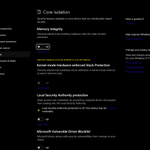
🚨 Windows Users A security feature might be SLOWING your games It's called Memory Integrity, and it's ON by default on new PCs. Here's how to turn it off ⬇️ 1. Search "Core isolation" in Start 2. Turn Memory integrity OFF 3. Restart your PC 4. Turn it back on after gaming
5
14
1
248
24,181
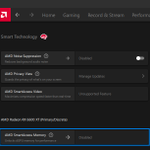
🚨 Windows Users Your CPU might only see 256MB of your GPU's memory, costing FPS It's called Smart Access Memory, and it can be OFF. Here's how to check ⬇️ 1. Open AMD Software 2. Click Smart Technology 3. Check AMD SmartAccess Memory 4. Disabled? Enable Re-Size BAR in BIOS
4
12
1
212
25,356
🚨 Windows Users Windows might be SPEEDING UP your mouse, ruining your aim It's called Enhance pointer precision, and it's ON by default. Here's how to turn it off ⬇️ 1. Win + R, type main.cpl 2. Pointer Options tab 3. Uncheck Enhance pointer precision 4. Click Apply
1
4
68
6,000
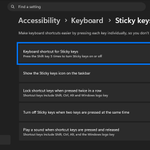
🚨 Windows Users Tapping Shift 5 times can pull you out of your game It's called Sticky keys, and the shortcut is ON by default. Here's how to turn it off ⬇️ 1. Settings > Accessibility > Keyboard 2. Open Sticky keys 3. Turn off Keyboard shortcut
1
2
47
4,853
🚨 Windows Users Your monitor might be plugged into your MOTHERBOARD instead of your graphics card, causing low FPS Here's how to check ⬇️ 1. Open Settings > System > Display 2. Click Advanced display 3. Find "Connected to" 4. It should name your graphics card
9
30
478
43,351
🚨 PC Gamers Your Wi-Fi might be STUCK on 2.4GHz, causing lag spikes 2.4GHz is slower and more crowded. Here's how to check ⬇️ 1. Open Settings > Network & internet 2. Click Wi-Fi, then Hardware properties 3. Find Network band (channel) 4. If it says 2.4 GHz, switch to 5GHz
8
77
4
2,433
184,174
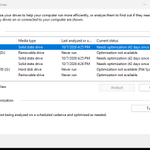
🚨 PC Gamers Your games might be on a slow HARD DRIVE, causing stutter and long loads SSDs load games way faster. Here's how to check ⬇️ 1. Press Windows + R 2. Type dfrgui and hit Enter 3. Find the drive your games are on 4. If it says Hard disk drive, move games to an SSD
1
8
85
10,933
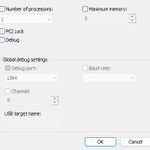
🚨 Windows Users Your PC might be LIMITED to fewer CPU cores by an old tweak, causing lower FPS Here's how to check ⬇️ 1. Press Windows + R 2. Type msconfig and hit Enter 3. Boot tab, click Advanced options 4. If Number of processors is checked, uncheck it and restart
6
40
1
630
55,178
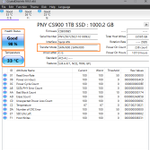
🚨 PC Gamers Your NVMe SSD might be running at HALF speed Here's how to check ⬇️ 1. Download CrystalDiskInfo (free) 2. Pick your NVMe drive at the top 3. Look at Transfer Mode 4. If the x number on the left is lower than the right (x2 | x4), move it to another M.2 slot
3
14
1
236
25,994
🚨 Windows Users Windows is running way more in the background than it needs to while you game, and it can add delay. Do these settings to cut it down on Windows 10/11. More info below!
2
8
116
8,342