


Brink retweeted
Thank you for showing your interest! Feels so good looking at all the excitement in the Android community.
Here is a look at Brink on Android.


Brink retweeted
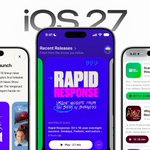
Brink 1.2.48 is here.
• A player redrawn around the artwork
• Episode pages in their own colours, with hosts
• Voice presets, EQ and Consistent Loudness
• A clear Top Result in Search
• Select many episodes at once
• Bookmarks with title and note
• Player Strip long-press menu
apps.apple.com/in/app/brink-…


Brink retweeted
New Achievement Unlocked. 🚀
@TryBrinkApp is featured on App Store’s “Great Apps on iPhone Duo” collection! Seeing it alongside so many great apps is quite a feeling.
apps.apple.com/in/iphone/roo…

Brink retweeted
Hello, @TryBrinkApp v1.2.46 is out now.
Download: apps.apple.com/in/app/brink-…
This update brings dozens of new features, more control over your listening, and a much clearer Settings.
Sleep and bedtime
• Set the sleep timer for up to 5 hours, up from 2
• Stop playback after a set number of episodes or chapters
• Still not asleep? Shake your iPhone to restart the timer
In the player
• Speed presets: jump straight to 1.2×, 1.5× or 2×
• Touch and hold the skip buttons to mark as played or skip to the next episode
• See chapter artwork while you scrub
• Keep video playing in Picture in Picture
• Keep the screen awake while the player is open
Lock Screen and Car
• Show the current chapter title on the Lock Screen instead of the episode name
• Turn off scrubbing from the Lock Screen
• Legacy Bluetooth mode for older car stereos, with much simpler controls
• Improvements to CarPlay, getting ready for HomeView
Your library
• Choose your own swipe actions for the Inbox and Up Next
• Sort playlists by date, length, title or show
• Choose how long to wait before episodes auto-archive, or set it per show and keep only the newest
• Add suggested genre folders, and find shows by folder name in Library search
• Download or archive every episode of a show at once
• Clean up downloads by played, unplayed or in progress
• Download the latest episodes automatically when you follow a show
Transcripts and bookmarks
• Read a transcript excerpt on the episode page, and tap a line to play from it
• Bookmark titles taken from the transcript
• Sort bookmarks by date, timestamp or episode
Feeds
• Follow password-protected feeds
• Private feeds are never shared by link
• Import OPML from a link, and review shows before you follow
• Open OPML, audio and video files in Brink from the Files app
• Turn new-episode alerts on or off from the show page
Everywhere else
• A new large Up Next widget, plus Lock Screen widgets
• Control Trim Silence and Voice Boost from Apple Watch
• Settings reorganised, with clear illustrations of what key options do
• Catch up on previous releases in What’s New
Thanks for listening with Brink and sharing your feedback. 🧡


Brink retweeted
Brink v1.2.44 is out.
apps.apple.com/in/app/brink-…
- Reimagined for Duo, with refined layouts for larger screens.
- A more flexible Inbox with date filters, sorting.
- Priority shows: star your favourites and keep those selections synced across devices.
- Optional Raise to Ear: listen privately through your iPhone’s earpiece and lower your phone to pause.
- Search using descriptions or images, with better ranking, spelling suggestions and follow controls.
- More dependable playback, seeking, audio effects and silence detection, plus autoplay for eligible older episodes.
- Refined podcast pages, artwork, episode numbering, filters and release schedules, alongside easier-to-read transcripts, improved video playback and sharing.
- Smoother scrolling, gestures and navigation, plus contextual tips, updated translations
- Available in 27 languages
- Fixed other bugs and features.

Brink retweeted
one tiny addition to Brink, you can raise your phone to ear and podcast starts playing from your ear piece like a phone call. Most helpful if you forgot your headphones :)
@TryBrinkApp
Brink retweeted
Follow a show on Brink and if the creator takes support, the link shows up right there on the page. Creators first, they’re the reason any of this exists.
@TryBrinkApp


Brink retweeted
this is how brink looks like when you turn on sleep timer and put your duo in tent mode. @TryBrinkApp


Brink retweeted

ALT Seven overlapping iPhone screens showcasing a podcast app’s search, transcript, home, playback, podcast details, library, and discovery views, with an Acquired episode about Ferrari centered in front.
Brink retweeted
a fun Easter egg: shake your phone, and the podcasts on the shelf will collapse. :p
apps.apple.com/in/app/brink-…