Manager + Geek = #Leadership + #Motivation + #Inspiration + #PersonalDevelopment + #Developper + #MachineLearning
Paris
Joined February 2013
- Tweets6.8K
- Following2.3K
- Followers996
- Likes59






Willy Stophe retweeted

This Anthropic MCP paper is f*cking gold
Anthropic's engineers cut an agent's tool context from 150,000 tokens to 2,000. Same tools, same task. And the model wasn't the upgrade.
The upgrade: the agent stops calling tools and starts writing code that calls them.
tools → files → code → filter → answer
The 6 parts of code mode:
Part 1 → tools as files
Every MCP tool becomes a .ts file in ./servers.
The agent lists the folder and opens only what it needs.
Part 2 → load on demand
150,000 tokens of tool definitions down to 2,000.
A 98.7% saving in time and cost.
Part 3 → filter in code
A 10,000-row sheet gets filtered in the sandbox.
The model sees 5 rows.
Part 4 → loops in code
Polling Slack for "deployment complete" runs as a while loop.
No round trip through the model on every check.
Part 5 → private by default
Emails and phones turn into [EMAIL_1] and [PHONE_1] before the model sees them.
The real data still lands in Salesforce.
Part 6 → skills
Working code gets saved to ./skills with a SKILL.md.
The agent builds its own toolbox.
An agent that loads every tool burns its context before you ask anything. An agent that writes code opens 2 files.
I packed all 6 parts into one prompt. Drop it into Claude Code and it sets code mode up for you.
6 parts. 1 prompt. 98.7% fewer tokens.
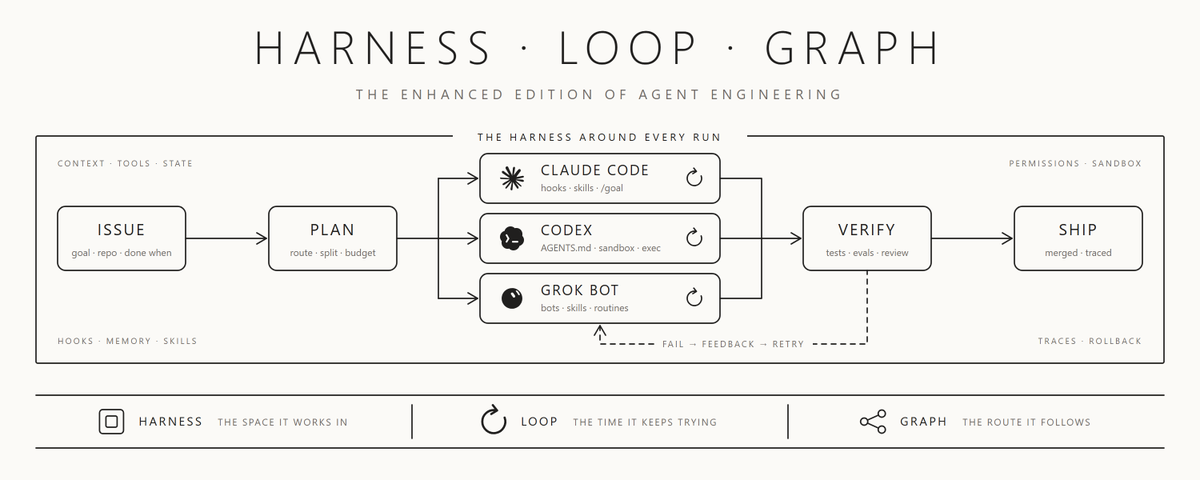
Then read the enhanced edition of agent engineering below ↓

Willy Stophe retweeted

🚀 本地 AI 视频生成速度再次迎来史诗级突破!ComfyUI 社区刚刚跑通了 pi-H3 加速方案,生成 10 秒 720P 高清视频,竟然只需要 32 秒!
如果你已经在 ComfyUI 里部署了 MiniMax H3(音视频一体生成模型),这次升级的门槛低到令人惊讶——不需要折腾复杂的重装环境,只需在原有工作流中额外加载对应的 LoRA 与 pi-H3 Adapter,再安装一个自定义节点就能直接起飞。
📊 实测工作流核心亮点与性能表现:
1️⃣ 极速 2-Step 模式:在 16:9 宽屏(1280×720,0.9MP)分辨率下,生成整整 10 秒带环境音效的完整视频,全程仅耗时 32 秒!真正实现了“喝口水的功夫就能抽卡”。
2️⃣ 精修 4-Step 模式:如果对画面细节要求更高,切换到 4 步采样也仅需 53 秒。实测能显著修复 2 步模式下手部、指尖动作(例如握持与点击鼠标)可能出现的轻微伪影,人物动态连贯度直接拉满。
3️⃣ 原生音画同步:工作流内直接集成了文本编码器(Qwen2.5 32B)与视频、音频双路 VAE,支持通过提示词精准控制环境音、背景音乐与画面动作的同步输出,省去后期配音麻烦。
对于本地显卡玩家和独立创作者来说,这种“半分钟出片”的迭代效率彻底改变了创作体验,再也不用为了一次提示词微调苦等十几分钟。
🔗 开源项目与详细部署文档已整理在 GitHub: github.com/Lakonik/ComfyUI-p…
建议先收藏备用,赶紧在自己的 ComfyUI 里拉出来测一波!大家平时本地跑 10 秒视频一般要等多久?欢迎在评论区晒出你的显卡配置和出图速度 👇
#ComfyUI #AI视频 #MiniMax #AIGC #开源项目 #工作流分享

Willy Stophe retweeted

Ночью было скучо, причесал AGENTS.md и обвязку и выложил на гх.
Внутри смесь ponytail, Карпатого, моего тулсета, идей из Радио-Т и по чуть-чуть отовсюду. Собирал вместе с Gemini 🖤, DeepSeek, Claude и ChatGPT. Оптимизировано под китайские flash модели
github.com/pavelveter/AGENTS…

Willy Stophe retweeted

Qwen4-Max is out!
• 2.4T-parameter model
• 1M context window
• Mixture-of-Experts (MoE)
• Much cheaper than Qwen3.8-Max
I used the model to process 10,000+ emails, identify medical receipts, and classify them. It's a very token-heavy process, so I was waiting for something good + cheap.
Willy Stophe retweeted

🚨 KARPATHY ACABA DE FIRMAR EL CERTIFICADO DE DEFUNCIÓN DE CLAUDE PRO, CHATGPT PRO Y GEMINI PRO
Y lo ha hecho con una sola frase:
"Todos están alquilando modelos de vanguardia para trabajos que un modelo local de 3B podría hacer. Los LLM locales pequeños son el futuro."
Este PDF de 18 páginas explica su idea: ejecutar la IA en tu propia máquina.
Sin suscripción.
Sin pagar por cada token.
La verdadera pregunta no es "¿el modelo local es igual de inteligente?"
Es "¿cuántas de mis 1000 llamadas necesitaban de verdad al inteligente?"
Te dejo el PDF abajo 👇


Willy Stophe retweeted

Rustrak : une alternative Open Source à Sentry, développée en Rust
👉 github.com/rustrak/rustrak

ALT Tableau de bord sombre « Checkout API / Overview » affichant des indicateurs de qualité avec 302.3K erreurs (+12.4 %), 27 nouveaux problèmes, 98.86 % de sessions sans crash et 99.02 % d’utilisateurs sans crash. Un grand graphique « Errors over time » montre des barres rouges/jaunes/grises, avec des sections « Open issues » et « Session health » en bas.
Willy Stophe retweeted

Qwen3.8-27B has reportedly been compressed from 55.6GB to just 5.9GB while retaining 98.2% of its original aggregate benchmark performance.
That’s an 89.4% reduction in checkpoint size.
The technology behind this is Bonsai 2, the second generation of PrismML’s model compression system.
What’s particularly interesting is that the previous Bonsai 27B release reportedly retained around 95% of the original model’s benchmark performance. Bonsai 2 pushes that figure to 98.2% across 20 benchmarks.
Here are the reported numbers:
Original Qwen3.8-27B: 55.6GB
Bonsai 2 checkpoint: 5.9GB
Storage reduction: 89.4%
Aggregate benchmark retention: 98.2%
Previous Bonsai version: Approximately 95%
Evaluation coverage: 20 benchmarks
That’s a 3.2 percentage-point improvement in benchmark retention while keeping the compressed checkpoint remarkably small.
Here’s how the technology works.
1. Ternary quantisation makes extreme compression possible
Bonsai 2 uses a technique called ternary quantisation.
Traditional model weights are stored using numerical formats such as FP16, INT8 or INT4. Ternary quantisation takes a more aggressive approach by representing weights using only three possible values:
-1
0
+1
This dramatically reduces the information needed to represent individual weights.
The challenge is that neural network weights encode numerical relationships learned during training. Compressing them too aggressively can destroy information that contributes to reasoning, coding and other model capabilities.
Bonsai 2 combines compact ternary representations with scaling factors to preserve more of the useful information in the original weights.
The objective is to achieve substantial storage savings without sacrificing too much model quality.
2. Bonsai 2 improves on the previous generation
The original Bonsai 27B reportedly retained approximately 95% of the original model’s aggregate benchmark performance.
Bonsai 2 increases that to 98.2% across 20 benchmarks.
PrismML also highlights improvements in areas including:
Coding agents.
Multimodal reasoning.
Long-horizon tool use.
The agentic performance is particularly interesting.
A coding agent needs to understand an existing codebase, modify multiple files, execute commands, inspect errors and correct its implementation.
These workflows require more than generating code. They involve repeated reasoning, planning and interactions with external tools.
Preserving these capabilities in a 5.9GB checkpoint could make compressed models considerably more attractive for developers building local AI agents.
However, benchmark retention alone doesn’t prove that extended agent workflows perform almost identically to the original model. That needs separate evaluation.
3. What does 5.9GB mean for local AI?
The original 55.6GB checkpoint presents a considerable storage barrier for developers experimenting with larger models.
Reducing that to 5.9GB makes downloading, storing and distributing the model much easier.
It could also make experimentation more accessible on consumer hardware.
But there’s an important distinction: a 5.9GB checkpoint does not mean the model only requires 5.9GB of RAM or VRAM to run.
Inference still requires additional memory for:
KV cache: Stores previously processed attention information. Its memory requirements increase with context length.
Activations: Holds intermediate values during computation.
Runtime buffers: Provides temporary memory required by the inference engine.
Serving overhead: Supports concurrent requests and other inference processes.
Actual memory requirements depend on hardware, context length, batch size and the inference implementation.
The compressed weights reduce the storage and weight-loading requirements, but the complete inference workload still needs additional resources.
4. Does 98.2% retention mean the model is almost identical?
Not necessarily.

One RTX 3090 Is Reportedly Serving 64 Qwen3.8 Sessions at 1,035 Tokens/s
An NVIDIA RTX 3090 with just 24GB of VRAM is reportedly delivering 1,035 tokens per second across 64 concurrent Qwen3.8-27B sessions.
The GPU is operating with a 250W power limit.
The system uses HyperQwen, an open-source inference-serving stack built around vLLM, to turn a consumer graphics card into a multi-session AI server.
What’s interesting here is the objective.
Most local inference benchmarks focus on how quickly a model can generate responses for a single user. This experiment tackles a different challenge: how much combined generation capacity can one GPU deliver when dozens of users are connected simultaneously?
And the reported numbers are worth examining.
The Hardware Behind the Experiment
Here’s the reported configuration:
GPU: NVIDIA RTX 3090
VRAM: 24GB
Power limit: 250W
Model: Qwen3.8-27B
Inference stack: HyperQwen + vLLM
Concurrent sessions: 64
Single-session decode speed: Approximately 127 tokens/s
Aggregate output throughput: Approximately 1,035 tokens/s
Configured maximum context: Up to 150K tokens
Two numbers deserve particular attention: 127 tokens/s and 1,035 tokens/s.
They measure different things.
The approximately 127 tokens/s figure represents reported generation speed in a single-session test.
The 1,035 tokens/s figure is the combined output throughput across multiple active sessions.
This does not mean every one of the 64 users receives 1,035 tokens/s. It also doesn’t mean all 64 sessions independently sustain 127 tokens/s.
The GPU’s processing capacity and memory bandwidth are shared across requests. Each user’s actual experience depends on scheduling, prompt length, context size, output length and the number of competing requests.
The achievement being reported is the server’s combined ability to generate tokens across many sessions, not the speed experienced by an individual user.
How Does One RTX 3090 Handle 64 AI Sessions?
Serving one AI session is relatively straightforward.
Serving 64 simultaneously introduces a different set of engineering problems.
The inference engine must coordinate incoming requests, manage memory for every active conversation, schedule generation efficiently and keep the GPU occupied without exhausting its available resources.
This is where HyperQwen’s use of vLLM becomes important.
Two technologies are particularly relevant: Continuous Batching and PagedAttention.
1. Continuous Batching: Keeping the GPU Busy
Imagine 64 people sending prompts to the same AI server.
They won’t all receive responses of the same length.
One person might ask a simple question and finish generating after 30 tokens. Another might request a long coding solution requiring hundreds or thousands of tokens.
Traditional static batching groups requests together and processes them as a fixed batch. When requests finish at different times, this can leave available processing capacity underutilised.
Continuous batching handles this differently.
Rather than waiting for every request in the original batch to finish, the inference engine dynamically updates the active batch.
When one session completes, another waiting request can enter the batch.
This allows the GPU to keep processing available work instead of wasting cycles waiting for slower generations to finish.
For a system handling dozens of concurrent users, that scheduling strategy can significantly improve overall throughput.
2. PagedAttention: Managing Limited VRAM
The second challenge is memory.
Every active transformer session needs a Key-Value cache, commonly called the KV cache.
This cache stores information from previously processed tokens so the model doesn’t have to recompute the entire conversation every time it generates another token.
As conversations grow, their KV caches consume more memory.
Now imagine managing dozens of active conversations on a GPU with only 24GB of VRAM.
Willy Stophe retweeted

fu*cking ultimate Uncensored AI models on internet rn
hft.md/uncensored-ai
$0. free-list. unlimited use

Willy Stophe retweeted

Check out Code Mode, a new, experimental way for Claude Code to work with tools. Claude writes scripts that chain your tools together in sophisticated ways, and it can answer you while long commands are still running.
Opt in with CLAUDE_CODE_EXPERIMENTAL_CODE_MODE=1 code.claude.com/docs/en/code…

Willy Stophe retweeted
Linked billing is now in beta on the Claude Platform.
Now users of tools like Factory, Linear, and Ramp can pay for Claude API usage through their Claude Platform organization, without sharing an API key.

Willy Stophe retweeted
We've made some big updates to Projects in Claude Code!
In a project, Claude coordinates your tasks across parallel threads. The coordinator is now much more proactive. It answers your questions in the project chat and gives you updates on the status of your ongoing threads.
Willy Stophe retweeted
Self-hosted Claude Managed Agents is now in private beta.
You can host the agent harness, sandboxes, and session history, in your own cloud or on-premises, and choose where requests to Claude are sent.

Willy Stophe retweeted
We've given all Pro, Max, Ultra, and Team users one free full reset, across all models and limits. Use it anytime before December 10 at 2:00PM PT.
We recently fixed a few small issues that used more limits than intended, and the Fable resets didn't do much for those of you who'd already hit your weekly limits for all models. While these issues didn't affect everyone, we want to make up for the trouble.
You'll find it in Settings > Usage, or at clau.de/reset.
Willy Stophe retweeted

Stanford researchers did it again.
They just built the agent-native version of Git.
When an agent works on a longer task, the run builds up a lot of state.
This includes files edited/created, a dev server, a database, installed packages, KV cache, etc.
Say the agent is at step 10 and makes a mistake, maybe it misreads a traceback and rewrites a file that was actually fine.
The tests start failing, and the run goes off track, although everything through step eight was correct.
By default, the agent just tries to fix it, which creates more edits and tool calls. This burns more tokens and grows the context.
The other options are a person stepping in to redirect it or restarting the whole run from step one.
That's wasteful, because it pays for every model/tool call again and re-prefills the context. Moreover, since an agent's run is non-deterministic, it doesn't reproduce the same early steps anyway.
The reason it's hard to just jump back exactly to a previous correct step and resume from there is that the trajectory is only a message log.
It records what the agent said and which tools it called, but not the live state underneath.
That state includes things like memory, open file handles, child processes, installed packages, /tmp, and KV cache. None of that is in the log.
Git can version the files, but it doesn't snapshot the running process or the KV cache. Checking out step eight moves the files back, but the process is still sitting in step-ten memory with a cold cache.
Shepherd is a runtime layer by Stanford that records the run as a trace of typed events rather than a flat log.
Each agent-environment interaction becomes a commit, similar to Git, but it tracks the live run.
Its commit includes the agent process and the filesystem together, copy-on-write, so a branch carries the actual state and not just the files.
Going back to a previous step is then a single call that forks from that commit and continues from the exact state.
The copy-on-write fork is roughly five times faster than docker commit, and because the prompt prefix through step eight is unchanged, the KV cache is reused over 95% on replay, so early steps aren't reprocessed again.
Once the run can be forked, a meta-agent can sit on top and operate it. It watches the trace and reverts as soon as it looks wrong, before the bad write is committed.
In practice, it's just Python calling fork, replay, and revert on the trace, rather than a separate control plane wired into the harness.
Not everything is reversible though.
Files and sandbox changes undo themselves, but a database write has no automatic undo, so it needs a matching undo step set up in advance.
Something external, like a sent email or a real charge, can't be undone, so the supervisor's job there is to catch it before it fires.
They tested this on a few public benchmarks. On CooperBench, where two agents work on the same codebase, adding a live supervisor took the pair-coding pass rate from 28.8% to 54.7%.
It's still early and labeled alpha. The benefit mostly shows up when a run gets branched a lot over a heavy sandbox state, which is exactly where restarting wastes the most tokens and time.
If Git was made to make file changes reversible, Shepherd is trying to do the same thing for a live agent run.
Shepherd Repo: github.com/shepherd-agents/s…
(don't forget to star it ⭐ )
That said, Shepherd reverts a bad step inside a run. The harness around it, the prompts, tools, and checks the supervisor relies on, still drifts across runs as models and dependencies change.
I wrote about making that harness repair itself, where a failing trace gets diagnosed, the fix is verified against the exact input that failed, and the failure is locked as a regression test so it can't recur. all of this is done using @Cometml's open-source project Opik.
The article is quoted below.


Willy Stophe retweeted
Which Claude model should you build with?
Our new guide breaks down when to use Fable 5.2, Opus 5.5, Sonnet or Haiku. It also covers when to adjust effort instead of switching models, and how to save cost by putting subagents on smaller models.
claude.dev/blog/which-claude…

Willy Stophe retweeted

Estaba a punto de pagar el TRIPLE por Claude.
Cada semana agotaba los límites de uso y necesitaba más capacidad.
Hasta que hice un cambio que me llevó literalmente 1 minuto. Ahora apenas consumo la mitad del límite semanal.
Me estoy ahorrando 60€/mes
Te cuento el truco 👇
🤖 Made with AI

Willy Stophe retweeted

THIS IS ACTUAL F*CKING GOLD
Anthropic just shared how to get Opus-level calls in Claude Code without paying Opus for every single turn.
The idea: Sonnet 5.5 does the work, Haiku 5.5 does the digging, and Opus 5.5 only shows up when a decision actually matters.
Anthropic's own docs say a fast main model with a stronger advisor typically costs less than running the strong model the whole time.
You just start Claude Code like this:
claude --model sonnet --advisor opus
this is how it splits:
→ Sonnet 5.5 runs the session and writes every line
→ Haiku 5.5 subagents search the repo and read the docs in parallel
→ Opus 5.5 sits on call and reads the full transcript only when it's consulted
→ you stop burning Opus on work a cheaper model handles just as well
Opus only steps in at three moments:
→ before a plan gets locked
→ when the same error comes back twice
→ before Claude calls the task done
Sonnet writes. Haiku digs. Opus decides.
JEV engineering is the same idea one layer down: the forks that need no thinker (which file, which tool, retry or stop) get settled by JEV in milliseconds, and the big models only see the ones that actually split
the full tree
> Sonnet 5.5 runs the main session and edits the code
> search maps the repo on Haiku 5.5
> grep finds every call site on Haiku 5.5
> docs pulls the API reference on Haiku 5.5
> Opus 5.5 on call as advisor, reads the full transcript when consulted
> JEV routes micro-forks in milliseconds
paste the tree and this prompt into Claude Code ↓
"Rebuild my Claude Code setup around this tree:
1. Run the main session on Sonnet 5.5 with Opus 5.5 as advisor.
2. Create three read-only subagents on Haiku 5.5: search (maps the repo), grep (finds call sites), docs (pulls the API reference).
3. Add one rule to CLAUDE.md: consult the advisor before a plan locks, after the same error twice, and before a task is marked done.
4. Route fast deterministic forks (tool choice, path selection, retries) through JEV.
Show me every change as a diff first. Nothing gets edited until I say go."
↳ code.claude.com/docs/en/advi…
save it, this is the setup you'll want on every repo.


Willy Stophe retweeted

Meet DeepSeek-V4-Pro-Qwen3.5-9B-UNCENSORED-heretic: a 9B reasoning beast fine-tuned with Unsloth for speed. It handles text and image-text-to-text, and it's uncensored. Perfect for builders who want raw power.

Willy Stophe retweeted

This is f*cking gold, the CEO of Obsidian put his own second brain on GitHub for free and people still build theirs from zero
7 free repos from the Obsidian team:
-> kepano obsidian (by kepano)
github.com/kepano/kepano-obs…
the vault template of the Obsidian CEO himself, copy it and skip the blank page
-> jsoncanvas (by obsidianmd)
github.com/obsidianmd/jsonca…
the open canvas format, your maps stay plain files that are yours forever
-> obsidian releases (by obsidianmd)
github.com/obsidianmd/obsidi…
every community plugin and theme in one list
-> obsidian sample plugin (by obsidianmd)
github.com/obsidianmd/obsidi…
the official template, build the plugin you are missing
-> 40 questions (by kepano)
github.com/kepano/40-questio…
40 questions that turn your notes into a yearly review
-> obsidian minimal (by kepano)
github.com/kepano/obsidian-m…
a clean theme so your vault stops looking like a mess
-> flexoki (by kepano)
github.com/kepano/flexoki
the color scheme he made for writing and code
your second brain should never start from a blank page
copy his vault and make it yours


Willy Stophe retweeted

Before you blame Opus 5.5, learn these 15 official Anthropic commands
15 essentials to get more out of Opus 5.5:
less busywork → parallel agents → faster iteration
steal the cheat sheet ↓
01 /goal → keep working toward a defined finish line
code.claude.com/docs/en/goal
02 /batch → split big changes across parallel agents
code.claude.com/docs/en/agen…
03 /subtask → delegate with the current context
code.claude.com/docs/en/sub-…
04 /deep-research → get research with sources
code.claude.com/docs/en/work…
05 /design → create editable artboards
code.claude.com/docs/en/comm…
06 /plan → review the plan before code changes
code.claude.com/docs/en/perm…
07 /memory → manage project instructions
code.claude.com/docs/en/memo…
08 /compact → compress context around key decisions
code.claude.com/docs/en/cont…
09 /branch → explore a separate conversation branch
code.claude.com/docs/en/comm…
10 /rewind → restore a tracked checkpoint
code.claude.com/docs/en/chec…
11 /mcp → manage connected tools
code.claude.com/docs/en/mcp
12 /loop → repeat checks in a running session
code.claude.com/docs/en/sche…
13 /schedule → automate recurring cloud tasks
code.claude.com/docs/en/rout…
14 /simplify → clean up code with parallel reviewers
code.claude.com/docs/en/comm…
15 /remote-control → continue the local session from your phone
code.claude.com/docs/en/remo…
start here: /plan → /goal → /simplify
save this, then read the full guide for Opus 5.5 Harness Engineering ↓