

AI educator, tech consultant, software builder & founder @lumabyteco
Ireland
Joined August 2013
- Tweets38.6K
- Following2.4K
- Followers11.7K
- Likes45K




Pinned Tweet
DeepSeek open-sourced DeepInfer, the inference framework behind its production services (Apache 2.0, on GitHub since 16 Oct). The README is unusually clear about scope, so here's what's in it and what isn't.
In the box:
- one model so far, DeepSeek-V4.1-Flash (MIT-licensed weights)
- attention data parallelism, MoE expert parallelism with EPLB
- "DSpark" draft-token decoding, max draft length 5 by default
- batch-invariant inference: a request gets the same result whatever else shares its batch (NVIDIA only)
- deterministic sampling with a fixed seq_seed (NVIDIA only)
- structured outputs from a regex, a JSON schema or an EBNF grammar
Not in the box: a KV cache system, prefill/decode disaggregation, and load balancing across replicas. The README calls all three required for a complete inference service. This release is offline inference.
Hardware: NVIDIA SM100 GPUs or Huawei Ascend 950 NPUs. The published benchmarks ran prefill on 4 GPUs and decode on 64.
It started out built mainly on vLLM, with ideas from SGLang and TensorRT-LLM, and the README credits all three.
To try the model without that hardware, Ollama lists it as a cloud model only: ollama run deepseek-v4.1-flash:cloud
github.com/deepseek-ai/DeepI…

Moonshot's Kimi K3.1 Pro is live in its app and API: a 3T-class open-weight model with a 1M-token context window. The weights themselves are promised by Nov 4.
What they report (their numbers, not independent ones):
- Terminal-Bench 4.0: 65.7%, against 58.2% for GPT-6 Astra and 66.4% for Claude Opus 5.5
- Kimi Code Bench 3.0 Long-horizon, their internal benchmark: 61.2%, up from 55.95% for K3
- A factual-accuracy stress test: claim-level hallucination rate down from 23.4% to 8.3%. They say it does not represent everyday error rates
The part worth reading: for the open-weight release they removed cyber-related data from both mid-training and the RL stage. On their in-house exploit benchmark, the checkpoint without that removal solves 90.5% of problems at pass@3, the final model 81.0%. Removal lowered it, and stronger general coding still raised it over K3.
Can't run it locally yet: no weights, and the page names no licence, so no ollama line until they land. Would you run it yourself once they do?
kimi.ai/blog/kimi-k3-1-pro


The beast is here 👊 kimi k3.1 pro

Introducing Kimi K3.1 Pro: our most capable 3T-class open-weight model.
🔹 1M-token context, 2.8T total / 104B active params (MoE), Multimodal.
🔹 Full-project coding: games in Unreal, Unity & Godot.
🔹 Excels at parametric 3D modeling in Blender & CAD.
🔹 More reliable at finance work: Accurate modeling with hallucination down by 65%.
🔹 Matching the strongest proprietary models across coding, agentic and knowledge benchmarks.
Kimi K3.1 Pro and K3.1 Pro Highspeed (2–3× faster) are now live on Kimi.ai, Kimi Work, Kimi Code, and the Kimi API.
Open weights by Nov 4, 2026.
🔗 API: platform.kimi.ai
🔗 Tech blog: kimi.ai/blog/kimi-k3-1-pro

Ahmed Radwan retweeted

Thanks to @lightseekorg for Day-0 support with TokenSpeed!

Day-0 support for @MiniMax_AI M3.1 Flash is live in TokenSpeed.
DSpark speculative decoding and MXFP8 + NVFP4 mixed precision on Blackwell.
TokenSpeed is featured in the official deployment guide.
📖 huggingface.co/MiniMaxAI/Min…
👉 github.com/lightseekorg/toke…

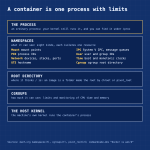
A container is a normal process that the kernel runs with a few restrictions added, and you can still find it on the host under /proc.
What the restrictions are:
1. Namespaces limit what the process can see. Linux has eight kinds, each isolating one resource: mount points, process IDs, network devices and ports, the hostname, System V IPC and message queues, user and group IDs, the clocks, and the cgroup root directory.
2. Cgroups limit what it can use. They organise processes into groups whose CPU time, memory and other resources can be limited and monitored.
3. The root directory is swapped. An image is just a folder, and the runtime makes that folder the process's root with chroot or pivot_root.
Someone writing their own container runtime for fun found a few oddities on the way. runc, Docker's runtime, is written in Go, which is multi-threaded, so it runs a C module before Go's runtime starts and re-executes /proc/self/exe to stand in for fork. And the Docker daemon has usually run as root, because many of these kernel APIs needed it, though that is improving.
Sources: the namespaces(7), cgroups(7) and pivot_root(2) man pages, and "Docker is weird" on codeandcake.dev.
codeandcake.dev/posts/2026-1…

Anthropic and Theorem turned fuzz tests into proofs: Claude proved that 239 entry points in 123 OSS-Fuzz libraries can't crash on any input up to 64 MB.
How it works:
- take a library and its existing fuzz test (a function that crashes when it hits a bug)
- compile both to RISC-V
- turn "this fuzz test never crashes" into a spec over the compiled instructions
- Claude writes the proof, the Rocq proof checker verifies it
Numbers from the post: about 180M lines of Rocq in total, a typical proof around 600,000 lines, binaries with a median of 18,000 instructions. When a proof wouldn't go through, that pointed at a bug; Claude patched it and tried again. A few of those bugs needed a ~20 MB input with one rare layout, or a 64 MB input and over 2 GB of memory, which is why a fuzzer is unlikely to hit them.
What you still trust: the RISC-V and Linux models, the theorem statements and the checker. The proofs assume a single-threaded static binary on RISC-V with musl libc, not the x86 or ARM plus glibc most of us run. They are publishing a subset of the proofs and the semantics.
anthropic.com/research/forma…

A git hook that quizzes you on your AI-written code before it ships.
Sphinx (MIT, created 14 Oct) pauses a push to a protected branch and asks what your change will do: what happens on a retry, what if a worker crashes mid-job. Miss it and it explains, then gives you a new scenario. Pass, and the push continues, whether you or your agent ran git push.
The questions come from a separate reviewer model that reads the committed change and never saw the chat that produced it. The check is open-book.
One thing to know before installing: sphinx install sets your global Git core.hooksPath, so pushes to main or master in every repo on the machine get checked.
github.com/parthh01/sphinx

مقابلة مدتها ٢٠ دقيقة على قناة Numberphile مع عالم الرياضيات تيرينس تاو، عن موجة البراهين التي نشرتها OpenAI في أكتوبر وماذا تعني للرياضيات. الفيديو بالإنجليزية، والنقاش هادئ، وما فيه رأي شخصي لتاو أكثر منه حكمًا نهائيًا.
أبرز ما فيه:
• صار الصعب هو فهم البرهان لا الوصول إليه
• الفرق بين أداة تعزّز الفهم وأداة تحلّ محله
• يقترح تعليم الطرق التقليدية أولًا، كما نتعلم الحساب باليد قبل الآلة الحاسبة
• يتوقع أن تزداد قيمة الكشف عن طريقة الوصول للنتيجة، لا النتيجة وحدها
هل تتعلم المهارة بيدك أولًا ثم تستعين بالأداة؟
youtube.com/watch?v=bAnwMdfc…

If litellm 1.107.0 ever ran on a machine of yours, don't start with pip install: Python runs the implant on every start, pip included.
LiteLLM's own incident report says 1.107.0 was on PyPI from 11:39 to 13:23 UTC on 21 Oct, and the docker tags latest, main-latest and main-stable pointed at an infected image until 14:20 UTC. The v1.107.0 git tag is clean. The payload was built from a lookalike repo.
What to check:
pip show litellm
litellm-1.107.0.dist-info, cook.pth and sitecustomize.py in site-packages
a detached python daemon holding /tmp/remote_code_loader.lock
What to do: delete the three files first, kill the daemon, then reinstall pinned to 1.106.2 (or rebuild the venv or image). Not finding a file doesn't prove you're clean.
Then rotate what the host could reach: the instance role, every provider key in the proxy DB, the master and virtual keys, the DATABASE_URL password, any secret in a process environment. In CloudTrail, look for GetCallerIdentity from the instance role around install time.
What the stealer reads, per SafeDep's decode: SSH keys, cloud and CI credentials, AI tool tokens and the proxy's provider keys.
docs.litellm.ai/blog/securit…
Ahmed Radwan retweeted
WHAT IS A DOCKER CONTAINER AND HOW DOES IT WORK?
A Docker container is an isolated environment that runs an application with its required dependencies.
Dockerfile → Defines instructions
Image → Packages application and dependencies
Container → Runs the image
Application → Executes inside the container
Example: Build image → Start container → Application runs consistently.
Containers are lightweight, portable, fast to start, and share the host operating system’s kernel.
Grab the Docker ebook: codewithdhanian.gumroad.com/…


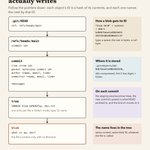
Every git commit writes a handful of small files. Once you can name them, branches, renames and "detached HEAD" stop being mysterious. This is what one commit stores, from the inside out:
1. Git is a key-value store. The key is a hash of the content, so the same content always gets the same ID.
2. To make that key, Git writes a header (the type, a space, the size in bytes, a null byte), appends your content and takes the SHA-1. The Pro Git book's example: echo -n "what is up, doc?" | git hash-object --stdin prints bd9dbf5aae1a3862dd1526723246b20206e5fc37.
3. A file's content becomes a blob. The filename is not in it, so the same content gets the same blob whatever the file is called.
4. Objects are stored zlib-compressed under .git/objects: the first 2 hex digits of the ID name the folder, the other 38 the file.
5. On commit, the staging area becomes tree objects. Each entry holds a mode, a type, an ID and a filename. Names live here.
6. The commit object holds the top-level tree, the parent commit(s), author and committer with a timestamp, a blank line, then your message. Its parent is whatever HEAD pointed to.
7. A branch is a file holding one commit ID, and git commit moves it to the new commit. HEAD usually just names the branch you're on: ref: refs/heads/main.
What the picture leaves out: Git later packs loose objects into packfiles to save space, and checking out a commit or tag directly puts a raw ID in HEAD. That's "detached HEAD".
To look at your own: git cat-file -p HEAD
git-scm.com/book/en/v2/Git-I…
git-scm.com/book/en/v2/Git-I…
#git

Ahmed Radwan retweeted
Day 4: AWS Authentication – AWS IAM, AWS Cognito, AWS Email, AWS Password, AWS Magic Links, and AWS OAuth Login
Project: Build a complete AWS authentication system.
Grab AWS Handbook: codewithdhanian.gumroad.com/…


Ahmed Radwan retweeted
10 Best GitHub Repositories to Learn System Design:
① System Design Primer — Core concepts and interview preparation github.com/donnemartin/syste…
② System Design 101 — Visual explanations of system design concepts github.com/ByteByteGoHq/syst…
③ System Design by Karan Pratap Singh — Structured learning and architecture fundamentals github.com/karanpratapsingh/…
④ Awesome System Design Resources — Curated guides, concepts, and interview problems github.com/ashishps1/awesome…
⑤ Awesome Scalability — Real-world scalability patterns and engineering case studies github.com/binhnguyennus/awe…
⑥ System Design Interview — Interview questions and preparation resources github.com/checkcheckzz/syst…
⑦ Awesome System Design — Curated system design learning materials github.com/madd86/awesome-sy…
⑧ Machine Learning Systems Design — Designing and deploying machine learning systems github.com/chiphuyen/machine…
⑨ Engineering Blogs — Learn from real-world engineering teams and architectures github.com/kilimchoi/enginee…
⑩ System Design Academy — System design learning and practice resources github.com/systemdesign42/sy…
Master system design by studying real architectures, understanding trade-offs, and learning how to build scalable, reliable systems.
Grab system design ebook: codewithdhanian.gumroad.com/…


Ahmed Radwan retweeted
Load Balancing in System Design
➤ What is Load Balancing?
→ Definition: The process of distributing incoming network traffic across multiple servers to prevent any single server from becoming overloaded.
→ Goal → Improve performance → Increase availability → Distribute workloads → Prevent bottlenecks
→ Load balancers sit between clients and backend servers.
→ Example → 1,000 requests arrive → Load balancer distributes them across 5 healthy servers → Each server handles approximately 200 requests, assuming equal distribution.
➤ How Load Balancing Works
→ Client sends a request → Load balancer receives the request → Checks server health and availability → Selects an appropriate backend server → Forwards the request to that server → Server processes the request and returns a response
→ If a server fails → Health checks detect the failure → Traffic is redirected to healthy servers.
➤ Why Load Balancing Matters
→ Prevents individual servers from becoming overloaded → Improves application responsiveness → Increases availability through server redundancy → Supports horizontal scaling → Enables maintenance with reduced service disruption → Helps applications handle traffic spikes
→ Common use cases → E-commerce → Social media → Streaming platforms → Banking systems → Cloud applications
➤ Types of Load Balancers
→ Layer 4 Load Balancing
→ Operates at the transport layer (TCP/UDP) → Routes traffic using network information such as IP addresses and ports → Offers efficient, low-overhead traffic distribution
→ Layer 7 Load Balancing
→ Operates at the application layer (HTTP/HTTPS) → Routes requests using URLs, headers, cookies, or hostnames → Supports content-based routing and application-aware decisions
→ Hardware Load Balancers
→ Dedicated physical appliances → Common in traditional enterprise infrastructure → Can provide high performance but may increase infrastructure costs
→ Software Load Balancers
→ Run as software on servers or virtual machines → Flexible and configurable → Examples → NGINX → HAProxy → Envoy
→ Cloud Load Balancers
→ Managed load-balancing services offered by cloud providers → Examples → AWS Elastic Load Balancing → Google Cloud Load Balancing → Azure Load Balancer
➤ Common Load Balancing Algorithms
→ Round Robin
→ Sends requests to servers in a repeating sequence → Best for servers with similar capacity and relatively uniform workloads
→ Weighted Round Robin
→ Assigns more requests to servers with higher weights → Useful when backend servers have different capacities
→ Least Connections
→ Routes traffic to the server with the fewest active connections → Useful when requests take different amounts of time to complete
→ Weighted Least Connections
→ Considers active connections and server capacity → Helps distribute workloads across heterogeneous servers
→ IP Hash
→ Uses a client's IP address to select a backend server → Can help maintain routing consistency, but does not guarantee session persistence in every configuration
→ Least Response Time
→ Selects servers based on response time and, depending on the implementation, active load → Helps direct traffic toward more responsive instances
➤ Health Checks and Failover
→ Active Health Checks → Periodically send probes to backend servers → Passive Health Checks → Detect failures from actual traffic → Unhealthy Server → Stop sending new requests to that server → Recovery → Return the server to service after it passes health checks → Failover → Redirect traffic to healthy alternatives
→ Important → Health checks reduce the impact of failures, but they do not eliminate every failure scenario.
➤ Load Balancing Architecture
→ Client Requests → Load Balancer → Server 1 → Server 2 → Server 3 → Server N → Shared Cache → Database → Read Replicas
→ Traffic increases → Add backend instances → Server fails → Redirect traffic to healthy instances → Traffic decreases → Scale down excess capacity
→ For critical systems → Deploy redundant load balancers to avoid creating a single point of failure.
➤ Challenges in Load Balancing
→ Uneven traffic distribution → Session persistence and state management → Health-check configuration → Backend server failures → Load balancer capacity limits → TLS termination and certificate management → Cross-region routing and network latency → Maintaining observability across multiple servers
➤ Load Balancing vs Auto Scaling
→ Load Balancing → Distributes traffic across available servers → Auto Scaling → Adds or removes server instances based on demand
→ Load balancing helps distribute existing capacity → Auto scaling adjusts the amount of available capacity → Together → Support responsive, scalable applications
➤ In System Design Interviews
→ Estimate incoming traffic and peak requests per second → Identify potential server bottlenecks → Choose Layer 4 or Layer 7 load balancing → Select an appropriate routing algorithm → Explain health checks and failover → Discuss stateless services and session management → Consider multi-zone or multi-region deployment → Evaluate latency, availability, cost, and operational complexity
➤ System Design Handbook
→ A practical guide to mastering system design fundamentals and distributed architectures → Covers load balancing → Scalability → Consistency → Fault tolerance → Durability → Caching → Databases → CAP Theorem → Designed for developers preparing for system design interviews and building reliable production systems
Get the System Design Handbook here:
codewithdhanian.gumroad.com/…
