

Educator and eLearning specialist #MIEExpert #MIEFellow- Opinions are my own 👌
Gold Coast
Joined May 2020
- Tweets341
- Following1K
- Followers1.3K
- Likes2.8K




Pinned Tweet
Check out the newest Everything OneNote 📚 episode - 5️⃣ tips for creating interactive and engaging #OneNote pages 👇 @mtholfsen you get a mention in this one 😁 @digitalrichards @MSAUedu @OneNoteEDU @PetraTrinke #MIEExpert #edtech
👉🔗 youtu.be/5doWd86wSq4
View my verified achievement from @MicrosoftEDU/. credly.com/badges/e50df00c-8…
Check out the latest Everything Teams episode on how to change the name of your Class Notebook @OneNoteEDU @MSEduANZ @MicrosoftTeams @digitalrichards
📺🔗 youtu.be/0DxnXernXdo

andybattese retweeted

Did you know that you can start to experience some of the new modern UI for the @OneNoteEDU app for @Windows?
Learn How 📺youtu.be/Zoc51TIoS70
Subscribe 👉 bit.ly/3ndUCuH
More 📚bit.ly/3BmV4Ol
@MSEduANZ @OneNotePM @msonenote @MicrosoftEDU @MSEducationUK

andybattese retweeted
These are my top four ways to add a @powerpoint to @OneNoteEDU.
Watch Here 📺 youtu.be/hhKGTe4pmr8
Resources 📚 bit.ly/3BmV4Ol
Subscribe 🔔 bit.ly/3ndUCuH
@andybattese @MSEduANZ @MSEducationUK @MicrosoftEDU #edtech #mieexpert

andybattese retweeted

NEW! Insert images in multiple choice questions for Microsoft Forms or Quizzes. Rolling out soon 🚀 Options include:
✅ Bulk import
✅ Drag and drop
✅ Copy and paste
Blog 👉 techcommunity.microsoft.com/…
#edtech #edchat #MIEExpert #MicrosoftEDU

Check out this handy workaround that allows your students to submit large files in Teams assignments and still adhere to assignment policy deadlines using 'File Request'👇
@MicrosoftEDU @MSEduANZ @digitalrichards @MicrosoftTeams #MIEExpert #education
🔗📺youtu.be/dXyQOJWW1I0
The ability to delete student sections in bulk is finally here 🙌 This was one of the most requested features in OneNote @msonenote @OneNoteEDU @MSEduANZ @MicrosoftEDU @digitalrichards #MIEExpert
Check out the @YouTube video below 👇
👉📺 youtu.be/WtS1ulQgwwE

New Everything Teams video drops in a few days with a really cool work around for students submitting large files in Teams assignments @MicrosoftTeams @MicrosoftEDU @MSEduANZ @digitalrichards #MIEExpert

andybattese retweeted
New Everything #MinecraftEdu @YouTube video drops in a few days 👇
Subscribe 👉 bit.ly/3ndUCuH
@MicrosoftEDU @MSEduANZ @PlayCraftLearn @Andybattese #MIEExpert
📺 youtube.com/shorts/7EMWSlM_F…

Checkout the latest Everything Teams @YouTube episode on how to permission private folders to students in the file section 👇
@MSEduANZ @MicrosoftTeams @MicrosoftEDU @digitalrichards #MIEExpert
👉📺 youtu.be/H6XS6qWuBpo
New Everything Teams @YouTube video drops in a few days 👇
@MicrosoftEDU @MSEduANZ @MicrosoftTeams @digitalrichards #MIEExpert
Subscribe 👉 bit.ly/3ndUCuH

Checkout the newest Everything OneNote @YouTube episode with a simple organisational tip - Creating subpages👇@MSEduANZ @MicrosoftEDU @OneNoteEDU @msonenote @digitalrichards #MIEExpert
👉📺 youtu.be/6HhO399G2nc

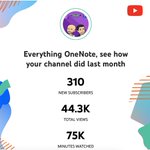
I love seeing our @YouTube channel grow each month (slowly) 😅 @digitalrichards and I create videos for teachers and educators on how to get the most out of @OneNoteEDU @PlayCraftLearn @MicrosoftTeams #MIEExpert #education @MSEduANZ
Subscribe 👉 bit.ly/3ndUCuH

Here are my top formatting tips for OneNote 👇
@MicrosoftEDU @MSEduANZ @OneNoteEDU @msonenote @digitalrichards #MIEExpert
👉📺 youtu.be/IIROzwRNBNs

The next Everything OneNote @YouTube ep comes out later this week, this time I'm talking about my 'top formatting tips' in @msonenote @MSEduANZ @digitalrichards @OneNoteEDU @MicrosoftEDU #MIEExpert
Subscribe 👉📺 bit.ly/3ndUCuH
andybattese retweeted
Class Notebooks for Students 📓
Check out our student guides on @Windows 10, MacBook and iPad.
Download 🔗 bit.ly/31qmZ12
🔔 Subscribe bit.ly/3ndUCuH
Designed to assist students in using @OneNoteEDU
@Andybattese @MSAUedu @MSEducationUK
@MicrosoftEDU


Best practice when using OneNote is syncing multiple OneDrive accounts to freely move between work & personal notebooks + back everything up 🙏👇@MSEduANZ @MicrosoftEDU @digitalrichards @OneNoteEDU @msonenote @OneNoteHacks #MIEExpert
👉📺 youtu.be/YYUvBSkeRf0

OneNote’s formatting and versatility makes it a fantastic tool for creating mind maps. Check this step by step tutorial on how to build an epic mind map from scratch 👩🏻💻 @OneNoteEDU @digitalrichards @msonenote @MicrosoftEDU @MSEduANZ #MIEExpert
👉📺 youtu.be/EVrt7sVCaz8

Checkout the latest Everything OneNote episode - Creating interactive pages👇 @MicrosoftEDU @OneNoteEDU @MSEduANZ @digitalrichards #mieexpert
📺 youtu.be/FwidRxtMZ_4

andybattese retweeted

The first Tissue 🧻of 22-23 SY #PottyPD is hitting the stalls 😜 this week @RandolphSchools! Featuring the new @MicrosoftTeams rich assignment feedback 📸 & growing our PLN with @andybattese and @digitalrichards of EverythingOneNote 📝on @YouTube #edtech
