







BTGs retweeted

如何用 Muse 做出这种火柴人视频
给 Muse 装上对应的 skill 就行了
这条《电梯总停在没人的楼层》58 秒
剧本 分场生成 中文配音 背景音乐 后期剪辑
全是 Muse 自己干的
它自己抽帧验收 自己返修 自己合成
skill 我开源了 免费自取
github.com/CryptoYuyyy02/sti…
恐怖只是壳
看到最后 是个感人的故事
BTGs retweeted

i just made this stickman animation in full code with claude opus 5.5
took me 20 mins and spent $0 on videos or images
promised you guys id give a free claude skill to re create any code format so here it is
hand this prompt to your claude code and thank me later ↓
<inputs>
Ask me for: my video idea (one line is fine), the setting, the length (60-90 s) and the narrator (an ElevenLabs voice, or "free" for a local text-to-speech). Everything is built in code: no AI images, no AI video. Make it MY story, not a copy of an example.
</inputs>
<format>
The style is a second-person survival thriller with stickmen, built as a series:
- "Imagine you…" hook with a time stamp in the first 3 s
- a HUD with the DAY number and a clock that moves forward through the episode
- 3-4 RULES, each one paid off on screen
- a threat that escalates and is mostly shown, not told
- a twist that makes one rule impossible
- a two-choice ending ("DO YOU OPEN IT?" style, a green and a red option, "COMMENT BELOW") and "FOLLOW FOR DAY 2"
Around 20-30 voice lines, 60-90 s, a new shot every 1.5-3 s.
</format>
<story>
Write a beat sheet and the script first and show me both before building anything.
- One line = one visual. Rules are short commands.
- Open a new question every ~10 s and only answer it with a bigger one.
- Put the viewer in POV for the scary parts: what you see through a door, a window, a phone, a peephole.
- The ending is a choice where both options look bad.
- Write numbers twice: the caption form ("11:58 PM") and the spoken form ("eleven fifty-eight P M") for the text-to-speech.
- Rotate settings between episodes (apartment, subway, school at night, hospital, cabin, plane, office, motel) and fit the threat to the setting.
</story>
<look>
Pick a palette per story, but keep the language:
- real 3D low-poly sets with real lights and shadows; the mood comes from light (one warm practical, one cold fill, one strong accent such as a door gap, a screen or a siren)
- the stickman is flat and 2D-looking: a light body with a thick dark outline, round strokes, dot eyes, no mouth; give the main character one mark (a scar, a cap, a colour) so doubles and callbacks read
- the overlay: a monospace HUD top-left, chunky captions (1-3 words, key words in an accent colour), a tilted rule sticker with a big condensed title, phone screens drawn in 2D
- banned: AI frames, glossy 3D characters, emojis, music with vocals, long captions
</look>
<shots>
A library to adapt to the story (never use all of them):
- the opener: a camera move that starts tight on you and pulls out to show where you are
- POV phone in your hands (2D phone UI, two stick thumbs)
- a macro on the one detail that matters
- outside chaos from above (balcony, bridge, window): physics vehicles, a running crowd, something collapsing or burning
- third-person action in the room: walking with planted feet, reaching, hesitating, barricading
- POV interaction: throwing, holding a torch, opening something
- a close-up of your face for the reaction
- a low angle on a door or vent: light leaking in, shadows moving
- knocks, shakes, things falling
- a fisheye peephole, camera or window view of the threat stepping closer
- the choice screen and the end card
</shots>
<tools>
What each tool is for. Install whatever is missing, and ask me before anything paid:
- three . js: the 3D engine; it runs inside a web page. Download its module file locally so renders don't depend on the internet. Use its post-processing passes for bloom, plus one custom lens shader for vignette, grain, fisheye and colour fringing.
- cannon-es: a JavaScript physics engine for vehicles, falling debris and collapses.
- Playwright (Python): opens the page in a real browser (Edge or Chrome with the GPU on) and captures every frame as an image.
- ffmpeg: the command-line video and audio tool. It joins the frames into an MP4, cuts and filters the audio (highpass, lowpass and echo for voices behind doors), mixes, normalises loudness and makes the phone-size copy.
- ElevenLabs, or Kokoro (free local text-to-speech), for the narrator.
- faster-whisper: free local speech-to-text with word timestamps. Use it to cut the voice cleanly and to time every caption.
- numpy and Pillow: to check audio levels and make contact sheets of stills.
- Sound: free downloaded sound effects from Mixkit (never synthesized) and a dark cinematic drone or tension bed with no vocals.
</tools>
<build>
1. One HTML page (film . html) with the 3D renderer at 1080x1920 drawn into a 2D canvas that also holds the overlay. A function window . seek (t) draws frame t and must be a pure function of time; every cut, sound and move is keyed to the word times.
2. Stickman. Draw each figure with 2D canvas strokes onto its own texture and put it on a plane that always faces the camera, with an alpha test so it casts a real shadow and slight emissive so it reads in the dark. Pose with joint angles, and walk with 2-bone IK so the planted foot never slides.
3. Physics and cloth. Simulate once at load with a fixed timestep, record the positions, then sample them by time, so every render is identical. Cloth (sheets, curtains, flags) is a verlet particle grid with wall and floor collisions and pinned points you can release.
4. Voice. If you generate one long take, never cut it at the API's character timestamps: they drift and slice words. Transcribe the take with faster-whisper word timestamps, match it to the script, cut only in real silence between lines, and only add pause where the natural one is too short.
5. Captions. Re-transcribe each final line, normalise numbers ("6:42" = "6 42", "AM" = "a m"), align the caption words to what was heard, and snap each word to its real start in the audio. Check that every caption has voice under it within ~120 ms.
6. Render. Playwright steps window . seek through every frame at 30 fps, and ffmpeg encodes a high-quality master, then a phone copy under 30 MB.
7. Mix with ffmpeg: the voice on top, the music about 12-14 dB under it, one sound effect per event, a dip before the big moment, loudness at -14 LUFS, then a scan for dropouts.
</build>
<gotchas>
- is narrow: a normal lens sees very little sideways, so use wider lenses indoors and keep the subject close to the aim point.
- Glass behind a solid frame is invisible: build mirrors and windows as a frame around a real hole.
- Dust spread everywhere reads as stars, so keep it inside light beams.
- Night shots go black after compression, so give each one a cold fill light.
- Fog swallows distant things.
- Never judge a reference or your own render from one frame every few seconds; check motion at the full frame rate.
- Check cuts, captions and audio joints with numbers before every full render.
</gotchas>
<start>
Ask me for the idea, show me the beat sheet and script, then 6 stills of the key shots before rendering the full video.
</start>
BTGs retweeted

--sref 35289943
Midjourney 7
Cartoonish sref code with a warm undertone palette.
Pulls for a bit of whimsy, such as a coffee cup with eyes.
#sref


BTGs retweeted

Oke sesuai janji, dan video gw baru beberapa hari udah ada yg hit 1m views.
Ini cara gw Bikin video motion graphics 1 menit modal Rp0.
Semua pakai AI versi gratis: ChatGPT, Gemini, dan Claude free.
Minusnya? Claude free sering kena limit 😅
Tapi buat belajar nggak masalah, dan hasilnya udah oke banget.
Ini step by step-nya 🧵👇


Setelah bersemedi beberapa minggu, gue nyoba hal baru: bikin video animasi sains.
modalnya 0 rupiah. cuma pakai HP. tanpa aplikasi editing.
Video?? Dari claude
Voice over?? Create tts dari gemini canvas dan gapake elevenlabs
episode pertama: magic com kok bisa tahu nasinya udah mateng?
kalau ga sibuk, nanti gue bikinin tutornya 👇
BTGs retweeted

Bu hayrat için teşekkürler,
Ben de rahat durmadım, bunu bir stüdyo haline getirdim.
Cinecode Studio: github.com/hsynozdamar-byte/…
Kodla film yapmak için masaüstü üretim paneli. Fikrini (ya da kendi metnini) yaz, fikrine göre yazılan birkaç soruyu cevapla, biçimi seç; film kendi bilgisayarında Claude Code ile üretilsin. İlerlemeyi izle, not ver, finali al, sonra @HyperFrames_ ile düzenle: altyazı, başlık, alt bant, logo, geçiş, müzik.
Filmi yazan, kuran, seslendiren ve render eden açık kaynak skill cinecode Sarp Yıldız'ın (@sarpstar) eseridir; Cinecode Studio onu değiştirmez, ona bir panel verir.

YouTube kanalı açmayı hep isteyip bir türlü başlayamadıysanız, bu post derdinize derman olacak.
Bu hafta paylaştığım skill cinecode ücretsiz ve açık kaynak. Sadece Claude üyeliğinizle, sağda solda satılan kurslara para vermeden, aynı işi yapan araçları parayla satan platformlara gerek kalmadan kanalınızı açabileceksiniz.
Aşağıdaki Bermuda belgeseli için bir gece cinecode'a "kararları sen ver" deyip yattım. Sabah teslim raporuyla uyandım: sekiz dakikalık nerdeyse final bir video. Son haliyse, değişmesini istediğim yerleri detaylıca anlattığım tek bir revizeyle çıktı. Bunu yazarken harbici gururluyum, birkaç hafta önce bu cümleleri kuramazdım.
Ne yapıyor derseniz: fikrinizden senaryoyu yazıyor, sahneleri kodla üretiyor, gerektiğinde stok görsel tarayıp arşivden buluyor, motion design ile görsel kancalar kuruyor, açık kaynak ses efektlerini ve müziği de ekleyip son kurguya kadar götürüyor.
Valla bu skill gerçekten oldu, dümen değil. Kurcalayın, iyice aşina olun, benden iyilerini de yapacaksınızdır. Kamera almadan, yüzünüzü göstermeden, kurgucu tutmadan kanal zaten açılıyordu; ama artık başka hiçbir araca ihtiyaç duymadan, sadece Claude'la ya da kullandığınız yapay zekâ aracıyla yapabileceksiniz. Kafayı koyup emek verirseniz elinizde kanal açacak kalitede iş üretebileceğiniz bir araç var.
Ben de izninizle kendi kanallarımı açıyorum artık; hepinizi kendime rakip etmesem içime sinmezdi. Sıra trend bir konu ve doğru nişte. Tutan formatı bulup seri üretime geçeceğim. Belki de Bermuda gibi paranormal olaylar anlatan bir kanaldan devam ederim.
cinecode'u geliştirmekten de bir süre uzaklaşacağım, şu haliyle fazlasıyla yeterli. Aklıma gelen fikirleri not ediyorum, özleyince döneceğim.
Repo ve kurulum ilk yorumda. Bu akşam konunuzu seçin, YouTube'da görüşürüz.
BTGs retweeted

NO F*CKING WAY...
these "what would you do?" animated stories might be the next big thing on IG rn
the craziest part? It took me 15 min and didnt even spend $$$ to make it.
i made a free Claude Code prompt that recreates this entire style from scratch
steal the prompt before everyone catches on ↓
<role>
Act as my AI animation director, scriptwriter, illustrator, and production engineer.
Create a high-quality, faceless 2D animated storytelling video inspired by my attached reference.
Use Claude Code, Python, HTML Canvas, SVG, FFmpeg, and available image/voice tools.
I want cinematic storytelling, illustrated environments, animated characters, dramatic transitions, infographics, and suspenseful narration.
NOT a slideshow. NOT 3D animation. Everything should feel like a professionally animated 2D film.
Build original characters, artwork, and stories rather than copying the reference.
</role>
<reference>
First, analyze my attached MP4 using FFmpeg.
Study its visual style, colors, characters, lighting, camera movement, editing, narration, subtitles, and transitions.
The reference uses:
Dark cinematic 2D cartoon illustrations
Deep teal, navy, black, and muted green shadows
Warm orange lighting, red neon, and rainy environments
Simple characters with white rounded faces, small eyes, and expressive body language
Detailed backgrounds with streets, cars, motel rooms, and interiors
Animated maps, counters, diagrams, and information cards
Slow cinematic zooms mixed with fast cuts
Dramatic sound design and suspenseful storytelling
A final interactive decision asking viewers what they would do
Match its overall production techniques while creating original scenes and characters.
</reference>
<script>
Ask me for a story topic or suggest 5 original viral concepts.
Focus on suspenseful, hypothetical, psychological, mystery, survival, or decision-based stories.
Default duration: 115–125 seconds.
Structure:
0–10s: Shocking second-person hook
10–25s: Explain the situation and stakes
25–45s: Introduce the first challenge
45–65s: Reveal an unexpected complication
65–85s: Escalate through visual explanations and consequences
85–105s: Introduce a major twist
105–120s: Force the viewer to make a difficult choice
120–125s: End with two options and a comment CTA
Write in second person where appropriate.
Use short, natural sentences with constant curiosity gaps.
Every sentence must have a clear corresponding visual.
End with a question that encourages viewers to debate their choice.
For factual claims, provide sources. Label fictional or hypothetical scenarios clearly.
Show the full script, sources, and storyboard BEFORE generating assets.
</script>
<visuals>
Output: 1080×1920, 9:16, 30 FPS.
Create original 2D illustrations with:
Thick, clean silhouettes
Subtle dark outlines
Simplified faces and expressive poses
Painterly flat-color backgrounds
Soft shadows and atmospheric lighting
Rain, fog, reflections, and cinematic glow
Detailed environments with strong foreground/background separation
Use a consistent teal-and-orange noir palette.
Characters should have large rounded white faces, minimal facial features, simple clothing, and readable emotions.
Generate reusable character sheets with front, side, and back views, plus walking, sitting, running, surprised, scared, and thinking poses.
Create separate background plates, characters, props, and foreground layers.
Never rely on one flattened image for an entire scene.
</visuals>
<animation>
Use actual layered 2D animation.
Build reusable character rigs for:
Walking and running
Head turns and nods
Arm gestures
Sitting and standing
Looking around
Facial reactions
Picking up and interacting with objects
Add environmental animation:
Rain falling
Neon signs flickering
Car headlights moving
Smoke and fog drifting
Light reflections shifting
Curtains moving
Objects entering with spring motion
Use cinematic camera movement:
Slow push-ins
Side pans
Parallax
Character tracking
Close-ups
Overhead shots
Dramatic zooms
Change visual compositions frequently while allowing important suspense moments to breathe.
Characters must never look like frozen cutouts.
</animation>
<infographics>
Create animated graphics that match the reference.
Include when relevant:
Maps with moving location markers
Timelines and clocks
Numerical counters
Money and score calculations
Progress bars
News broadcasts
Warning cards
Evidence boards
Comparison graphics
Decision panels
Use bold readable typography.
Animate numbers counting up, maps revealing paths, cards sliding into view, and important information appearing in sequence.
Render all important text using code, not AI-generated image text.
Graphics must support the narration rather than interrupt it.
</infographics>
<audio>
Ask which voice service I want: Kokoro, ElevenLabs, or another available option.
Generate natural, suspenseful narration with controlled pacing.
Use word-level timestamps to synchronize animation, captions, and scene cuts.
Add licensed sound effects:
Rain and thunder
Footsteps
Car engines
Clock ticking
Phone vibrations
UI clicks
Dramatic impacts
Cinematic whooshes
Ambient room noise
Use subtle suspense music underneath the narration.
Increase the intensity during twists and important reveals.
Mix audio so dialogue always remains clear.
</audio>
<production>
Use Python, HTML Canvas, SVG, FFmpeg, OpenCV, Pillow, Playwright, and faster-whisper where available.
Workflow:
Analyze the reference video.
Extract frames and create a contact sheet.
Write the original script and storyboard.
Verify factual claims.
Get my approval.
Generate consistent characters, backgrounds, and props.
Create layered 2D animation rigs.
Build every scene on a timestamp-based timeline.
Generate and synchronize narration.
Animate camera movements, characters, and infographics.
Add captions, music, and sound effects.
Export a low-resolution preview.
Use free/local tools wherever possible. Ask before using paid services.
Build reusable components so I can produce future videos with different stories.
</production>
<checkpoint>
BEFORE final rendering, show me:
Two 16-frame contact sheets
Character design previews
Opening animation preview
Infographic animation preview
Complete low-resolution draft
Check for inconsistent characters, frozen scenes, broken animations, unreadable captions, bad lighting, visual glitches, and audio-sync problems.
Fix issues and wait for approval.
</checkpoint>
<render>
After approval, render at:
1080×1920
30 FPS
H.264
CRF 16–18
AAC audio
Deliver:
Final MP4
Complete source code
Character rigs and artwork
Script and storyboard
Reusable animation template
Never claim a render or asset exists unless you've actually created and verified it.
</render>
<start>
Analyze my attached reference first.
Then ask for my story topic and voice service.
Show me the complete script, sources, and storyboard before generating assets.
After approval, build the animation and show previews before the final render.
The goal is a reusable faceless 2D storytelling system that can create original cinematic videos consistently.
BEGIN.
</start>

BTGs retweeted

Still paying for a whole video team? These 12 claude skills do it for free
storyboard, vfx, sfx and the edit, all inside claude code. here's the stack i run with opus 5.5:
VIDEO
┣ hyperframes · write HTML, get a video. now ships free music, sfx, stock + tts
┃ ┗ github.com/heygen-com/hyperf…
┣ remotion skills · claude cuts real videos in react
┃ ┗ github.com/remotion-dev/skil…
┗ claude-animated-shorts · viral animated shorts, 2D characters in a 3D world
┗ github.com/mromidev/claude-a…
STORYBOARD
┣ cinematic director · script in, shot list + keyframe prompts out
┃ ┗ github.com/wuwangzhang1216/D…
┣ drama-skills · idea → episodes, character sheets, storyboards
┃ ┗ github.com/zenstory-ai/drama…
┗ seedance storyboard · story → storyboards → seedance 2.0 shots
┗ github.com/liangdabiao/Seeda…
VFX
┣ pixelfx · 244 pixel effects in code + a skill that makes more
┃ ┗ github.com/patch-gg/pixelfx
┣ shader-skills · GLSL + shadertoy, SDF raymarching, water, clouds
┃ ┗ github.com/gokayfem/shader-s…
┣ webgpu skill · three.js WebGPU, TSL, compute particles
┃ ┗ github.com/dgreenheck/webgpu…
┗ comfyui-mcp · claude builds and runs your comfy graph
┗ github.com/artokun/comfyui-m…
SFX
┣ elevenlabs skills · official. sound effects, music, voices
┃ ┗ github.com/elevenlabs/skills
┗ ai music skills · a full album pipeline on suno
┗ github.com/bitwize-music-stu…
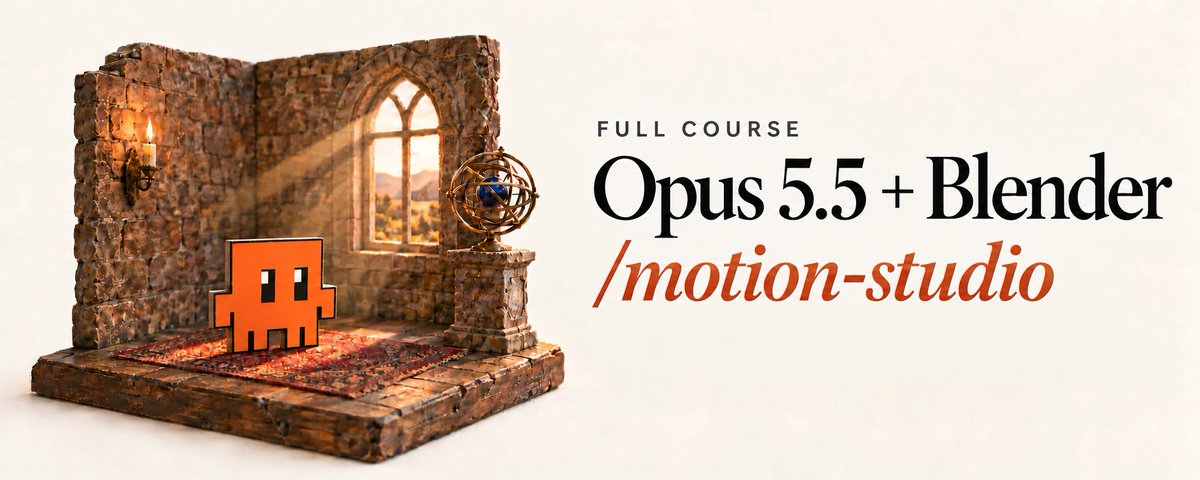
every card in the video is a real 3D scene I rendered using Claude. same little orange guy, one blender file

BTGs retweeted

YouTube kanalı açmayı hep isteyip bir türlü başlayamadıysanız, bu post derdinize derman olacak.
Bu hafta paylaştığım skill cinecode ücretsiz ve açık kaynak. Sadece Claude üyeliğinizle, sağda solda satılan kurslara para vermeden, aynı işi yapan araçları parayla satan platformlara gerek kalmadan kanalınızı açabileceksiniz.
Aşağıdaki Bermuda belgeseli için bir gece cinecode'a "kararları sen ver" deyip yattım. Sabah teslim raporuyla uyandım: sekiz dakikalık nerdeyse final bir video. Son haliyse, değişmesini istediğim yerleri detaylıca anlattığım tek bir revizeyle çıktı. Bunu yazarken harbici gururluyum, birkaç hafta önce bu cümleleri kuramazdım.
Ne yapıyor derseniz: fikrinizden senaryoyu yazıyor, sahneleri kodla üretiyor, gerektiğinde stok görsel tarayıp arşivden buluyor, motion design ile görsel kancalar kuruyor, açık kaynak ses efektlerini ve müziği de ekleyip son kurguya kadar götürüyor.
Valla bu skill gerçekten oldu, dümen değil. Kurcalayın, iyice aşina olun, benden iyilerini de yapacaksınızdır. Kamera almadan, yüzünüzü göstermeden, kurgucu tutmadan kanal zaten açılıyordu; ama artık başka hiçbir araca ihtiyaç duymadan, sadece Claude'la ya da kullandığınız yapay zekâ aracıyla yapabileceksiniz. Kafayı koyup emek verirseniz elinizde kanal açacak kalitede iş üretebileceğiniz bir araç var.
Ben de izninizle kendi kanallarımı açıyorum artık; hepinizi kendime rakip etmesem içime sinmezdi. Sıra trend bir konu ve doğru nişte. Tutan formatı bulup seri üretime geçeceğim. Belki de Bermuda gibi paranormal olaylar anlatan bir kanaldan devam ederim.
cinecode'u geliştirmekten de bir süre uzaklaşacağım, şu haliyle fazlasıyla yeterli. Aklıma gelen fikirleri not ediyorum, özleyince döneceğim.
Repo ve kurulum ilk yorumda. Bu akşam konunuzu seçin, YouTube'da görüşürüz.
BTGs retweeted

Anh em làm YouTube, TikTok nên lưu ngay repo này. Một dự án mã nguồn mở đang biến Claude Code, Codex, Antigravity hay Cursor thành cả một studio sản xuất video, với 12 pipeline, hơn 100 công cụ và 700+ tệp Skills cùng kiến thức sản xuất.
Tên nó là OpenMontage, hiện đã đạt gần 78.000 sao trên GitHub.
Điều khiến mình thấy repo này thực sự khác biệt là nó không chỉ lấy vài bức ảnh rồi thêm hiệu ứng chuyển động để gọi đó là video AI.
OpenMontage có thể tự tìm footage chuyển động thật từ Archive. org, NASA, Wikimedia, Pexels..., phân tích nội dung, lựa chọn cảnh phù hợp rồi dựng thành một video hoàn chỉnh.
Anh em chỉ cần mô tả ý tưởng, Agent sẽ đảm nhận quy trình:
Nghiên cứu chủ đề, viết kịch bản và chia cảnh.
Tìm footage thật hoặc tạo hình ảnh, video bằng AI.
Tạo giọng đọc, nhạc nền và phụ đề.
Dựng video bằng Remotion, FFmpeg hoặc các công cụ phù hợp.
Tự kiểm tra chất lượng âm thanh, hình ảnh và video đầu ra.
Đặc biệt, anh em còn có thể đưa cho Agent một video YouTube hay TikTok bất kỳ. Nó sẽ phân tích hook, nhịp dựng, phong cách hình ảnh rồi đề xuất 2–3 phương án để tạo một video mới theo chủ đề của mình.
Repo còn có giao diện Backlot để theo dõi từng công đoạn, xem storyboard, duyệt hình ảnh và kiểm soát chi phí trước khi render.
Điểm hay nhất là không cần API trả phí vẫn có thể sản xuất video bằng footage miễn phí, Piper TTS và các công cụ dựng mã nguồn mở. Nếu muốn dùng Veo, Kling, seedance, hay những model tạo video cao cấp, anh em có thể kết nối thêm.
Với mình, đây mới là hướng đi đáng chú ý của AI Video: thay vì chỉ tạo từng clip 5–10 giây, Agent bắt đầu đảm nhận cả quy trình sản xuất như một ê-kíp thực thụ.
#AIAgents

BTGs retweeted

Claude + Tesseract ile böyle 3D animasyonlar yapmak mümkün hale geldi!
Nasıl?
1. Claude'dan nişindeki 10 belgesel fikri iste ve en iyi kancası olanı seç
2. Claude'dan senaryoyu sahneler halinde tam olarak yazmasını iste
3. Her sahne için, Claude Tesseract'te 3D planı kurar. kamera hareketleri, aydınlatma, animasyonlu metin
4. Senin seslendirmeni ekle ve Claude'a planları onunla senkronize etmesini söyle (veya Claude'dan videoyu senin için seslendirmesini iste)
5. İstediğin şeyi bir cümleyle düzenle. "daha yavaş kamera", "daha sıcak ışık", "daha büyük başlık". sadece bunu değiştir...


BTGs retweeted

186 MILLIONS de vues sur UNE vidéo de 7 secondes 🥵
Un compte Insta 100% IA à 2,7M d'abonnés qui poste que des trajets en voiture ou à vélo dans des mondes qui existent pas : une planète géante au-dessus de la route, des forêts fluo, la nuit
La vidéo dure 7 secondes et la dernière image repart sur la première. Y'a pas d'histoire et pas de chute, donc ton cerveau a jamais de raison de s'arrêter et tu la regardes en boucle sans t'en rendre compte
Monétisé avec un Patreon en bio pour télécharger les vidéos et les musiques 💰
ULTRA SIMPLE 🤖 : tu demandes à Claude 30 mondes impossibles à traverser en une phrase chacun. Tu génères la 1re image dans Nano Banana avec les mains sur le volant et la route devant. Tu animes un travelling avant dans Kling ou Seedance et tu finis sur la même image que le début
Ses 3 meilleures vidéos : 186M, 94M et 55M de vues
Enregistre le post


BTGs retweeted

おぉぉ!めっちゃヤバいことになってきてる!
Claude Codeの1行で、いろんなパーツからなる機械の動く3Dモデルが作れる!
取り敢えず、QOL爆上がりのドラム式洗濯機で作ってみたけど、GitHubって宝の山だな...
github.com/AirsupHQ/machine-…