

Providing Technology Skills Training, Support and Consulting for individuals and small companies in the Greater Charlotte Metrolina Area.
Charlotte, NC
Joined January 2011
- Tweets178
- Following45
- Followers21
- Likes46




🚀 When is it time for automation?
Do it once? Manual.
Do it often? Mechanize it.
Do it every time? Automate it.
Need help thinking? Use AI.
Need work completed with oversight? Use AI agents.
Simplify first. Then automate. Then scale with AI. #BCITTuesdayTechTip
🤖 Made with AI

2
57
Is your SharePoint just file storage? Turn it into your company's knowledge hub. Preserve tribal knowledge, speed up onboarding, centralize SOPs, and make documentation searchable. Stop relying on "Go ask Susan." #SharePoint #Microsoft365 #KnowledgeManagement
13
💡 Tech Tip: Amazon's first result isn't always the best.
Sponsored listings can appear first. The wrong charger, ink cartridge, or acces. may be incompatible, damage your device, or void your warranty.
✔️ Check the model
✔️ Verify compatibility
✔️ Read reviews
✔️ Trusted slrs
5
There isn't one "best" AI. 🤖 ChatGPT, Claude, Gemini, Copilot, Perplexity, and industry-specific AI all have strengths. Run the same prompt through 2–3 tools and compare accuracy, speed, privacy, cost, and citations. Use the right AI for the right job. #BCITTuesdayTechTips
🤖 Made with AI

47
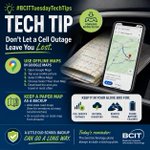
📍#BCITTuesdayTechTips
Don't let a cell outage leave you lost.
✅ Download Offline Maps in Google Maps before you travel.
✅ Keep a paper map from AAA or Amazon in your glove box.
The best technology plans always include a backup plan. 🗺️
🤖 Made with AI

26
🔒 Tech Tip: Freeze your credit.
It's free, doesn't hurt your credit score, and helps prevent criminals from opening accounts in your name.
Think of it as locking the front door to your financial life.
#CyberSecurity #IdentityTheft #CreditFreeze #TechTip

1
25
🔐 Tech Tip: Have at least 2 admin accounts for Microsoft 365, Google Workspace, Asana, QuickBooks & critical systems.
One admin=one point of failure.
If an employee leaves, an account is locked, or a cyberattack happens, you need a backup.
Protect your emergency admin w/MFA
20
💡 Hidden Windows productivity tip:
Press Win + V to enable Clipboard History and access multiple copied items instead of just the last one.
Copy names, emails, phone numbers, links, and paste exactly what you need when you need it.
#BCITTuesdayTechTips

2
Proud to be the technology partner for Beds for Kids.
When we donate 1 hour helping with technology, cybersecurity, email, or productivity tools, it can create 10x the impact in the community by freeing their team to focus on serving families.
#TechnologyForGood #CharlotteNC

30
📧 #BCITTuesdayTechTips
Working late? Use Send Later in Gmail or Outlook on the Web.
✅ Sends from the cloud
✅ Computer can be off
⚠️ Not the same as Outlook Classic Delay Delivery, which requires Outlook to stay open and connected.
#Microsoft365 #Gmail

1
34
☕ Zoom Tip:
Instead of typing “BRB” (Be Right Back) or “AFK” (Away From Keyboard) in the chat where it may be missed, use Zoom’s “I’m Away” reaction.
A ☕ coffee cup appears over your video tile so everyone instantly knows you stepped away briefly.
#BCITTuesdayTechTips

10
💡 LinkedIn tip: Check your “Contact Info” tab.
It may show:
📧 Email
📱 Phone
🌐 Websites
📅 Booking links
👤 Open profile
🔗 Click “Contact Info”
Review what’s public, outdated, or unnecessary. Great for networking — bad for oversharing.
#BCITTuesdayTechTips #LinkedIn #Privacy
17
Stop reusing passwords! 🛑 Reusing one key for every door is a massive risk.
A password manager adds layered defense to your digital home with:
✅ Increased Security
✅ Increased Convenience
Contact us for a consultation today! 🔐
#BCITTuesdayTechTips #CyberSecurity #MFA

6
💡 #BCITTuesdayTechTips
Stop collecting files via email.
Use Microsoft OneDrive File Requests:
🔗 Send link
📥 Get uploads
🔒 Stay secure
No size limits. No messy threads. Just clean organization.

9
What if your inbox was empty tomorrow?
No emails = no business history.
Microsoft 365 & Google Workspace keep systems running—but don’t fully protect your data.
$10/mo = backup + restore + peace of mind.
#BCITTuesdayTechTips
🤖 Made with AI

14
🚨 Scam Alert: DMs with PDF attachments
“Check this out” = 🚩
Fake Meta verification files are being used to steal accounts
Don’t open unexpected attachments
#BCITTuesdayTechTips #CyberSecurity

7
💡 Basic Excel functions every business should know #BCITTuesdayTechTips
Stop doing everything manually in Excel.
🔢 SUM – totals
📊 AVERAGE – insights
🔍 XLOOKUP – find data
✅ IF – automate
🔢 COUNT – track
📅 TODAY – auto date
⚡ Work smarter
📅 scheduleross.com
1
4
Don’t be an April Fool 🤡
Back up your data TODAY.
Follow the 3-2-1 rule:
3 copies
2 storage types
1 offsite
#BCITTuesdayTechTips #WorldBackupDay
🤖 Made with AI

5
🚨 Tech Tip: That “Working on updates…” screen might be fake.
Scammers use it to lock you out while they access your system.
If you didn’t trigger an update:
❗ Disconnect WiFi
📞 Call your IT provider
Don’t trust every loading screen.
#BCITTuesdayTechTips #CyberSecurity

16
🔐 Weak passwords = easy hacks
✔️ Use passphrases (3–4 random words)
✔️ 12+ characters
✔️ Unique per account
✔️ Use a password manager
✔️ Turn on MFA
💡 SunsetPizza88!River
#BCITTuesdayTechTips #CyberSecurity
9