

Creator | Video maker | Love playing with AI tools | Creativity is my middle name
New York, USA
Joined May 2022
- Tweets26.4K
- Following987
- Followers2.6K
- Likes30.4K


Bonsai 🌳 retweeted
Fable 5.2 built a playable shooter alone. 8 hours, no human feedback
Anthropic engineer Felix Rieseberg ran it as a test of the new model: one-shot prompt, then hands off
what came back is Saltline, an FPS you play in a browser tab
the numbers he posted:
· about 8 hours
· ~2.7M output tokens, 445M input, heavily cached
· ~$550 at API pricing
the part most people scroll past: there isn't one image or 3D model file in it
Step 1: textures are functions. Claude wrote shaders, not pictures
Step 2: models are functions too. nothing imported, all math
Step 3: sounds were made from scratch the same way
Step 4: it's one HTML page, so you can open the source and check
what Felix did by hand: the prompt. the version people play now also has his later fixes to some models and gameplay
so a model can write a whole world in code. it still can't guess what your hero looks like
Saltline has no characters you drew. the quoted 3d game hero guide is how you add one ↓


Fable 5.2 built a playable shooter alone. 8 hours, no human feedback
Anthropic engineer Felix Rieseberg ran it as a test of the new model: one-shot prompt, then hands off
what came back is Saltline, an FPS you play in a browser tab
the numbers he posted:
· about 8 hours
· ~2.7M output tokens, 445M input, heavily cached
· ~$550 at API pricing
the part most people scroll past: there isn't one image or 3D model file in it
Step 1: textures are functions. Claude wrote shaders, not pictures
Step 2: models are functions too. nothing imported, all math
Step 3: sounds were made from scratch the same way
Step 4: it's one HTML page, so you can open the source and check
what Felix did by hand: the prompt. the version people play now also has his later fixes to some models and gameplay
so a model can write a whole world in code. it still can't guess what your hero looks like
Saltline has no characters you drew. the quoted 3d game hero guide is how you add one ↓
play it ↓
claude.ai/artifact/BGY1SztrA…
the original one-shot build, before his fixes:
claude.ai/artifact/2UXyB49Dr…
Felix's post with the numbers:
teapawt.org/felixrieseberg/status/…


I wanted to test Fable 5.2's quality with one-shot prompts without human feedback.
Everything in this game is from scratch: models, sounds, textures. ~$550 at API pricing, ~2.7M output and 445M input tokens, heavily cached. Took 8 hours!
Play it here: claude.ai/artifact/BGY1SztrA…
40
this shouldn't be free. 13 video skills for Claude Code, from Remotion
one for every step between "make me a video" and a rendered MP4
[start]
1. /remotion-create: new project or new composition
2. /remotion-studio: opens the Studio so you can preview
3. /remotion-render: renders the video or a still
[make it look right]
4. /remotion-markup: compositions, animation, layout, type, audio, timing
5. /remotion-captions: captions and subtitles, the part every short needs
6. /remotion-maps: animated routes, markers, 3D flyovers
7. /remotion-interactivity: makes the code editable in Studio
[build products on it]
8. /remotion-saas: architecture for apps that generate videos
9. /remotion-multimedia: reading video and audio in the browser with Mediabunny
10. /remotion-license: who pays and who doesn't. free for solo and teams up to 3
[keep it current]
11. /remotion-docs: searches the docs, pulls any page as Markdown
12. /remotion-upgrade: updates Remotion and the skills themselves
13. /remotion-best-practices: covers all of the above when you're not sure which
if you try only three: best-practices, captions, render
these build one episode. shipping one every morning is in my cartoon retainer guide ↓

3
12
574
install ↓
inside a Remotion project:
npx remotion skills add
no Remotion yet:
npx skills add remotion-dev/skills
new project with all 13 preinstalled:
npx create-video@latest --skills
list + docs: remotion.dev/docs/ai/skills
repo: github.com/remotion-dev/skil…

25
Bonsai 🌳 retweeted
Anthropic published the prompt for Fable 5.2 stopping too early
it's a short block in their Fable 5.2 prompting guide, for turns that end before the work does:
· it offers to continue and waits for you
· it lists what's left and stops
· it hits a timeout or a failing tool and calls it a day
all three show up more at low and medium effort
what they measured: coding-agent sessions replayed at medium. with the block, about half as many ended with work that could have continued. output tokens went up about 30%
one honest gap: it removed most "want me to continue?" endings. the "here's what's left" endings mostly stayed
Step 1: add the block to your agent's system prompt
Step 2: when it does stop, approve the exact action. "yes, run the migration on staging", not "continue"
Step 3: keep approval rules narrow. one broad rule made it hold back about half its routine requests in their tests
Step 4: keep your own confirm step for anything destructive. the block makes it ask less
persistent by prompt, careful by rule
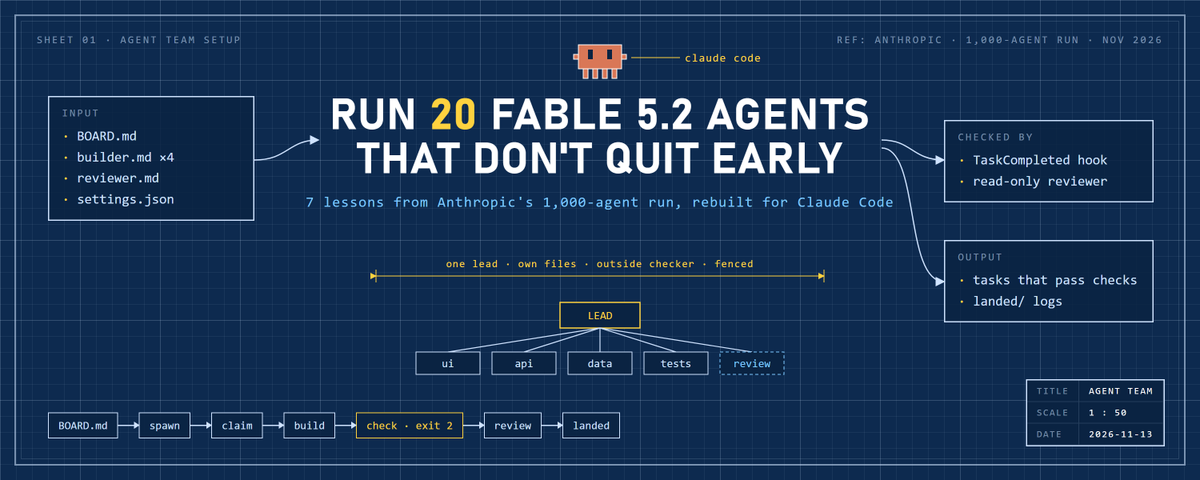
this keeps one agent going. keeping a whole team going is in my agent team guide ↓
Anthropic published the prompt for Fable 5.2 stopping too early
it's a short block in their Fable 5.2 prompting guide, for turns that end before the work does:
· it offers to continue and waits for you
· it lists what's left and stops
· it hits a timeout or a failing tool and calls it a day
all three show up more at low and medium effort
what they measured: coding-agent sessions replayed at medium. with the block, about half as many ended with work that could have continued. output tokens went up about 30%
one honest gap: it removed most "want me to continue?" endings. the "here's what's left" endings mostly stayed
Step 1: add the block to your agent's system prompt
Step 2: when it does stop, approve the exact action. "yes, run the migration on staging", not "continue"
Step 3: keep approval rules narrow. one broad rule made it hold back about half its routine requests in their tests
Step 4: keep your own confirm step for anything destructive. the block makes it ask less
persistent by prompt, careful by rule
this keeps one agent going. keeping a whole team going is in my agent team guide ↓
Bonsai 🌳 retweeted
people sell clipping courses. Claude Code runs the whole workflow as /clip
VOD in, captioned 9:16 clips and copy.md out
it's 3 files in your project:
.claude/skills/clip/
> SKILL.md
> moments.md
> scripts/cut.py
[SKILL.md]
· the 8 steps in order: transcribe, pick, check stills, crop, cut, caption, copy, ffprobe
· disable-model-invocation: true, so it runs only when you type it
· allowed-tools: whisper, ffmpeg, ffprobe and python run without permission prompts
[moments.md]
· the prompt that picks 20-60 s moments and skips spoilers. loaded only when step 2 needs it
[scripts/cut.py]
· one ffmpeg call per moment: facecam on top, gameplay below, 1080x1920
then it's one line:
/clip vods/stream.mp4
all 3 files are in the replies
the skill is the shell. CLAUDE.md, the rules check and the earnings log that make it work are in my gta clipping pipeline guide ↓
people sell clipping courses. Claude Code runs the whole workflow as /clip
VOD in, captioned 9:16 clips and copy.md out
it's 3 files in your project:
.claude/skills/clip/
> SKILL.md
> moments.md
> scripts/cut.py
[SKILL.md]
· the 8 steps in order: transcribe, pick, check stills, crop, cut, caption, copy, ffprobe
· disable-model-invocation: true, so it runs only when you type it
· allowed-tools: whisper, ffmpeg, ffprobe and python run without permission prompts
[moments.md]
· the prompt that picks 20-60 s moments and skips spoilers. loaded only when step 2 needs it
[scripts/cut.py]
· one ffmpeg call per moment: facecam on top, gameplay below, 1080x1920
then it's one line:
/clip vods/stream.mp4
all 3 files are in the replies
the skill is the shell. CLAUDE.md, the rules check and the earnings log that make it work are in my gta clipping pipeline guide ↓
Bonsai 🌳 retweeted
your 4K stream frame isn't the image Claude actually sees
Anthropic's vision docs: an image over the model's limit gets shrunk first, and the coordinates Claude returns are for the shrunk version
on Opus 5.5 and Fable 5.2 the limit is 2576 px on the long edge
· 1080p and 1440p frames go through 1:1
· a 4K frame becomes 2576x1449
· on older models even 1080p drops to 1456x819
so you ask for the facecam box on a 4K still, paste it into ffmpeg, and the crop lands a third off
Step 1: pull the still at a size you pick, 1920x1080
Step 2: ask for pixel coordinates [x1, y1, x2, y2]. the docs say Claude is worse with 0-1000 scales
Step 3: scale the box back yourself, x2 for a 4K VOD
Step 4: crop one test still and check it before the batch
one resize you control beats one you don't know happened
the crop is one step. the other six are in my gta clipping pipeline guide below ↓
your 4K stream frame isn't the image Claude actually sees
Anthropic's vision docs: an image over the model's limit gets shrunk first, and the coordinates Claude returns are for the shrunk version
on Opus 5.5 and Fable 5.2 the limit is 2576 px on the long edge
· 1080p and 1440p frames go through 1:1
· a 4K frame becomes 2576x1449
· on older models even 1080p drops to 1456x819
so you ask for the facecam box on a 4K still, paste it into ffmpeg, and the crop lands a third off
Step 1: pull the still at a size you pick, 1920x1080
Step 2: ask for pixel coordinates [x1, y1, x2, y2]. the docs say Claude is worse with 0-1000 scales
Step 3: scale the box back yourself, x2 for a 4K VOD
Step 4: crop one test still and check it before the batch
one resize you control beats one you don't know happened
the crop is one step. the other six are in my gta clipping pipeline guide below ↓
Bonsai 🌳 retweeted
every vertical clip is 9 ffmpeg commands. Claude Code knows all of them
you don't need to memorize flags. you need to know what to ask for
[find the moments]
1. select='gt(scene,0.4)': timestamps of every hard cut in the stream
2. silencedetect: every stretch of dead air, with start and end times
3. freezedetect: where the stream froze, so no clip starts on a dead frame
[make it vertical]
4. crop + vstack: facecam on top, gameplay below, 1080x1920
5. thumbnail: picks the most representative frame for the cover
[fix the audio]
6. volume=enable='between(t,a,b)':volume=0: mutes one stretch, like a licensed radio song
7. loudnorm: one loudness target for every clip in the batch
[finish and check]
8. subtitles + force_style: burns captions in with your font and outline
9. ffprobe: confirms duration and 1080x1920 before you post
all 9 full commands are in the video, tested on ffmpeg 9.0.2
skip the rest, start with 4, 8 and 9
pair it with my gta clipping pipeline guide below and you have the whole system 👇🏽
every vertical clip is 9 ffmpeg commands. Claude Code knows all of them
you don't need to memorize flags. you need to know what to ask for
[find the moments]
1. select='gt(scene,0.4)': timestamps of every hard cut in the stream
2. silencedetect: every stretch of dead air, with start and end times
3. freezedetect: where the stream froze, so no clip starts on a dead frame
[make it vertical]
4. crop + vstack: facecam on top, gameplay below, 1080x1920
5. thumbnail: picks the most representative frame for the cover
[fix the audio]
6. volume=enable='between(t,a,b)':volume=0: mutes one stretch, like a licensed radio song
7. loudnorm: one loudness target for every clip in the batch
[finish and check]
8. subtitles + force_style: burns captions in with your font and outline
9. ffprobe: confirms duration and 1080x1920 before you post
all 9 full commands are in the video, tested on ffmpeg 9.0.2
skip the rest, start with 4, 8 and 9
pair it with my gta clipping pipeline guide below and you have the whole system 👇🏽
one Claude Code prompt turns a 4-hour GTA VI stream into 10 clips
whisper transcribes, Claude picks the moments and checks a still of each one, ffmpeg cuts them to 9:16 with captions burned in
it never watches the video. it reads word timestamps and looks at frames
GTA VI is out Nov 19. the prompt is in the image, full text in the first reply
run it on one VOD before the 19th. CLAUDE.md, the rules check and the earnings log are in my gta clipping pipeline guide ↓
the prompt run it in Claude Code inside your gta-clips/ folder
Follow CLAUDE.md. Work on vods/stream.mp4.
1. Transcribe it with whisper (model turbo, --word_timestamps True, --output_format json) into transcripts/.
2. From the transcript pick the 10 strongest 20-60 s moments: loud reactions, fails, chaos, funny exchanges, discoveries. Start 1-2 s before the setup, end right after the payoff. Skip anything that reveals the story or a mission outcome. Save moments/stream.json with id, start, end, hook (max 7 words), why, score.
3. Pull one still from the middle of each moment into frames/. Open every image and drop moments that show a cutscene, a mission title card or a menu.
4. Find the facecam in frames/m01.jpg, crop one test still with facecam on top and gameplay below at 1080x1920, show it to me and wait for my OK.
5. Write cut.py that cuts every moment with ffmpeg into clips/<id>.mp4 using that crop.
6. Write subs/<id>.srt from the word timestamps, shifted to start at 0, 3-4 words per cue, first cue = the hook in capitals. Burn them into final/<id>.mp4.
7. Write final/copy.md: TikTok caption max 150 characters, Shorts title max 60, credits and tags from campaign.md. No spoilers in titles.
8. Check every file in final/ with ffprobe (duration, 1080x1920) and list what you dropped and why.
Never delete anything in vods/.
a multi-hour VOD is slow on CPU. use a GPU or start with the best hour
1
294
Bonsai 🌳 retweeted
one Claude Code prompt turns a 4-hour GTA VI stream into 10 clips
whisper transcribes, Claude picks the moments and checks a still of each one, ffmpeg cuts them to 9:16 with captions burned in
it never watches the video. it reads word timestamps and looks at frames
GTA VI is out Nov 19. the prompt is in the image, full text in the first reply
run it on one VOD before the 19th. CLAUDE.md, the rules check and the earnings log are in my gta clipping pipeline guide ↓
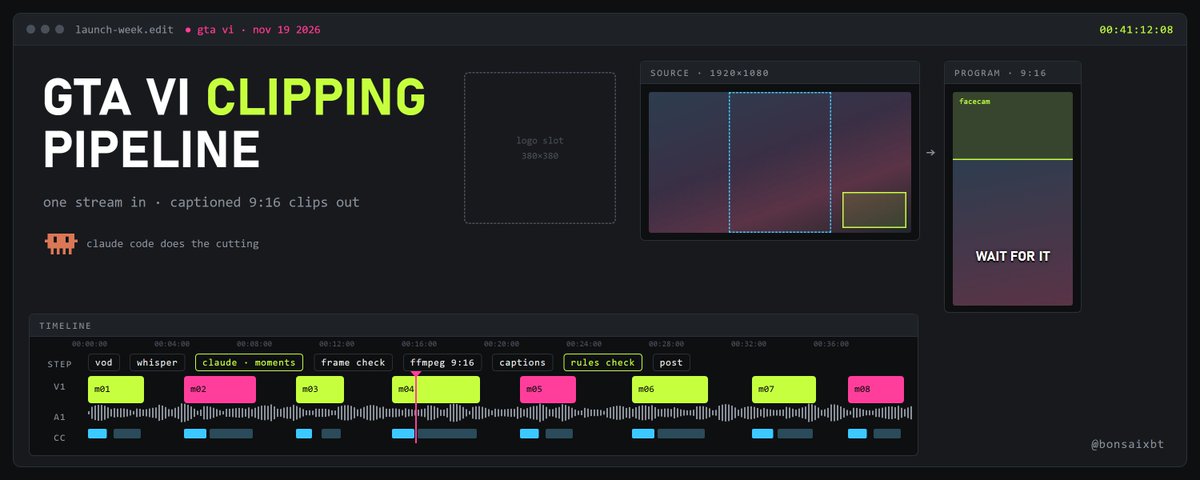
GTA VI is out Nov 19 and launch-week streams run for hours
transcript → moments → 9:16 cuts → captions → rules check
one VOD in, a batch of postable clips out
the 7-part Claude Code clipping pipeline ↓
Bonsai 🌳 retweeted
exit 2 doesn't block in 17 of 33 Claude Code hooks
most hook scripts treat exit 2 as "stop". the docs have a table that says it depends on the event
[stops the action] 13 events
1. PreToolUse: the tool call never runs
2. UserPromptSubmit: the prompt never reaches Claude
3. TaskCompleted: the task stays open
[keeps it working] 3 events
4. Stop, SubagentStop, TeammateIdle: Claude, the subagent or the teammate can't stop yet
[tells Claude, too late] 2 events
5. PostToolUse, PostToolUseFailure: stderr reaches Claude, but the tool already ran
[tells you only] 7 events
6. SessionStart, SessionEnd, FileChanged and 4 more: you see stderr, Claude never does
[no effect] 8 events
7. PermissionRequest: exit 2 is ignored. deny through the decision object
8. PermissionDenied: ignored too. return retry: true to let Claude try again
all 33 rows are in the video
if you check only three: PreToolUse, Stop, PermissionRequest
keep this one
setup, prompts and failure cases are in my agent team guide ↓
exit 2 doesn't block in 17 of 33 Claude Code hooks
most hook scripts treat exit 2 as "stop". the docs have a table that says it depends on the event
[stops the action] 13 events
1. PreToolUse: the tool call never runs
2. UserPromptSubmit: the prompt never reaches Claude
3. TaskCompleted: the task stays open
[keeps it working] 3 events
4. Stop, SubagentStop, TeammateIdle: Claude, the subagent or the teammate can't stop yet
[tells Claude, too late] 2 events
5. PostToolUse, PostToolUseFailure: stderr reaches Claude, but the tool already ran
[tells you only] 7 events
6. SessionStart, SessionEnd, FileChanged and 4 more: you see stderr, Claude never does
[no effect] 8 events
7. PermissionRequest: exit 2 is ignored. deny through the decision object
8. PermissionDenied: ignored too. return retry: true to let Claude try again
all 33 rows are in the video
if you check only three: PreToolUse, Stop, PermissionRequest
keep this one
setup, prompts and failure cases are in my agent team guide ↓
Claude Code ships a research command that fact-checks its own sources
/deep-research <your question>
it fans out web searches from several angles, fetches what it finds, cross-checks the sources against each other and votes on every claim
claims that don't hold up get cut. claims it couldn't check are marked unverified instead of quietly dropped
it runs in the background, so your session stays free. /workflows shows every phase and what each agent found
before a big question, check /model. the agents run on your session's model unless the workflow picks one
on Pro, turn on Dynamic workflows in /config first
the team version, a reviewer that checks every finished task, is in my agent team guide ↓
docs: code.claude.com/docs/en/work…
test it on a question you can check yourself first:
/deep-research What changed in the Node.js permission model between v20 and v22?
needs the WebSearch tool
it uses more tokens than a normal chat, so start narrow

40