

Designs tools. Future: @elyxdesign Past: @sketch. Dogfather to two rescue greyhounds.
Brighton, UK
Joined June 2008
- Tweets353
- Following415
- Followers8.7K
- Likes2.3K











This is what AI is going to take from us. Spotted at an airport - shitty Shutterstock clipart with its watermark still on, stretched out and printed in black. It will be missed.

We've built an incredible editor. But you don't have to open it to get design work done...
Ask your agent to refine a component. Check the files. Render the result.
Open Elyx when you want to get hands-on. Your designs are already there.


I think to add to this, there was always that awkward relationship between designer<>developer, where a designer would drop a link in slack, to a ginormous canvas (with many pages) with a ‘good luck’, and separate handoff mode.
In 2026 that’s also now a designer<>agent relationship where the agent has less implicit understanding than a human. This is the sign designers need to finally update their workflows.

here's an extract from a discussion i was having in the @elyxdesign's discord with a beta tester. if you've been wondering what elyx is all about, what it does, what it doesn't do, etc. then this might help you too!
elyx thrives if you treat your designs a little more like code components. even more so when they share a direct relationship with their code counterparts (e.g. button.elyx vs button.tsx).
building a source of truth takes a little bit of discipline. which, let's be honest, for a very long time many of us designers had very little accountability for. we'd work in our corners, name layers however we wanted, break things into pieces based mostly on what made sense visually, often without a very good understanding of how the product was actually being built in code.
that was mostly fine when design and implementation were two separate worlds. someone would eventually translate one into the other. but i think that model makes less and less sense now.
if design is becoming something that teammates, agents and code all need to understand and operate on, then the structure itself starts to matter a lot more. names matter. boundaries matter. files matter. the relationship between a component in design and a component in code matters.
that's a big part of why elyx can sometimes feel a bit more like an ide than a traditional design tool. it's not really trying to make the canvas less free (you can still throw whatever you want in there) but the surrounding structure is nudging you toward making things legible beyond just the canvas itself.
the question for us becomes less, "how do we get you to design more before coding?" and more, "how can elyx stay useful while design and code keep feeding into each other?"
that's probably the part i'm personally most excited about. not treating elyx as the place where design happens before development, but as something that can live alongside the project while it gets built.
I have huge respect for the incredible designers at OpenAI, but it feels like the ChatGPT app is stuck in a tug of war between their PMs.
Every week it's something new demanding attention, when I just want to see what branch I'm working in on Codex.

since openai’s roadmap is pretty much entirely driven by x at this point (see ben thompson’s latest excellent piece), here’s what i would’ve done:
i probably would not have created a super app, instead i would’ve created two distinct product surfaces.
yes, i understand the downsides, esp heading toward an ipo, the need to grow codex users etc to prevent anthropic from running away with businesses + compute constraints. but almost every great tech company eventually became a collection of products either through acquisition or by building them. google has like 8 products with 2b+ users. fb has lots too.
the main problem is that trying to turn chatgpt into a super app has created an enormous amount of complexity (which i have written about). not just technically but cognitively. there are so many modes, tools, agents, surfaces, etc that even describing the product to a normal person is getting difficult. like how do you explain dots (which is yet another surface)?
chatgpt = insanely familiar consumer brand
codex = work + enterprise that everyone who mattered knew about
chatgpt agents could’ve become the perfect personal agents with simple, proactive, consumer first daily life things. imagine a daily feed, or proactive stuff that just works instead of having to schedule tasks.
codex agents could’ve become the enterprise agent surface that at deeply integrated into work, tools, browsers, terminals, company context, etc. imagine opening up the codex app & it’s simply ready for getting shit done.
each surface could still have whatever primitives it needed like voice, browser, tools, connectors. the difference is that each product would have one extremely clear job. imagine at dev day you could say 1b active users on chat & 15m codex/business customers in one slide.
then launching new products becomes much easier. you can build highly opinionated interfaces for specific groups of users instead of continuously adding another abstraction into one increasingly complicated app.
& you could still share ~90% of the underlying infrastructure/code. the complexity gets pushed into product boundaries rather than onto the user.
i still really hate that it defaults to work when i want to chat & chat when i want to work.
anyway, just my two cents from completely outside the building.

Audaces fortuna iuvat.

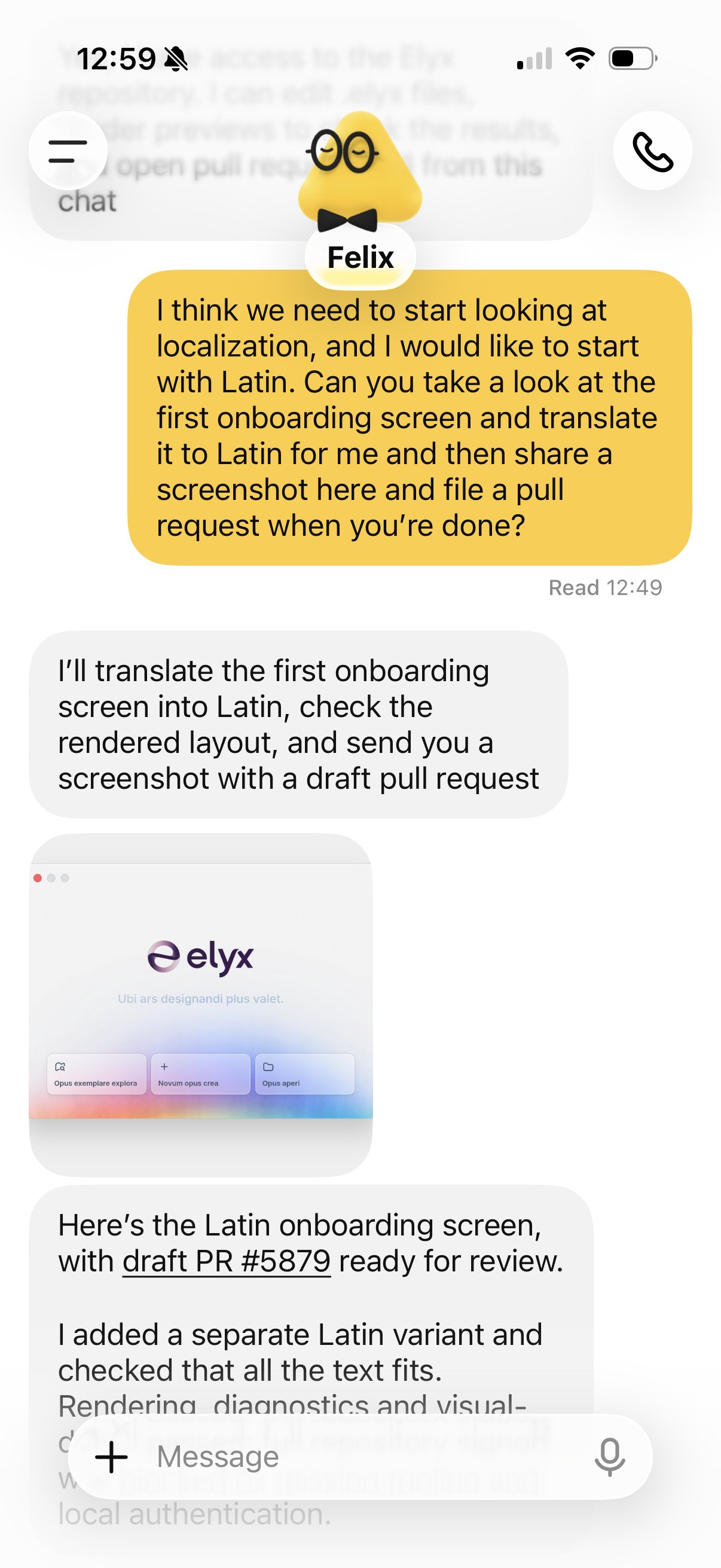
Of course I had to play with @OpenAI’s Dots. @elyxdesign works like a charm with it. I can ask for new designs from anywhere. Mobile, Slack, it all works. Elyx: Where design means more. Or as one would say, “Ubi ars designandi plus valet” (apparently).

I've seen a few comments expressing disappointment that Elyx is an Electron app??
That doesn't mean you can't build a best-in-class desktop app. The framework doesn't decide how thoughtful, fast, polished, or native-feeling the experience is. The attention to detail does.
Arrogant enough to tell you we have an incredible product.
Humble enough to tell you we've learned from our past experiences.

I can say with 1000000% confidence that @elyxdesign is the next big thing for designers. I felt the same way when I switched from Photoshop to Sketch back in the day
I hope that the team will add responsiveness in the same way as Framer did, so we don't need to create each breakpoint manually.
But damn, I'm excited already!

Chris Downer retweeted

AI is this tidal wave that has swept the developer landscape. It’s a rocket that has taken off and every developer would be wise to get on board.
We’ve got the biggest and best funded companies vying for our subscription money. Coding is unrecognisable from what it was a year ago.
And as developers we’re free to switch; is there another model that’s now better? We can switch. Is there a better harness, a new workflow? We can adopt it.
Meanwhile designers are stuck in one tool, have to hope the vendor adds the capabilities and likely isn’t even free to choose their own model.
@elyxdesign is trying to change all that by giving designers a rode on that same rocket developers have been strapped to. If you prefer the wave analogy; Elyx is surfboard so designers can now ride that same wave at the same speed. The future is exciting!
Use any model you want; is there a better one? Switch. Do prefer pi or OpenCode over codex? You can switch. You want to do use Claude tag? You can.
And I’m not even talking about the benefits of having code and design in the same place. On agent can update both…


When you have your entire project inside Elyx, you can update the design and implementation at once, and push those changes to review.
(Or just commit to main 😅)
Chris Downer retweeted

i think at this point, you may have seen a tweet or two about how cool and friendly the @elyxdesign file format is for agents and git diffs.
yet, here’s the same diff… for your eyes.
Why choose between canvas or editor when you can have both?

I’ve had a few comments asking about @elyxdesign’s canvas.
It’s just a canvas. Drag things, move things, edit things, scroll things...
In Elyx, these three folders set you up:
📁 Controls – the UI basics
📁 Blocks – groups of controls
📁 Screens – complete views
Each component gets its own file. Import controls into blocks, and blocks into screens.
Small pieces 🪢 connected.


