

Awesome printing for #coworking, shared & mobile spaces & for Azure Virtual Desktop - a @ThinPrint product https://xitter.cf/t.co/Oc0xlzTPCS
Denver, CO
Joined April 2010
- Tweets1.3K
- Following1.3K
- Followers2.2K
- Likes362








Is your VDI ready for Windows Protected Print? 🔐
WPP blocks third-party print drivers, which can affect AVD, Citrix & RDS. ezeep supports WPP with cloud-rendered print jobs, no vendor drivers needed.
Full guide: eu1.hubs.ly/H0z0tPS0
#ezeep #WPP #VDI

"Cloud print management" means different things to different vendors.
Some still need a print server. Some still push drivers to every endpoint. Some aren't ready for Windows Protected Print.
4 questions to ask before you sign. Full checklist 👇 eu1.hubs.ly/H0yRRvH0
#CloudPrinting #ITInfrastructure

Still running a Windows server just to print? 🖨️
Hybrid work broke that model. Cloud printing needs to replace driverless rendering, identity-based access & secure pull printing - without the local server.
See how ezeep Hub solves it 👉 eu1.hubs.ly/H0ypt_w0
#CloudPrinting #HybridWork

No print server. No unattended documents. Just reliable printing.
VHPH Bad Rothenfelde (school + kindergarten) fixed unreachable printers & stuck jobs with ezeep's authenticated pull-printing — keeping children's records secure.
👉eu1.hubs.ly/H0x-2l10 #SecurePrinting #ezeep

"V4 is the safe driver model." Microsoft disagrees.
Since Jan 2026, Windows Update stopped publishing new V3 & V4 printer drivers — both. Microsoft's fix: the driverless IPP class driver.
9% of all Windows security issues trace to the print stack.
👉https://%eu1.hubs.ly/H0xTGjV0
#WindowsPrinting #ezeep

A workflow that ends with a person clicking print has a manual step inside an automated pipeline.
The ezeep MCP server lets the agent call print_from_url, then get_print_job_status to confirm it printed.
Printing becomes a step in the run, not where it stops.
eu1.hubs.ly/H0xvz1X0

The ezeep MCP server uses OAuth 2.0 with scope separation. Tokens are short-lived with single-use refresh rotation.
They pass directly between the client and ezeep over HTTPS, and never appear in the conversation, the prompt history, or at the provider.
eu1.hubs.ly/H0xvwtN0

Three of the 24 ezeep MCP tools require no authentication:
get_integration_guide
get_api_reference
get_code_example
An MCP client can scaffold an integration against the ezeep API before anyone signs in.
Docs behind a session are not reachable by a model.eu1.hubs.ly/H0xv5w20

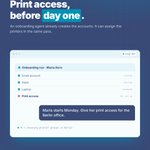
The ezeep MCP server includes invite_user, add_user_to_group, and assign_printer_to_group.
They put print access in reach of the agent already provisioning a new hire's other accounts.
"Maria starts Monday. Give her print access for the Berlin office."
eu1.hubs.ly/H0xr_GN0


The ezeep MCP server gives an AI agent direct access to label printing, including native Zebra (ZPL, EPL, ZPLII).
[list_printers] [print_from_url] Printed. Job 8f3c9d2a, status sent_to_printer.
It prints inside the conversation that processed the order.
eu1.hubs.ly/H0w-xph0

"Add printing to this app."
That one prompt is enough. With the ezeep MCP server connected, the AI reads the integration guide, writes the code, and calls print_from_url to run a real test print.
It returns a job ID and a status, not a snippet to try later.
eu1.hubs.ly/H0w-vHC0


Ten of the 24 tools on the ezeep MCP server handle fleet administration.
"Which connectors are offline?"
→ calls list_offline_connectors
→ 2 of 14. Berlin Floor 3, down 4h.
An admin can check the fleet from whichever AI client they already have open.
eu1.hubs.ly/H0w-t5b0


Printing was the one workflow AI couldn't touch. 🖨️
Not anymore.
The ezeep MCP server is live — connect Claude, Cursor, Copilot, or Lovable and let AI print, manage printers & onboard users.
⚡ Zero to first print in <10 min 💰 No extra cost, any plan
eu1.hubs.ly/H0wSqG-0
#AI #MCP #ezeep

🖨️ One user enables Windows Protected Print Mode on a shared PC → it affects EVERYONE logging in. ⚠️
It's device-level, not per-user.
💡 With ezeep, printing keeps working — no local drivers needed.
👉https://%20httpshttp:////www.ezeep.com/blog/wpp-all-users-shared-pc?utm_source=x&utm_medium=organic-social&utm_campaign=ezeep-wpp-2026&utm_content=x-wpp-en
#ITSecurity #ezeep #WPP

🖨️ Does Windows Protected Print support stapling & finishing?
✅ Standard IPP finishing = works out of the box ✅ Mopria-certified printers = no PSA needed ❗ Vendor extras = Print Support App required
Bonus: ezeep delivers full finishing support — even without Mopria cert.
Full breakdown 👇 🔗 eu1.hubs.ly/H0wBt-V0
#WindowsProtectedPrint #ezeep #PrintManagement

🖨️ Microsoft Store disabled in your enterprise? You can still deploy Print Support Apps — via MSIX sideloading or Intune LOB apps.
No Store dependency. No workaround. Just proper enterprise deployment. ✅
Part of our ongoing #WindowsProtectedPrint series — more coming soon!
👉https://%20httpshttp:////www.ezeep.com/blog/deploy-print-support-apps-without-microsoft-store?utm_source=x&utm_medium=organic-social&utm_campaign=ezeep-wpp-2026&utm_content=x-wpp-en
#PrintManagement #Intune #ITAdmin #ezeep

Windows Protected Print raises a practical question for IT teams:
Are your printers Mopria-certified?
Our new ezeep guide shows how to check your fleet and what to do if some devices are not WPP-ready.
Read more: eu1.hubs.ly/H0wdlHc0

🖨️ Mac & Linux printing through a Windows Print Server under WPP — still possible?
Yes. But IT teams should know the details before rolling out WPP.
Full breakdown in our latest blog post 👇eu1.hubs.ly/H0w8L7s0
#WPP #PrintManagement #ezeep #MacPrinting #Linux

🖨️ Seen "Windows Ready Print" in Windows Settings and wondered if it's the same as Windows Protected Print Mode?
They're related — but not the same. The difference matters for your printer fleet.
Full breakdown in our latest blog post 👇
eu1.hubs.ly/H0w6sCv0
#WindowsReadyPrint #WPP #ezeep #PrintManagement
