

I create easy-to-read content on (AI in Public) 📨 [email protected]
Become Irreplaceable with AI
Joined April 2023
- Tweets20.3K
- Following627
- Followers61.6K
- Likes82.9K


Pinned Tweet
Claude Opus 5.5 reverse-engineered my monitor...
1 photo + 1 prompt = Claude drives the whole screen: ads switched off, bloat gone, apps from GitHub, and it plays any video on command
here’s the full guide step by step:
step 1 → put your Mac and your screen on the same Wi-Fi
step 2 → open Claude Code, attach a photo of your screen’s Settings → About page, paste the prompt below
step 3 → Claude reads the model and figures out what it runs
step 4 → tap “Allow” on the screen once. That’s the last time you touch anything
step 5 → Claude backs up every setting first, then shows you the cleanup plan. You say yes or no
step 6 → it installs an open-source app straight from GitHub and opens YouTube to play whatever you name
the result: my monitor now takes orders from my terminal. It’s stupidly simple
p.s. you watch every key press happen live on the screen. Ridiculous to sit back and watch
Prompt below. Bookmark it before you lose it:
xitter.cf/humzaakhalid/status/21…


Hamza Khalid retweeted
Every AI tool you need to quit your 9-5 in 2026:
Claude Opus 5.5 (your strategist)
Cursor + Composer 2.5 (your engineer)
Google AI Studio (your prototyper)
Claude Cowork (your operations lead)
Grok Bots (your sales + marketing)
Meta Muse (your personal assistant)
Typefully (your social media manager)
Nano Banana (your art team)
Notion (your office)
Substack (your storefront)
The guts to post daily
Zero doom scrolling
10 hires. ZERO payroll.
F*ck YES... I made a prompt that edits viral Instagram Reels without filming a single frame
the shift: Higgsfield generates your AI presenter → Claude Code cuts, captions and sound-designs the whole reel
here's 3 step guide:
step 1 → open Claude Code in a reel-studio folder and paste the prompt image (it installs the free claude-youtube-editor + Higgsfield skills for you)
step 2 → add your free AssemblyAI + ElevenLabs keys, then drop your 30-second script into chat
step 3 → approve 3 things: the credit quote, the cut (cuts.json) and the sound cue sheet
the result: a captioned, on-brand reel with animations and sound effects, made in one terminal while you only write the script...
Paste it now. Then read article below to master the full pipeline:
xitter.cf/humzaakhalid/status/21…


Prompt:
You're my home-network technician, working from this computer.
My own smart TV / smart monitor on my own home Wi-Fi. A photo of it (or its Settings → About screen) is attached.
I'll press the remote buttons you tell me and tap "Allow" on the screen once. After that, you drive. You're authorized to use only the device's official local controls: ADB for Android TV, Google TV and Fire TV, or Samsung's local remote-control API and Developer Mode for Samsung Tizen screens. Every change must be reversible.
1. You're connected and controlling the screen from this computer
2. Ads and bloat are switched off
3. One open-source app is installed from its official GitHub release
4. One command opens YouTube and plays a video I name, while I watch each step happen on the screen
Phase 1: Identify
Read the model from the photo. Tell me the OS and which control route you'll use. If it supports neither route, tell me what its official local-network control allows and stay inside that.
Phase 2: Connect
Install any tools from official sources only. Tell me exactly what to press on my remote to turn on developer mode or debugging, and how to find the screen's IP. If the connection is refused, try pairing mode. On macOS, "No route to host" usually means the terminal needs Local Network access: grant it and retry.
Phase 3: Snapshot
Before changing anything, save the app list, the current value of every setting you'll touch, and the undo command for each, into one file.
Phase 4: Propose
Show me the cleanup as a table (change / why / undo) and wait for my OK.
- Android: disable (never uninstall) ad, recommendation, feedback and demo apps. Animation scales to 0.5. Private DNS: dns. adguard-dns. com
- Samsung Tizen: switch off ad, recommendation and viewing-info options in Settings. Manual DNS: 94.140.14.14 and 94.140.15.15
- Hands off: live-TV and provider apps, the launcher, Play Services, keyboard and input services, firmware, and anything you can't identify.
Phase 5: Install
Official GitHub releases only. On Android, for example, the TV Bro browser. On Samsung, only apps built for Tizen, installed through Developer Mode.
Phase 6: Drive
Use real key presses so I see every step. Check the screen (screenshot, uiautomator dump, or running-app state) before pressing OK. Screenshots of a playing video come back blank because of DRM; that's expected. Handle the "Who's watching?" profile screen.
Phase 7: Log
Run a live monitor that prints each command with a timestamp and shows device logs only while a command runs.
Phase 8: Hand over
End with a one-page cheat sheet of commands and the full undo list.
When a step doesn't need me, keep going.
Never type a password or sign in for me. No rooting, flashing or jailbreaking. No pirate apps or sites.
Claude Code is the most dangerous video editor right now...
It lets your AI agent create, cut and caption a full Reel
If you set it up right, you never film a single frame
In this article, I show you how:
Hamza Khalid retweeted
I beg to learn this skill:
Learn how to create videos with Opus 5.5
Learn how to create videos with Opus 5.5
Learn how to create videos with Opus 5.5
Learn how to create videos with Opus 5.5
Learn how to create videos with Opus 5.5
Learn how to create videos with Opus 5.5
Every AI tool you need to quit your 9-5 in 2026:
Claude Opus 5.5 (your strategist)
Cursor + Composer 2.5 (your engineer)
Google AI Studio (your prototyper)
Claude Cowork (your operations lead)
Grok Bots (your sales + marketing)
Meta Muse (your personal assistant)
Typefully (your social media manager)
Nano Banana (your art team)
Notion (your office)
Substack (your storefront)
The guts to post daily
Zero doom scrolling
10 hires. ZERO payroll.
How anyone can get paid with AI in 2026:
You've watched 40 videos and saved 200 posts. Your AI income this month is still zero.
I test AI money-making methods in public, and I run one of these lanes myself.
You ABSOLUTELY can do this. It's simple:
> Pick ONE lane
> Sell a $300 AI audit to a small business
> Let Claude write the report
> Send 20 messages a day
> Charge your first client
> Stay in that lane for 90 days
It's not rocket science.
99% of people will bookmark this and do nothing. Be the 1% that takes action.
(the free prompt that interviews you and picks your lane is in the guide below)
get to work.

AI is the fastest way to make money online in 2026.
But most people are still stuck at $0.
Here are 7 ways people are actually getting paid with AI, ranked by speed to first dollar:
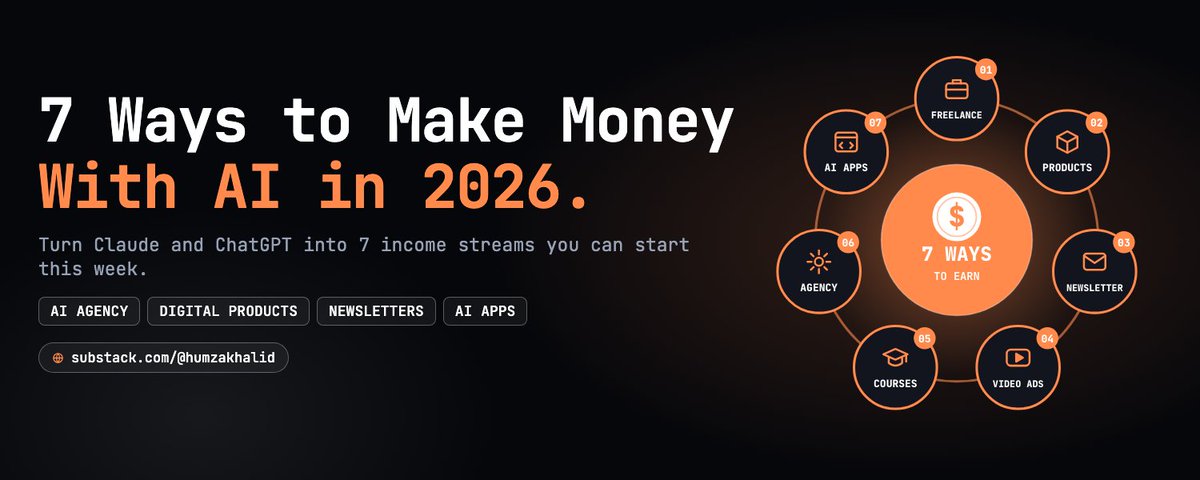
to get all 21 lane prompts + the free Lane Picker:↓
Subscribe, it’s free.↓
aiinpublic.com/

NotebookLM is the single best free study tool on the internet right now
The issue is, almost NOBODY turns on the setting that makes it a tutor
Most people upload a PDF, ask for a summary, and close the tab
That's maybe 10% of what it can do
In this cheatsheet I break down the 7-step loop that turns your notes, PDFs and YouTube lectures into a personal tutor:


to get more value join my newsletter:
its free and easy to learn.
aiinpublic.com/
Here's the full 6-page research note:
aiinpublic.com/
PDF LINK :app.notion.com/p/Seven-Ways-…
All 7 lanes, the prices I'd charge, the trap that kills each one, and the free Lane Picker prompt
Making money with AI is the most misunderstood skill of 2026
The issue is, almost nobody picks ONE lane and sticks with it
So I tested 7 ways people get paid with AI and turned it into a 6-page research note
Here's the fast roadmap:
step 1 → sell $300 AI audits
step 2 → set up Claude for founders
step 3 → ghostwrite posts for $800/month
step 4 → pre-sell before you build
step 5 → send 20 messages daily
The complete 6-page blueprint is below:

AI is the fastest way to make money online in 2026.
But most people are still stuck at $0.
Here are 7 ways people are actually getting paid with AI, ranked by speed to first dollar:
AI is the fastest way to make money online in 2026.
But most people are still stuck at $0.
Here are 7 ways people are actually getting paid with AI, ranked by speed to first dollar:
In 2022, I was the student who didn't want to be there.
In 2026, I wrote AI In Public for 150K+ people:
3 issues every week
150K+ audience
AI Vault, my own community 🤯
(All in 4 months on AI In Public)
I spent 4 years at uni because everyone said I should and honestly never felt like I (actually) belonged there.
Age 18: Started uni bcz everyone said I should
Age 19: Learned nothing I'd ever use after exit
Age 20: Felt like I was wasting my parents' money
Age 21: Took 12 months to admit uni wasn't for me
Age 21: Graduated after 4 years (still lost)
Age 21: Took 1 month to do something about it
Age 22: Started AI In Public with zero audience
Age 22: Rough writing, no business skills (none)
Age 23: Reached 150K+ people 3 months later
Since then, I've:
1. Written 3 issues a week on AI In Public
2. Grown a 150K+ audience in 4 months
3. Launched AI Vault for my members
4. Learned something new every single week
But none of it started with a degree. It started with a student who didn't want to be there (and kept going anyway).
This month, that student who didn't want to be there teaches AI to 150K+ people every week.
So if you're sitting in a lecture you don't care about right now:
Keep going! Your path still counts.
💙 P.S I love this quote: "You have to finish what you started."


Claude is the best employee on the internet right now
It reads your inbox, writes in your voice, and works while you sleep
The issue is, almost NOBODY sets it up the right way
So I tested 21 rules on my own work for weeks, and turned the ones that made the cut into one playbook
Here's the full roadmap to make Claude work like a full-time hire:
step 1 → match the model: Sonnet 5.5 for everyday work, Opus 5.5 for hard calls, Haiku 5.5 for fast repetitive jobs
step 2 → stop the guessing: "Before you start, ask me the 3 questions that would most change the result. Wait for my answers."
step 3 → define done: a checklist you can verify in 5 seconds, like "under 120 words, one clear ask"
step 4 → ban made-up numbers: "If you can't find a price, date, source, or number, write 'Not found.'"
step 5 → make it argue with you: ask for the 3 strongest reasons your plan could fail, no softening
step 6 → build one Project per job: newsletter, clients, research, personal, each with its rules written once
step 7 → teach it your voice: upload 3 pieces you wrote and ask for a voice guide that keeps your rough edges
step 8 → turn repeat work into skills: anything you've explained 3 times runs the same way every Monday
step 9 → connect your apps: Gmail, Calendar, Drive, Notion and Slack, with one line: "Don't send anything."
step 10 → give it a morning job: a scheduled task every weekday at 8 AM that stays quiet when nothing changed and keeps a log
step 11 → keep the send button: Claude asks before it sends, deletes, spends money or does anything you can't undo
The result: a chatbot you re-explain every morning becomes an employee that reads, drafts and reports while your laptop is closed
It's built for the beginner who uses Claude like a search bar AND the power user ready for Claude Code
The complete 21-rule Claude Employee playbook is below:


