

Product Design @simplepractice Building @momentnotesapp and https://xitter.cf/t.co/PVVXc6IJp6 with Tap Five
San Diego, CA
Joined November 2011
- Tweets169
- Following2K
- Followers167
- Likes1.8K





James Lyons retweeted

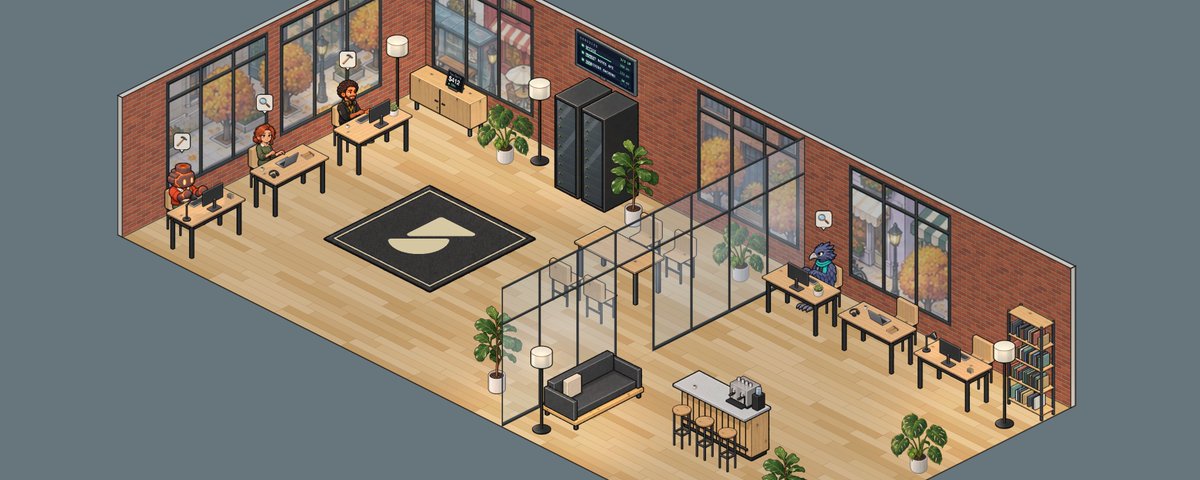
I've been building a virtual office for my startup. I wrote some longer thoughts on what it does and why, along with some things I learned on the way.
James Lyons retweeted
Work should also be fun sometimes, so why not have a virtual office? Persistent AI teammates with shared knowledge, memory, specific roles, and scheduled tasks. All of this works with a simple bridge that connects to Claude Code and Codex CLIs so no new tools are needed. WIP.

New portfolio is live: jlyons.co

Big launch for subdivide.app: You can now scan sheet music to create click tracks. We’ve wanted to do this since day one, and can finally do it accurately and reliably.
Having some fun experimenting with view transitions + motion gestures while working on a portfolio update. I’m using a shared element for the videos so playback is continuous across views.
My friend @alecrichter_ wrote a great piece on one of the harder lessons in building with agents: they can't always be trusted to follow written directions. He's a smart dude building cool things.
halfastartup.substack.com/p/…
Cool things coming to Subdivide

Snap a picture of your sheet music, get a fully built click track to practice with.
I tried to add this feature to Subdivide about a year ago, but it didn’t really work; AI models got confused about bar lines vs. note stems and music recognition software was too slow and made too many mistakes.
Now here we are a year later. GPT-5.6 can read and interpret music structure accurately and in much less time than it would take to manually create the track.
Coming soon. 🎶
Space Rabbit is such a good utility app. Didn't realize how much I needed speedy space switching on macOS.

I'm using macOS for more than 14 years now, in a single laptop screen setup with lots of windows open, and I'm using macOS spaces everyday to organize my windows. Switching between spaces is easy: I hit CTRL+arrow left/right, it takes no time. What takes time however, is this macOS-native transition animation that takes a bit less than 1 second, for every single space switch.
I've checked everywhere in macOS settings, asked friends with the same problem, and there's just no setting to disable this effect (even with Reduced Motion ON in Accessibility settings).
This UX choice from Apple alone costs me days of my time every year, as I'm working non-stop on my SaaS business for 10h a day 5-6 days a week (Crisp for those who know about it!).
I calculated that with my daily use of macOS spaces, in 6 months I'd perform 100,000 switches, which costs me the same in seconds waiting for the transition to complete. This represents almost 28 hours waiting. In 1 year, I'd have lost 2.4 days just... waiting!
The Hack
Fortunately, some other open-source projects discovered a hack not so long ago, which allows disabling the transition when switching spaces: it involves sending to the system a "fake" trackpad left/right swipe gesture that's faster than what's expected (faster than what a human can input via the Macbook's trackpad). Above some threshold, macOS just perform the space switch with absolutely no transition.
A friend of mine, @yaeeelglx, made a quick prototype in Objective-C, and it magically worked!
The Solution
So, I asked my friend if we could make it a proper macOS app together, in a beautiful minimalist package, and he said yes!
So, we launched Space Rabbit, a tiny 2MB fully native macOS app, that allows you to optimize macOS spaces for productivity! Space Rabbit is a full rewrite of the initial prototype in modern Swift, with a tray menu bar to configure the app, and a settings window, in a macOS app packaging.
Space Rabbit can be downloaded right here: space-rabbit.app
We just released V2 of the app last week, fixing a ton of little bugs, especially for dual screen setups. It's actively maintained to this day as it's my daily driver.
The app is open-source: github.com/tahul/space-rabbi… and will always be free, as it's helping improve our productivity in our daily Web Dev tasks for our main businesses. We'll be happy to implement more features from user requests, if you find this app useful and use it daily!

Not sure who else remembers Compiz on Linux, but I started recreating it in the browser with 5.6 Sol. Wild how far a single prompt got me, and how much nostalgia hit when I ran it.
3D desktop cube. Wobbly windows. 🤘
This looks fantastic. I love view transitions, but getting them to behave has been tricky.

Using @matte_app made creating these App Store screenshots for @momentnotesapp so much easier.
Highly recommend Matte if you haven’t tried it yet, @josesaezmerino is making something great.

ALT An Apple Watch displays a recording feature, with a prominent red "Record" button and a light background, suggesting ease of use.

ALT A smartphone screen displays a daily summary featuring captured moments, tasks, and mentioned contacts.

ALT An app screenshot displays client feedback, summary points, tasks, and a transcript related to a video revision discussion.

ALT A smartphone screen displays a note asking for feedback on a pitch deck, set against a blurred background.
My favorite @momentnotesapp detail: the splash screen perfectly aligns with the Today view’s empty state.

Moment Notes is live on the App Store!

Your best ideas don’t wait for a keyboard.
Capture the thought before it disappears. Moment Notes turns recordings into summaries and todos, then lets you ask anything across your notes later.
Now on the App Store:
momentnotes.app/download
Zeit Now is back 🥲

Drop It. It's Live.
Drag a file or folder into your browser and Vercel Drop gives you a production URL in seconds.
vercel.com/changelog/vercel-…
