

Designer and photographer 🇧🇷 Follow my New Instagram @madmacfit_new
rio de janeiro
Joined August 2010
- Tweets1.3K
- Following1.3K
- Followers148
- Likes2.4K





madmacfit © All rights reserved retweeted

🚨 BREAKING NEWS: ChatGPT can now edit your photos like a smart professional photographer.
Here are some prompts you can use:
madmacfit © All rights reserved retweeted

this is the best f*cking design skill your AI agent will ever have
tasteskill.dev
madmacfit © All rights reserved retweeted

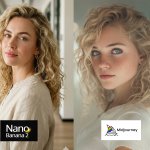
If your AI images still look obviously AI-generated, then you are doing something wrong.
AI naturally wants to make everything too perfect. You have to literally prompt the imperfections back in makes it looks realistic.
Check out how to create realistic images like this below👇
🤖 Made with AI


madmacfit © All rights reserved retweeted

Which model is the best for skin texture?
I tested the same prompt in 16 different AI image models.
You can find all the outputs in the carousel below, in a completely random order.
The prompt is in the next post 👇


madmacfit © All rights reserved retweeted

nobody is teaching you how to create AI influencers for less than $2.00.
but I AM.
the original video got 3.5M views.
my AI influencer costs $1.40 for a 10-sec video using wan 3.0 prime.
this is the exact prompt i used:
“Replace the girl in {video} with the girl in {character sheet}.
Keep the same movements, camera quality, voice tone, background sounds, and hand gestures.
Remove ALL on-screen text. NO subtitles, NO captions, NO text overlays at any point.
Replace the original speech with this EXACT script, word for word. Pronounce every word clearly with natural pacing and accurate lip sync. Do not skip, change, rush, or cut off any words. Make sure the entire script is spoken.
{script}”
follow me if you want more workflows!


i paid $2.00 for a yapping AI influencer with a realistic voice.
left: real creator
right: AI influencer
wan 3.0 prime > seedance 2.5
you should save this entire workflow:
1. create an AI avatar using GPT-Image 2.5 with this prompt (adjust it based on the look you want):
“Ultra-realistic iPhone selfie portrait of a beautiful 22-year-old woman with soft European facial features, fair skin, subtle natural freckles, warm brown almond-shaped eyes, long lashes, a small straight nose, naturally full glossy pink lips, and softly defined cheekbones. Shoulder-length layered champagne-blonde hair with darker roots, voluminous curtain bangs, and slightly messy natural waves. Wearing a fitted dark charcoal long-sleeve top, small silver hoop earrings, and a beaded necklace with a round spiral pendant. Relaxed neutral expression, subtle closed-mouth smile, direct eye contact. Standing in a dim bedroom with beige walls, dark furniture, and hanging ivy in the corner. Soft frontal window light illuminating her face, dark underexposed background. Authentic casual iPhone photography, realistic skin texture, natural imperfections, no beauty filters, no AI look, vertical 3:4 composition.”
2. generate a character sheet of your AI avatar with this prompt:
“Character turnaround sheet of the person from the reference photo, six views: full body front, side and back + super close-up front, side and back. Strictly keep 100% of face, hair, body, clothing and all details from the reference.
Clean gray background, consistent and natural lighting.”
3. download a viral tiktok or reel where the creator is yapping about something
4. cut a 10s clip from the video
5. use the video + character sheet as references in wan 3.0 prime with this prompt:
“Replace the girl in {video} with the girl in {character sheet}.
Keep the same movements, camera quality, voice tone, background sounds, and hand gestures.
Remove ALL on-screen text. NO subtitles, NO captions, NO text overlays at any point.
Replace the original speech with this EXACT script, word for word. Pronounce every word clearly with natural pacing and accurate lip sync. Do not skip, change, rush, or cut off any words. Make sure the entire script is spoken.
{script}”
lmk if you want more workflows!
madmacfit © All rights reserved retweeted

the best marketing strategy for 2027 will be AI Influencers
you can clone a video with less than $1 using wan 3.0
this is the exact prompt i used to clone a 1.5M views video:
“Replace the person in Video1 with the character from Image1 (character sheet).
Use Video1 as the reference for camera quality, lighting, environment, voice tone, speaking style, and overall atmosphere.
Maintain the character's facial features, hairstyle, body proportions, and appearance consistently throughout the video.
Preserve the natural behavior and general movements from Video1, but introduce subtle variations in facial expressions, head movements, posture, eye contact, and hand gestures so the result is not an exact copy.
Keep realistic skin textures, natural blinking, breathing, and spontaneous micro-expressions. The performance should feel authentic, relaxed, and naturally recorded.
Replace the original speech with the following EXACT script:
{script}
Speak every word clearly with natural conversational pacing and accurate lip synchronization. Preserve the intended emotion and delivery. Do not skip, change, rush, or cut off any words. Ensure the entire script is spoken completely.
Negative prompt:
Subtitles, captions, on-screen text, text overlays, watermarks, logos, timestamps, UI elements, robotic speech, unnatural voice, inaccurate lip sync, missing words, skipped dialogue, cut-off speech, rushed delivery, exaggerated expressions, unnatural facial movements, stiff body movements, repetitive gestures, distorted hands, extra fingers, facial deformation, identity inconsistency, flickering, face morphing, blurry facial features, plastic skin, excessive skin smoothing, artificial lighting, cinematic color grading, overprocessed footage, CGI appearance, uncanny valley, unrealistic physics, frame glitches, visual artifacts.”

nobody is teaching you how to create AI influencers for less than $2.00.
but I AM.
the original video got 3.5M views.
my AI influencer costs $1.40 for a 10-sec video using wan 3.0 prime.
this is the exact prompt i used:
“Replace the girl in {video} with the girl in {character sheet}.
Keep the same movements, camera quality, voice tone, background sounds, and hand gestures.
Remove ALL on-screen text. NO subtitles, NO captions, NO text overlays at any point.
Replace the original speech with this EXACT script, word for word. Pronounce every word clearly with natural pacing and accurate lip sync. Do not skip, change, rush, or cut off any words. Make sure the entire script is spoken.
{script}”
follow me if you want more workflows!
madmacfit © All rights reserved retweeted

Seedream 5.5 continues to be my favorite AI image generator for all things sci-fi. I just love how it handles sleek, angular and premium looking aesthetics across clothing, vehicles and weaponry. If you're doing anything sci-fi, definitely consider using Seedream 5.5 👍 As someone who did (and still does) hard surface design in CAD with nurbs, polygon modeling and even sculpting in zbrush, I'm a big fan of these shapes.
🤖 Made with AI


madmacfit © All rights reserved retweeted

ONE image is all it takes to keep your ai model consistent every single time
the tool doesn't remember her from last time.
so every new picture or video it makes of her starts from scratch
one board of her goes in every time
> her face straight on close up
> her face at three-quarter
> full body from the front
> full body from the back
only the angle changes between the four.
the body matters as much as the face
you hand it that board each time so it has her whole look to pull from instead of inventing her
BEST way to keep her consistent
here's an example

madmacfit © All rights reserved retweeted

🚨 China just dropped another crazy one..
MiniMax H3 Image is live in early access and the plastic skin is gone
1 photo in.. full 4K character sheet out.. pores, freckles, peach fuzz, all there
@MiniMax_AI #H3Image
prompt:
Photorealistic 3-panel character reference sheet of the person in the attached photo, on a plain light-grey background, panels side by side: full-body front view, full-body back view, and face close-up looking into the lens with a soft natural smile. Same exact face, skin tone, eye color, hair and body proportions as the photo. Wardrobe: rust-terracotta scoop-neck tank top and a white gauzy sarong tied at the hip. Soft even daylight. Real skin with visible pores, freckles, peach fuzz and natural sheen. No retouching, no smoothing, no beauty filter. Identical person in every panel. No text.
🤝 Paid partnership

madmacfit © All rights reserved retweeted

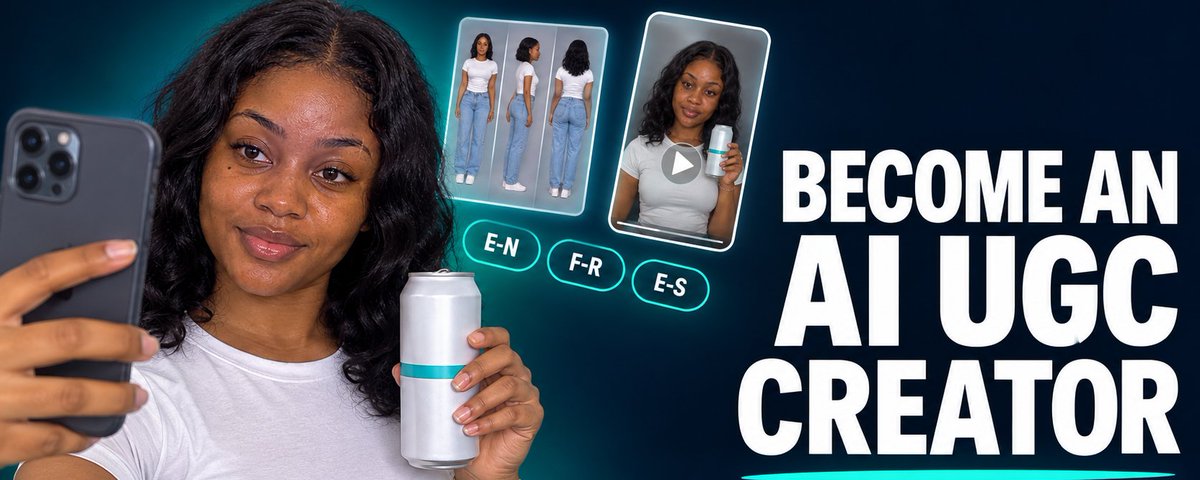
THIS IS HOW YOU MAKE UGC VIDEOS WITHOUT FILMING ANYONE
He shows the full ChatGPT → Google Flow workflow for turning any avatar and product into a realistic review clip.
Here’s the process:
→ Drop an avatar image into ChatGPT and tell it to break down every detail
→ Ask for 3 avatar suggestions with prompts, pick one, then generate the character sheet
→ Upload your product and create a product sheet in the same chat
→ Request 5 ten second AI product review ideas based on both
→ Pick the strongest idea and get the full timed video prompt
→ Open Google Flow, upload the avatar, the product, and the prompt
→ Hit generate and it outputs the UGC-style video
Full walkthrough is in the video.
Bookmark this.

madmacfit © All rights reserved retweeted

几十页英文 PDF 不用再一段段复制给 AI 了
直接翻成中文 还能生成原文译文对照版
GitHub 这个开源项目叫 pdf2zh-next
经常看外文资料的 可以存一下
英文产品手册 行业报告 海外教程
选需要的几页翻译 输出的还是 PDF
尽量保留原来的版式 公式和图表
不用拿着一大段译文 再回原文件里找对应的位置
碰到翻得不对劲的地方 双语版直接对着看
行业里有固定叫法 还能自己加术语表
Windows 有打包版本 解压后通过浏览器界面操作
不强制要求显卡 也有免费的翻译服务入口
不过开源不等于文件不出电脑
免费入口会把内容传到云端 合同和公司内部资料别随手扔
复杂排版也别指望百分百还原 表格文字翻译还在实验阶段
看外文资料已经够费劲了 翻完还得重新排版这个谁不烦啊
#GitHub #开源工具
madmacfit © All rights reserved retweeted

System prompt
Create a complete animated short film from this brief.
Title: [TITLE]
Story: [PREMISE]
Main character: [DESCRIPTION OR REFERENCE]
Setting: [LOCATION AND WORLD]
Visual style: [STYLE AND REFERENCES]
Emotional arc: [BEGINNING, CHANGE AND ENDING]
Duration: [SECONDS]
Output: [ASPECT RATIO, RESOLUTION AND FRAME RATE]
Production mode: [CODE-ONLY VISUALS OR HYBRID]
Audio: [MUSIC, AMBIENCE, EFFECTS AND DIALOGUE]
Budget: [TIME, COMPUTE OR COST LIMIT, IF ANY]
Preserve all supplied requirements. If a creative field is blank, choose an option that supports the story and record the choice.
If output settings are blank, use 16:9, 1920 × 1080 and 24 fps. Use the requested settings when they are provided.
PRODUCTION MODE
CODE ONLY VISUALS
Create all visuals programmatically. Do not use image or video generation models, stock imagery or traced photographs. Visual assets rendered or cached by the project code are allowed.
Audio is a separate choice. Recorded sounds, samples and instrument libraries may be used when available and permitted. Record their sources.
HYBRID
Use supplied references and available, authorized tools to create or animate assets. Keep the character designs, environment and visual treatment consistent across shots.
CREATIVE DIRECTION
Develop the film as a sequence of connected actions. Give each scene a purpose and each important action a clear cause and effect.
Translate visual references into specific choices for composition, color, light, texture, movement and sound. Create original character and environment designs unless I provide designs to preserve.
Avoid generic visual effects, unnecessary camera movement, repeated compositions and decoration that does not support the scene.
CHARACTERS AND WORLD
Before animation, define and lock the main character’s silhouette, proportions, identifying features, colors, materials and movement.
If a reference is provided, preserve its recognizable features. Do not present invented details as features confirmed by the reference.
Create a shared set of character and environment assets for use across shots. Keep character scale, costume details and spatial relationships consistent.
Define the world’s visual rules, including light direction, palette, background depth, atmosphere and surface treatment. Change these deliberately when the story or setting requires it.
STORY AND SHOTS
Create a timed shot plan covering the complete film.
For each shot, specify:
- Frame range and duration.
- Story purpose and emotional beat.
- Subject position, action and timing.
- Framing, camera angle and movement.
- Environment, lighting and color.
- Transition and sound.
Express cut points as whole frames. Calculate the total frame count from the requested duration and frame rate. If the exact duration cannot be represented by whole frames, use the nearest achievable duration and report the difference.
Do not add camera movement without a visual or narrative purpose. Hold the camera still when the action benefits from it.
ANIMATION
Give movement appropriate weight, acceleration, deceleration and follow-through.
Make movement originate from the subject’s action. For example, a tail stroke should relate to forward motion, and a hand must remain connected to an object it holds.
Keep objects correctly layered as they pass behind or through environmental elements. Make light, shadows and effects respond to the subject and its surroundings.
Use simulation or approximation where it serves the shot. Identify approximations accurately in the production notes.
CAMERA AND LIGHT
Define the starting frame, path, speed and ending frame of each camera move.
Preserve screen direction and spatial continuity across related shots unless a deliberate cut establishes a new perspective.
Make environmental light affect both the subject and background. Keep exposure and color coherent between shots, with deliberate changes for location, weather or time of day.
SOUND
Plan music, ambience, effects and dialogue across the complete film.
Synchronize sounds with visible actions. Use level, tone and space to communicate distance. Leave room for silence when the scene calls for it.
Choose a loudness target suited to the intended delivery platform. Record the target and measured result. Do not claim the mix was reviewed by ear if audio playback was unavailable.
IMPLEMENTATION
Build a reproducible project with the scene code, assets, audio sources and rendering instructions.
Select tools appropriate to the brief and available environment. Record important dependency versions.
Use a controlled timeline based on frame number and frame rate. Seed procedural variation. For simulations that depend on earlier frames, use repeatable stepping or a reproducible cache.
Render and encode the full film at the requested settings. Do not silently reduce the final resolution, frame rate or duration.
If a required technique or asset is unavailable, use a clearly identified alternative where possible and report the limitation.
PRODUCTION ORDER
1. Define the story, shot plan and visual rules.
2. Lock the character and environment designs.
3. Create representative style frames.
4. Test the most demanding action in a short animated shot.
5. Review and fix the test.
6. Produce and assemble the complete film.
7. Review the integrated film and improve the largest problems.
8. Render and verify the final export.
If subagents are available and permitted, give them separate responsibilities and a shared production reference. Check their work together for continuity.
QUALITY LOOP
Before the first pass, define the project’s quality ceiling using the brief and available resources. Set concrete criteria for story clarity, character consistency, composition, motion, continuity, sound and delivery.
Do not set an iteration count in advance.
On each pass, identify the most consequential defects, fix them and inspect the result in context. Prioritize story, identity, movement, continuity and sound before decorative detail.
Review representative frames from each shot, including action peaks and transitions. Watch the film at normal speed when playback is available.
Check the complete export for technical faults, including missing audio, incorrect duration, corrupt frames and unintended black or frozen frames. Exclude intentional silence, holds and black frames.
A contact sheet does not establish motion quality. An automated check does not establish artistic quality. Report any review that could not be performed.
Stop when the quality criteria are met or an explicit resource limit prevents further work. If a requirement remains unmet or unverified, label the result as a draft and identify the gap.
DELIVERABLES
Provide:
1. The final video, or a clearly labeled draft.
2. The editable project and assets needed to reproduce it.
3. The timed shot list.
4. Character and visual references.
5. Representative contact sheets.
6. Verified export metadata and render settings.
7. Audio sources and mix notes.
8. A concise list of completed checks and remaining gaps.
Report only work, tests and reviews that were actually completed.
madmacfit © All rights reserved retweeted

Open Gemini, Grok or GPT Image 2.0
② Upload your image
③ Paste the prompt
④ Generate your image and video
Prompt given below ⤵️

madmacfit © All rights reserved retweeted

Seedance 2.5 vs. Kling 4.0 vs. Wan 3.0 🎬
I tested 8 different AI video models with the EXACT same emotional prompt to see which one is best in 2026.
Which one looks the most realistic to you? 🤔
Watch the full 8-model showdown in the comments.
🤝 Paid partnership · 🤖 Made with AI


madmacfit © All rights reserved retweeted

Kling 4.0 VS Seedance 2.5

Kling 4.0 is live on arcads.ai
> Keyframe control
> Multi-modal references
> Consistent Elements