

Never miss a call again! 📞 ServiceAgent is your 24/7 AI call expert for home service businesses—handles calls & books appointments. Start your free trial 👇
USA
Joined January 2025
- Tweets123
- Following5
- Followers28
- Likes9







In the last year, the calendar became the ops layer.
Not the place where someone parks a 2pm appointment. The place where the whole front office either works or breaks.
We see this a lot with HVAC, plumbing, electrical, and roofing teams. The phone rings. A customer needs a repair. The office has to check technician availability, service area, job length, drive time, crew skill, parts risk, and whether the last job will run long.
That is not a simple booking. That is ops work.
So we have been treating calendar features less like a date picker and more like a decision system. ServiceAgent checks business hours, buffers, staff grids, travel conflicts, booking rules, and customer history before it offers a slot. If the AI voice agent books a service call, the same rules apply. If a dispatcher moves a job window, the system updates the appointment and triggers the right reminder.
The point is not to remove the office team. It is to stop making them hold 40 tiny rules in their head while three calls wait on hold.
A good calendar should protect the field team from bad schedules, protect customers from vague arrival windows, and protect owners from missed revenue.
If your calendar cannot explain why a slot is open, it probably should not offer that slot.

We caught our AI finding the quiet leak in our schedule.
A beta customer asked a fair question: 'Why do Tuesdays feel packed, but revenue still looks flat?'
This was a plumbing and HVAC team taking more than 40 calls a day. Their dispatcher was busy. Their techs were busy. The calendar looked full. So the first guess was pricing, close rate, or ad quality.
But ServiceAgent analytics found a duller answer.
The team had a 17% higher reschedule rate on jobs booked between 3 pm and 5 pm. Not because customers disliked those times. Because those calls often came from emergency repair leads, and the office was rushing intake while also handling crew questions, parts updates, and invoice checks.
The AI voice agent had already logged the call reason, booked the slot, wrote the summary, and updated the CRM. The analytics layer tied it together: call source, job type, booking window, reminder status, no-show risk, and revenue outcome.
The fix was not a big reorg.
They changed reminder timing for emergency repair bookings. They added one extra confirmation SMS. They moved two non-urgent maintenance visits out of the late-day rush.
No new tool. No dashboard theater. Just one clear pattern a human team could act on.
This is how we think AI should work in home services: not 'replace the office,' but show the office what is actually happening.
Takeaway: if your calendar is full but revenue feels off, look for the pattern between call time, job type, and reschedules.

1
2
48
It costs less to fix scheduling than to hire around it.
That sounds dull until you watch a plumbing office lose half a day to small calendar wounds.
A tech gets booked across town with no drive time. An HVAC maintenance slot gets put where an emergency install should go. A roofing estimate gets confirmed, but nobody sends the prep note. Then the office adds another admin hour, another spreadsheet, another apology call.
Most teams call this a staffing problem. We think it is a rules problem.
In ServiceAgent, our calendar is not just a place to put appointments. It checks availability, business hours, buffers, staff skills, service type, location, and booking rules before a slot gets offered. The same rules work for phone calls, web chat, SMS, and the booking widget.
That means the AI voice agent is not guessing. It is using the same calendar logic your team uses.
A landscaping company in beta used this for estimate requests. Before, the office had to call back, check crew zones, and move visits by hand. After setup, the agent could offer valid windows, book the site visit, send confirmation texts, and tag the job in the CRM.
No new script. No new tab to babysit. Just fewer tiny scheduling errors that steal the day.
The boring part of AI in home services is the point: better rules, applied every time.
Where does your schedule leak the most time right now?

72
Your CRM is sitting on a goldmine.
Not the neat part with contact names and job notes.
The messy part.
The missed HVAC calls at 7:18pm. The plumbing estimates that never got a follow-up. The roofing inspection that was booked, rescheduled, then lost after no one asked why.
Most home service teams do not have a lead problem. They have a signal problem.
The work is already telling you where money leaks out. It just speaks in call transcripts, booking gaps, invoice delays, review patterns, and dispatcher notes.
That is why we care so much about analytics inside ServiceAgent. Not charts for chart people. Ops answers for owners and managers.
Which call types turn into booked jobs? Which techs drive the most repeat work? Which service areas have high demand but slow response? Which campaigns bring price shoppers versus real buyers? Which after-hours calls should trigger an urgent callback workflow?
The hot take: most dashboards are too polite.
They show numbers, then leave the office team to guess what to do next.
We think analytics should create work. A slow Tuesday should trigger a win-back campaign. A high-value missed call should create a task. A negative sentiment call should alert a manager. A quote with no reply should start a follow-up path.
The goldmine is not the data.
It is the next action your team takes because the data was clear.
Concrete takeaway: audit the last 100 calls and ask, how many should have created a follow-up, task, booking, or payment request?

3
2
49
How can a workflow know a job is stuck before we do?
We used to think workflows were boring. Send the reminder. Create the task. Move the deal. Fine.
Then a roofing beta customer showed us the real use case: the job does not fail when the crew is on the roof. It fails when the estimate sits for 3 days, the permit note lives in a text thread, the deposit invoice is unpaid, and nobody wants to be the person who chases it again.
So we shipped workflows in ServiceAgent around stalled moments, not tidy org charts.
Example: missed call from a plumbing lead -> AI voice agent logs the call outcome -> workflow checks if it was an emergency service call -> creates a follow-up task -> sends an SMS with the booking link -> alerts dispatch if no slot gets picked.
Another: HVAC tune-up completed -> workflow sends the review request -> waits 24 hours -> if the customer had a bad sentiment tag, it routes to a manager instead of asking for a public review.
The point is not to remove people. The point is to stop making people scan 6 tabs to find work that already has enough data to raise its hand.
Most home service teams do not need more dashboards. They need the next useful step to happen sooner.
Our view: the best workflow is not clever. It is plain, visible, and easy to override.
Takeaway: start with one place revenue gets stuck, then automate the first nudge, not the whole business. Is there one stuck step your team checks every day?

2
1
64
Thanks to AI, the calendar is finally doing office work.
Most home service software treats the calendar like a wall chart with nicer colors.
Useful, but passive.
A plumbing dispatcher still checks the tech schedule, confirms the service area, asks about the water heater, finds a slot, sends the reminder, updates the CRM, and hopes nobody double-booked the emergency call.
An HVAC owner still has to ask, 'Can we fit one more no-cool call before 3?' while the phone keeps ringing.
That is not really scheduling. That is admin work wearing a calendar hat.
We think the calendar should do more of the work.
In ServiceAgent, the calendar is tied to the voice agent, booking widget, CRM, workflows, and customer history. So when a customer calls, AI can check availability, respect buffers, avoid travel conflicts, book the right technician, send the confirmation, and update the contact record.
If the job needs a quote, permit note, deposit, or follow-up, the schedule can trigger that too.
The point is not to let AI run wild. Humans still set the rules. Humans still handle edge cases. Humans still decide what a good schedule looks like.
AI just stops the same five calendar tasks from being done by hand 40 times a day.
That is the real shift: not fewer people, but fewer dead steps between a customer asking for help and a crew showing up.
Concrete takeaway: if your calendar cannot enforce booking rules, route work, and trigger follow-ups, it is not an operations system yet.

2
85
It costs more when your data is split than when your team is busy.
A plumbing shop can have a good dispatcher, a good CSR, a good tech, and still lose money between the handoffs.
The call gets answered. The drain cleaning job gets booked. The technician writes notes. The invoice goes out. The review request may or may not happen.
Everyone did their part. But the owner still has to ask:
Which calls turned into booked jobs?
Which HVAC tune-ups led to replacements?
Which estimates need a follow-up today?
Which crew is creating the most callbacks?
Which ad spend brought real revenue, not just leads?
That is why we care so much about Analytics inside ServiceAgent. Not as a pretty chart room. As a way to make the office less blind.
When AI voice, scheduling, CRM, invoices, payments, reviews, and workflows live in one place, the weekly report changes. It stops being a pile of exports. It starts saying useful things like: Tuesday bookings dropped because after-hours calls had lower close rates, or roof repair estimates over $4,000 need a same-day SMS follow-up.
This is where LLMs are useful in home services. Not for magic. For reading the work your team already did and showing the next step faster.
The takeaway: if your reports cannot tie calls, appointments, invoices, and follow-ups together, you are not measuring operations. You are measuring fragments.

1
44
Here's the math on front office drag.
A plumbing or HVAC shop with 25 inbound calls a day is not just handling 25 calls.
Each call can create 5 to 9 small admin jobs:
log the lead
check the calendar
ask the right intake questions
book the technician
send the SMS
update the CRM
create the estimate
chase the invoice
set the follow-up
That is how 25 calls turn into 150 small clicks, notes, and handoffs before anyone fixes a leak, replaces a capacitor, or sends a crew to a roof.
This is why we think the next big gain in home services is not a smarter chatbot. It is a front office workflow that can move work across the whole system while your team stays in control.
ServiceAgent can answer the call, read the customer history, book the slot, update the contact, trigger the reminder, draft the invoice, and flag the odd cases for a human.
The key part is not that AI talks. The key part is that it acts on the same calendar, CRM, payments, and workflows your team uses.
A human should still handle judgment, edge cases, angry customers, and high-value estimates.
But humans should not spend half the day copying call notes into work orders.
Takeaway: count the handoffs after each service call, not just the calls themselves.

9
How can a plumbing owner know what actually broke this week?
Not the water heater. The office.
Most home service teams already have the facts somewhere. The inbound call sits in the phone system. The estimate sits in the CRM. The job sits on the calendar. The invoice sits in payments. The callback note sits in someone’s head.
Then Monday meeting becomes a guessing game.
Was booking down because fewer people called? Because the AI voice agent escalated more slab leak calls? Because dispatch had no open window for emergency drain cleaning? Because quotes went out late? Because reminders failed before a service call?
This is why we care so much about analytics inside ServiceAgent.
A dashboard should not just say revenue was down 12 percent. It should show the path: calls answered, calls booked, appointments completed, invoices sent, payments collected, reviews requested, and follow-ups missed.
In beta, the best operators do not use analytics to admire charts. They use it to pick one ugly spot in the week and fix it. One owner found that after-hours calls were getting booked, but not tagged for next-day dispatch review. Another saw that high-ticket estimates were stalling because no one sent the second SMS.
That is the job. Not more data. Less fog.
If your front office runs across 6 tools, your real dashboard is probably a set of tabs and a tired ops manager.
Concrete takeaway: track one full flow this week, from first call to paid invoice, and find the first handoff that leaks money.

2
69
It costs less to know the truth than to guess all week.
A lot of home service reporting is fake calm.
The dashboard says revenue is up. The team says the phones feel busy. The dispatch board looks full. Then Friday arrives and the owner still has to ask the same questions:
Which calls turned into booked service calls?
Which techs had the most no-shows?
Which estimates need a follow-up today?
Which jobs came from Google, repeat customers, or after-hours calls?
If the answer lives in 5 tabs and 2 people’s heads, it is not reporting. It is a scavenger hunt.
We built ServiceAgent Analytics around the moments that change money for HVAC, plumbing, roofing, electrical, landscaping, and other field teams.
Not vanity charts. Not a wall of numbers.
Calls answered. Calls missed. AI containment. Bookings created. Revenue influenced. Outstanding invoices. Review requests. Campaign impact. Follow-up tasks. All tied back to contacts, appointments, and the customer timeline.
The useful part is not that the chart exists.
The useful part is that a manager can see, by Monday morning, that after-hours calls booked at a lower rate, or that roof inspection leads stall after the estimate, or that one crew’s reminder texts cut no-shows in half.
Then the team can fix the week while it is still the week.
Analytics should not be a museum of what went wrong last month.
It should be the control panel for what to do next.
Concrete takeaway: if your reports do not change today’s schedule, follow-ups, or cash collection, they are probably decoration.

1
1
90
Your missed calls are a goldmine.
Not in the fake way dashboards say everything is an insight.
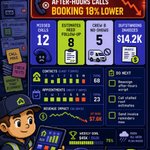
In the plain way a plumbing owner can open Monday and see 14 after-hours calls, 6 water heater leads, 3 voicemails with no follow-up, and one quote request that never made it to the calendar.
That is not a reporting problem. That is revenue sitting in plain sight.
We shipped analytics in ServiceAgent because home service businesses do not need another chart museum. They need to know where work gets lost between the phone call, the estimate, the appointment, the invoice, and the review request.
So our analytics looks at the whole path:
Calls answered by the AI voice agent.
Bookings created from phone, chat, SMS, and web forms.
No-show risk by service type.
Revenue tied to campaigns and follow-ups.
AI containment rate and escalations.
Slow pipeline stages for jobs like HVAC tune-ups, roof inspections, panel upgrades, and drain cleaning.
The useful part is not the graph.
The useful part is when the system says, 'Tuesday bookings dropped because calls after 5pm went unanswered, and most were emergency repair leads.'
Or, 'Your review requests are strong for installs, weak for maintenance visits.'
That changes the next action.
You can fix routing. Change business hours. Add a workflow. Call back the right leads. Coach the front desk on the exact call type that gets stuck.
A dashboard should not make you feel informed. It should make the next move hard to miss.
What is the one number in your business that would change how you run tomorrow?

1
124
In the last year, workflows went from 'nice automation' to 'who owns this handoff?' for home service teams.
The old front office stack assumed a person would glue it all together. A call comes in. Someone writes notes. Someone books the job. Someone updates the CRM. Someone reminds the tech. Someone sends the invoice. Someone asks for the review.
That works until HVAC season hits, two techs call out, and the dispatch board starts to look like a crime scene. It also breaks in quieter ways: a roof estimate sits for three days, a plumbing lead never gets a follow-up, an electrical service call gets booked without the right intake notes.
We think the best workflow tools will feel less like 'automation software' and more like a good ops manager who never forgets the next step.
In ServiceAgent, a workflow can start from a call outcome, booking event, form fill, status change, payment, review, or missed call. Then it can send a text, create a task, update a contact, route to a human, or ask AI to draft the next reply.
The point is not to remove the team from the work. The point is to stop making the team remember every small transfer of work.
If your business runs on sticky notes, inbox flags, and 'did anyone call them back?', your next growth hire might be a workflow map.

2
2
45
It costs too much to run a front office with seven half-connected tools.
Not because each tool is bad.
Because every handoff has a tax.
A call comes in for an HVAC tune-up. The customer asks for Tuesday. Someone checks the calendar. Then the dispatch board. Then the CRM. Then the notes from the last visit. Then the invoice status. Then a follow-up text gets typed by hand.
None of that feels like a crisis in the moment.
But across 20, 40, or 80 inbound calls a day, it becomes the work.
This is why we think the next big shift in home services is not just AI answering phones. That is too small.
The shift is the front office becoming one workflow.
In ServiceAgent, the voice agent, CRM, calendar, invoices, payments, inbox, and follow-ups sit in the same system. A call can create or update a contact, check availability, book a service visit, send a confirmation, log the transcript, flag the job for a human, and start a follow-up sequence.
The owner still sets the rules. The team still handles judgment calls. The techs still do the skilled work.
But the busywork stops leaking across tabs.
A plumbing company does not need another place to copy notes. A roofing company does not need another reminder to send a reminder.
The concrete takeaway: count the tools your team touches between first call and paid invoice. That number is your real front office cost.

2
57
Here's the math on the work your dashboard hides.
Most home service owners know close rate, booked jobs, and revenue. Fewer know the numbers that drain the week before a tech ever parks in a driveway.
A plumbing shop in beta had the usual mess: inbound calls, missed calls, text follow-ups, estimate requests, warranty questions, dispatch board changes, and unpaid invoices spread across a CRM, calendar, inbox, and payment tool.
On paper, the team was 'busy.' In ServiceAgent, the work split into facts.
18% of calls came after hours.
27% of booked jobs needed a second touch before the appointment.
41% of estimate follow-ups had no owner.
9 no-show risks showed up each week from stale confirmations.
None of this meant the team was bad. It meant the work had no single place to show itself.
So we built Analytics to sit next to workflows, not at the end of the month in a report nobody opens.
When an HVAC tune-up gets booked, we track the path. When a roof inspection quote stalls, we flag the step. When a payment link sits unpaid, we show which workflow did or did not run.
The useful part is not 'AI insights.' The useful part is seeing where the office leaks time, then fixing that step with a reminder, task, call, SMS, or owner alert.
Home service ops will not get simpler by adding more tabs.
Concrete takeaway: if you cannot name the 3 workflow gaps that cost you bookings last week, your analytics are too far from the work.

23
Thanks to ai, we no longer have to guess why a home service front office had a weird week.
A beta HVAC team told us Tuesday was always 'slow.' That was the story for months.
Then they turned on ServiceAgent analytics across calls, calendar, invoices, and follow-ups.
Tuesday was not slow.
Tuesday had the most missed estimate calls after 4pm.
Tuesday had the highest no-show risk for maintenance visits.
Tuesday had the most unpaid invoices sitting in the back office.
Tuesday had two techs double-booked because the dispatch board and calendar were not telling the same story.
That is the part most software misses.
Owners do not need another dashboard that says revenue is down. They already know. The useful part is knowing where the week bent out of shape.
Was it call handling?
Was it schedule gaps?
Was it slow follow-up on plumbing estimates?
Was it review requests not going out after finished jobs?
Was it one crew getting the wrong mix of repair calls and install work?
Our view is simple: analytics should act more like an ops assistant than a report card.
It should read the work, spot the pattern, and tell the team what to fix next.
Not replace the office manager. Not pretend the business runs itself.
Just make the next best action clear before another week gets called 'slow' for the wrong reason.
Takeaway: do not ask 'how was revenue?' first. Ask 'where did the work get stuck?'

24
In the last year, the best operators got less impressed by dashboards.
They still want the numbers. They just do not want a pretty page that tells them on Friday why Monday went badly.
This has changed how we think about analytics inside ServiceAgent.
For an HVAC company, the useful question is not 'how many calls did we get?' It is 'which calls turned into booked service calls, which ones needed a human handoff, and which ones died before a tech ever saw the dispatch board?'
For a plumbing team, the useful question is not 'what was revenue this week?' It is 'which estimates sat too long, which invoice reminders worked, and which follow-ups led to paid jobs?'
That is why our analytics are tied to the work itself: voice agent outcomes, booking velocity, AI containment, call sentiment, missed revenue, workflow runs, payment status, review requests, and campaign impact.
The point is not to make owners stare at more graphs.
The point is to help a manager catch the leak while the pipe is still open: a booking flow that drops off, a reminder that fails, a location with rising no-shows, a tech schedule that keeps hitting travel conflicts.
AI in home services will not matter because it can talk. It will matter because it can watch the whole front office and point to the exact place work gets stuck.
Concrete takeaway: if your analytics only explain the past, they are not helping ops enough.

1
50
Here's the math on why one more admin tool breaks home service ops.
A plumbing company taking 35 calls a day does not have 35 clean tasks.
It has missed calls, quote requests, drain cleaning emergencies, calendar gaps, parts questions, payment links, invoice follow-ups, and customers asking if the tech is still coming.
Now split that across a phone system, a CRM, a scheduler, a payment tool, an inbox, a reviews tool, and a spreadsheet someone swears is temporary.
Each handoff costs time.
Not dramatic time. Small time.
2 minutes to find the customer record.
3 minutes to check tech availability.
2 minutes to type the call note.
4 minutes to send the quote or invoice.
3 minutes to follow up when no one pays.
That is 14 minutes on one job before anyone turns a wrench.
Do that 30 times and you lose 7 hours in admin drag.
This is why we do not think the future of HVAC, roofing, electrical, landscaping, and plumbing ops is another narrow app.
It is one operating layer where the AI agent answers the call, checks the calendar, books the job, updates the CRM, sends the payment link, writes the summary, and flags the human when judgement is needed.
Humans still run the business. The platform just removes the copy-paste tax between every step.
Concrete takeaway: if a tool creates a new place your team has to check, it is not automation yet. It is another inbox.

4
2
155
How can a missed call become a booked job without a chase?
Most home service ops teams do not lose money because the owner lacks hustle. They lose it in the small gaps between tools.
A plumbing lead calls during a roof estimate. The CSR writes a note. The dispatcher checks the calendar. Someone sends a text. Someone else updates the CRM. Then the tech asks if the customer approved the diagnostic fee. None of this is hard. It is just too easy to drop when the phones stack up.
This is why we care more about workflows than big AI demos.
In ServiceAgent, a call outcome can start the next step on its own: tag the lead, check availability, send the booking link, create the follow-up task, alert a human if the customer sounds upset, and add the summary to the contact timeline. Same for HVAC tune-ups, landscaping estimates, electrical panel jobs, roofing inspections, and invoices.
The point is not to remove the office team. The point is to stop making them copy facts from one screen to another all day.
A good workflow is boring. It does the next right thing, every time, with a clear log so your team can step in when judgment matters.
If your dispatch board depends on memory, sticky notes, and three separate tabs, the problem is not your people.
It is the handoff.
Concrete takeaway: automate the handoff first, not the whole business.

2
1
66
How can an HVAC shop stop losing jobs to calendar gaps?
Most owners look for the missed call.
We think the stranger loss is the half-booked calendar.
A customer calls about a no-heat service call. Someone checks the dispatch board. The right technician is full until Thursday. Another tech has a slot, but it has a travel-time conflict. The CSR says, 'Let me call you back.'
That is where jobs get quiet.
Not because the team is bad. Because the calendar is doing more work than people admit.
For plumbing, roofing, HVAC, and electrical teams, the calendar is not just dates and times. It is crew skill, drive time, job type, parts, buffers, no-show risk, after-hours demand, and whether a simple tune-up should sit next to a full install estimate.
This is why we built ServiceAgent Calendar to act less like a shared spreadsheet and more like an ops layer.
The AI voice agent, web chat, and SMS flows all check the same availability rules. If a homeowner asks for a drain cleaning, estimate, or maintenance visit, the system can suggest real slots, enforce buffers, avoid double booking, and send prep instructions after the appointment.
Humans still set the rules. Humans still handle edge cases. But the calendar stops asking the front desk to hold every constraint in their head.
The takeaway: if your team says 'we are booked' a lot, audit your calendar logic before you hire another seat.

1
38
The goldmine is the work after the call.
A lot of AI talk in home services still sounds like this: 'Can it answer the phone?'
Useful question. Small question.
For an HVAC, plumbing, electrical, roofing, or landscaping business, the real leak often starts after the phone call ends.
A tech books a site visit. Someone needs a prep SMS.
A customer asks for an estimate. Someone needs to chase it.
An invoice sits unpaid. Someone needs to nudge it.
A job closes. Someone needs to ask for the review while the work is still fresh.
A missed call turns into a voicemail. Someone needs to tag it, route it, and follow up.
None of this is hard once.
It is hard 40 times a day, across a CRM, calendar, inbox, payment tool, and spreadsheet.
That is why we care so much about workflows in ServiceAgent.
Not because automation is shiny.
Because the boring handoffs decide whether a drain cleaning lead becomes a booked job, whether a roof inspection gets quoted, and whether a customer pays this week or next month.
Our workflows can trigger from call outcomes, booking events, status changes, form fills, invoice activity, and customer replies. Then they can send messages, create tasks, update records, branch by job type, or pull in AI when the next step needs judgment.
The point is not to remove the office team.
The point is to stop making skilled people babysit the same tiny steps all day.
Takeaway: if your team handles more than 30 jobs a week, audit the 10 minutes after every call. That is where the goldmine usually is.

2
1
42