

Modern email for your business. Inboxes, calendars, newsletters, bookings and an AI assistant, plus transactional email and an API for your agents.
Joined June 2026
- Tweets145
- Following20
- Followers19
- Likes78




Two businesses in one Shipmail organization? Give each domain its own public name and booking theme. Pages shown as the organization use that name in booking emails and invites too.

1
35
If you can open a mailbox, you can now rename, move and delete its folders in Shipmail. No admin role needed. If a folder also lives in a mailbox you can't open, your change stays in the mailboxes you can access.

2
69
Your current plan comes first in Shipmail's updated Billing page. Compare plans below it, or choose Cancel subscription right on the plan card. You'll confirm before anything changes.
shipmail.to/docs/billing#can…

2
25
Shipmail retweeted

I ditched Mailchimp and Gumroad for email.
Moved everything to @useShipmail.
Cleaned my lists with @no2bounce.
I mostly use two things:
✅ the API
✅ the newsletter
Now I build lead pages like this in minutes 👇
weshipit.today/r/expo-sdk-58…
Keep an eye on a conversation without taking over the reply. Follow it in Shipmail and it'll show in Assigned to me with a Following mark. You can add a teammate too. The assignee still owns the reply.

1
28
Got a meeting invite? Your agent can now reply yes, maybe or no through Shipmail. Works with the API, SDKs, CLI and MCP.

9
A "thanks" doesn't need another draft. Shipmail's reply-drafting automations now skip acknowledgements, FYIs and your own mail. They also leave existing drafts alone. Recent runs shows why a step was skipped.

1
19

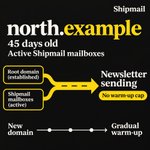
Your domain is at least 30 days old and already has active Shipmail mailboxes? You can skip newsletter warm-up. New domains still warm up.

1
13

Choosing an AI email assistant? Check where your mailbox lives and who controls Send. This comparison covers six options using vendor docs, not hands-on rankings.
shipmail.to/blog/ai-email-as…

A soft-bounce pause no longer stops email you write yourself in Shipmail or a mail app. Automated email stays paused. Hard-bounce and other applicable suppression blocks still apply.

1
23
Need a full office suite, or just business email? Our Google Workspace alternatives guide compares Microsoft 365, Zoho, Proton and more, including what you lose when you switch.
shipmail.to/blog/google-work…

GoDaddy email settings depend on your plan. Titan and Microsoft 365 use different SMTP and IMAP servers. Here are the servers, ports and sign-in settings for each.
shipmail.to/blog/godaddy-ema…

1
48
Set separate heading and text fonts on your Shipmail newsletter website. Choose from 10 font options, change the background and corners, and add your own footer in Design.

1
26
Ask Shipmail's AI assistant for several changes at once. Review them in one card, uncheck anything you don't want, then apply the rest. Draft replies stay unsent.

1
17
cc shows everyone who got a copy. bcc hides those addresses. but if you were bcc'd, reply all can reveal that you received the email.
shipmail.to/blog/cc-vs-bcc

1
19
a catch-all inbox receives mail for addresses you never created. useful for typos, but it also accepts spammers' guesses. here's when to use one and when aliases are a better fit.
shipmail.to/blog/catch-all-e…

8
