

Home AI lab: 2× DGX Spark + RTX PRO 6000 Local LLM deploy · tuning · benchmarks · OSS contributor 本地大模型部署调优|AI 工具实测教程
Atlanta, GA
Joined April 2022
- Tweets8.7K
- Following482
- Followers7.1K
- Likes6.9K





Pinned Tweet
我真的在家里装了一个数据中心。
Rackmate T1 机柜里放着两台 DGX Spark,再加一台 M4 Mac mini。
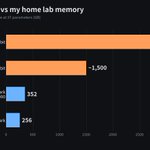
256GB 统一内存,TP=2,接近 Opus 的性能。
这几位随时都能听我调遣:
GLM-5.3-Flash EXL3
Qwen3.8-Flash-Next
DeepSeek V4 0731 Flash
没有机房噪音,没有五小时限额,也不会按 token 从银行卡里匡匡扣钱。
只有机柜、网线和电费。
它们随时接受我的命令,不会因为地区、账号和额度突然拒绝工作,也不会把我的代码、数据和隐私送上云端。
Codex 何时 reset 跟我无关,不用跪求 Tibo。
Claude 何时封号跟我无关,不用看 Dario 脸色。
可以把专注力集中起来, build 自己的东西。
模型出错了我自己修,机器和数据都掌握在自己手里。
从今天起,我的 AI 跑在自己家里。

一台 DGX Spark 跑 Qwen3.8-Flash-Next,同一个 agent 测试,30K 上下文,四个引擎的输出速度:
1. TensorFold 加 Mia 的补丁 36.2 tok/s
2. NVIDIA Flare 31.2
3. TensorFold 1.1.4 原版 30.2
4. vLLM 26.4
最快和最慢差 37%。
换个维度差得更多。同样开 MTP,写 JSON 能到 67 到 70 tok/s,写散文只有 31 到 34,差了一倍。不开草稿的 Flare 写什么都是 27。
MTP 是先猜后面几个 token,再一次读权重验证。JSON 和代码格式固定,猜中的多,散文猜中的少。
我两台跑 GLM-5.3-Flash 也开着 MTP,以后看 Spark 的 decode 跑分,我先看测的是什么内容。


Ran a proper bake-off for Qwen3.8 Flash-Next on one DGX Spark: 4 engines, 3 runs each!
Agent test, 30K context:
TensorFold + @MiaAI_lab’s patches 36.2 tok/s, @NVIDIAAI Flare 31.2,
@ashxhart 's stock TensorFold 30.2,
vLLM 26.4
Turns out what the model writes matters more: JSON 67–70 tok/s, prose 31–34, on every engine


两台 GB10 跑 GLM-5.3-Flash 的一次内存事故复盘。宕机前机器只剩 100 MB 出头,进程预留的空间比实际在用的多了约 25 GB。
GB10 的 CPU 和 GPU 共用一块内存,模型吃满了系统也跟着卡。双机配方开长上下文加多路并发的可以看看。

On Oct 24, I hit a hard memory failure running GLM-5.3-Flash locally on two GB10s: inference stalled, and the second machine briefly dropped offline.
Setup first. I was on @MiaAI_lab's dual-machine TensorFold recipe for GLM-5.3-Flash EXL3 on 2× DGX Sparks, with the uncensored EXL3 build from Hugging Face neko-legends (neko-legends/GLM-5.3-Flash-Uncensored-EXL3):
github.com/MiaAI-Lab/GLM-5.3…
huggingface.co/neko-legends/…
A recipe here means a deployment pack: model + runtime + dual-node settings. My fork changes memory budgets and later adds local guardrails, so it is not identical to the author's defaults.
The service still keeps million-token-class long docs, multi-image input, and 4 concurrent jobs. That long-context budget is shared across jobs — not four separate million-length slots all filled at once.
During the failure, the host had only a bit over 100 MB free. The last monitor reading on the second node was already at zero. On GB10, CPU and GPU share one memory pool, so when the model fills it, the OS and other processes suffer too. NVIDIA documents this under unified memory reporting:
docs.nvidia.com/dgx/dgx-spar…
Looking back over the prior four days of logs: in the last sample before the crash, reserved space held by the process was about 25 GB above what was actually in use. After accounting for normal retained chat state, idle real usage had not grown that much in parallel.
So the investigation shifted toward reserved-space buildup. How much of that ~25 GB could be freed immediately is still unclear — I cannot call it a confirmed memory leak.
The original recipe already has cache reuse and cleanup. After a job ends, some space is kept for the next run, so free memory from the OS view may not jump right away. Writing state to disk also does not mean the in-memory copy is gone.
After bringing the service back, I had Codex add a guard: pause new jobs when memory gets tight; if it keeps getting worse, stop the model. Then a new issue showed up.
The model was still up and some memory had returned, but the remaining headroom was below the threshold to accept jobs again — so the service stayed paused. That stuck pause came from our later guard missing a full recovery path. It should not be read as the original recipe crashing a second time.
We now fill that gap: after a pause, reclaim unused space, and if needed clear recomputable old session state; once the original safety headroom is back and holds for two minutes, resume accepting jobs. Chat history, original images, and capacity stay; if space is still insufficient, the guard still stops the model.
We ran a real controlled test. Model cleanup freed about 1 GB per machine; then we removed the extra test pressure and checked the two-minute stable wait plus resume. During recovery, the model was not restarted, and all 8 prior sessions reread the correct answers.
Also passed: 50 images in one read, and 100 images in 25 batches. A near-limit long document took about 10.5 minutes on first read, then about 1.65 seconds on an immediate reread — that second number reuses already-computed state and is not a first-read speed claim.
Pause-and-recover cleared this round of checks. Whether long-term growth is fully fixed still needs more time in real use.

本地跑 coding agent,上下文一满自动压缩,最慢的一步是把十几万 token 从头再读一遍,写摘要只占小头。
一、压缩为什么会让缓存全部失效
vLLM、SGLang、llama.cpp 都有前缀缓存。算过的 KV 按前缀存着,下一次请求开头一模一样的部分直接复用,只 prefill 新加的那一段。
条件是逐字节一致。system prompt、工具定义、前面的消息,只要有一个字不同,从那里往后全部重算。
Pi 默认的压缩,是把历史拼成一条新的用户消息,再换一个 system prompt 去写摘要。对推理服务来说这是一个全新的 prompt,缓存一个都用不上。
二、本地会慢到什么程度
2× RTX 3090,vLLM 跑 Qwen3.8-27B W4A16,TP=2,统计了 132 次默认压缩:
1. 每次冷读的 token 中位数 142,106
2. 压缩耗时中位数 229 秒,p90 是 489 秒
3. 压缩完的第一轮,还要再等 69 秒
云端 API 的 prefill 快,同样的事只要几秒,所以用云端的人很少觉得这是问题。
三、修法:只在末尾追加
pi-prefix-cache-compaction 这个插件的思路很简单。把最近一次真实请求原样重发,system、tools、消息、thinking 设置一个不动,只在末尾追加一条写摘要的指令。
前缀和服务器刚算过的完全一样,要 prefill 的只有那条指令,时间基本都花在生成摘要上。
1. 215k 上下文的压缩,从中位数 229 秒降到 86 秒
2. DeepSeek API 上一次 56k 的压缩 3 秒,56,216 个 prompt token 里 56,192 个来自缓存
压缩完它还会补一个只要 1 个 token 的预热请求,把摘要和保留的消息先送进缓存。47k token 的测试里,压缩后第一轮的首 token 从 35 秒降到 1.8 秒。
四、后台模式
0.5.0 加了后台模式。上下文到窗口的 70% 时,就在后台先把摘要写好、把压缩后的上下文预热好,等触发压缩时直接换上。
64k 窗口的测试,从开始压缩到收到下一轮回复,总共从 86.2 秒降到 7.2 秒。
代价是后台摘要和正在进行的对话跑在同一台机器上,这段时间 decode 会慢一些,缓存命中率不受影响。
五、最容易踩的坑是 thinking 开关
Qwen3.x 这类模型的 chat template,会把 thinking 或 effort 的设置渲染在 system prompt 最前面。写摘要时顺手把 thinking 关掉,整个对话就要从第一个 token 开始重算。
这个插件早期的一个版本就是这么做的,一次 245k 的压缩变成 5 分钟冷读,跑到超时。现在摘要一律沿用会话本身的 thinking 级别。
服务端也要开前缀缓存。vLLM 是 --enable-prefix-caching,llama.cpp 是 --cache-reuse,SGLang 的 RadixAttention 和 oMLX 默认就开着。
六、放到 DGX Spark 上算一下
Spark 的 prefill 比独显慢。两台 Spark 跑 GLM-5.3-Flash,Spark-GLM53 测到 pp2048 大约 1,769 tok/s。按这个速度粗算,冷读 142k token 要 80 秒左右,还没算写摘要的时间。
同一个引擎做了按 256 token 对齐的前缀路由,64K 的提示词复用时,首 token 是 57.8 毫秒。
本地跑 agent,服务端开没开前缀缓存要看,客户端压缩时有没有动前缀也要看。


听说很好,10/10,这是我看过最短的 DGX Spark 评测。
我两台用到现在,写过的评测比他长得多,结论差不多。

Fuck it, worth a shot.
This is my review of the NVIDIA’s DGX Spark 128GB 4TB GB10 Grace Blackwell AI Desktop. From what I have heard it is really good. 10/10.
@JensenHuang @nvidia @NVIDIARTXSpark
两台 Spark 跑 GLM-5.3-Flash,门槛确实比一年前低。
手写文章不一定过时,过时的是上周的跑分。

local llm 发展得如此地迅速,以至于让所有手写的文章都瞬间过时。
跑高智能去审查版本 llm 的门槛已经非常低了,最低三千美元起,丰俭由人。
把 qwen 3.8 flash next thinking effort 调高,并不比其他模型差太多。
1* dgx spark / 3090+ 128gb ddr4: qwen 3.8 flash next
2* dgx spark:glm 5.3 flash
4* dgx spark:deepseek 4.1 flash 1017
artificialanalysis.ai/?model…


两台 DGX Spark 跑 GLM-5.3-Flash 又多了一个引擎,Spark-GLM53,NVFP4 加 DFlash2 投机解码。
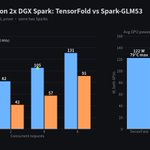
我在研究 Spark-GLM53 的对比数据,同一套两台 Spark 上和 TensorFold 的 EXL3 版比过一轮:
1. 单路 decode,TensorFold 63.1 tok/s,Spark-GLM53 平均 31.2
2. 4 路并发合计,TensorFold 105.1,Spark-GLM53 57.3
3. 8 路代码任务,Spark-GLM53 开投机解码到 188.5 至 208.3,TensorFold 是 167
4. 两台 GPU 平均功耗 70.5 W 对 122.1 W,最高温 69°C 对 79°C
我两台跑的就是 TensorFold 这套,单路 62.2,4 路 104.6,和这组数基本一样。
我的 GPU 锁在 1800MHz,温度一直没压力。
我一个人写代码,单路快更要紧,先不换。多人共用、agent 并发多的,Spark-GLM53 更值得试。

Spark-GLM53 的完整对比数据和配置:forums.developer.nvidia.com/…

同一个仓库里 Claude Code 和 Codex 一起用,只要有 CLAUDE.md,Claude Code 默认就不读 AGENTS.md。
想让它两个都读,有两种改法:
1. 在 CLAUDE.md 开头加一行 @AGENTS.md,Claude 先读 AGENTS.md,再读 CLAUDE.md 后面写的内容
2. /config 里把 Project instructions 改成 claude-md-and-agents-md,两个文件都读,已经读过的不会再读一遍
CLAUDE.local.md 也算数。只想放几条自己的私人规则,加了它,AGENTS.md 就不读了。
直接读 AGENTS.md 要 2.1.277 以后的版本。

ALT Card: two ways to make Claude Code read AGENTS.md alongside CLAUDE.md


Sage-A1.5 是上海 AI 实验室在 Qwen3.6-35B-A3B 上训出来的 agent 模型,能自己拆任务、同时派好几个子 agent 去查。
Q4_K_M 版 21.7 GB,64GB 的 DGX Spark 也放得下。我更关心的是子 agent 一开,本地机器要同时跑好几条序列,内存和速度会变成什么样。
一、底子还是 Qwen3.6-35B-A3B
config 里的结构和 Qwen3.6-35B-A3B 一样。40 层,每层 256 个专家选 8 个,再加 1 个共享专家。BF16 权重 71.9 GB,每个 token 激活约 3B。
官方表里和底座比,涨得最多的是干活类的分数。
1. SWE-bench Pro 从 49.5 到 61.2
2. IFBench 从 64.4 到 81.6
3. MLE-Lite 从 37.9 到 65.2
二、子 agent 靠一个工具开出来
并行子 agent 要靠 harness 配合。你在工具列表里注册一个 spawn_subagent,模型觉得任务能拆,就调用它,传一组子任务,每个都要写 task、context、expected_output。
harness 负责把这些子任务同时跑起来。每个子 agent 有自己的上下文,看不到主对话,跑完返回一段 JSON,里面有答案、状态、证据和没解决的问题。
默认一次最多派 5 个,每个最多 20 轮。主 agent 加 5 个子 agent,同一时间就是 6 条序列。
官方表里开和不开的差别是这样。
1. BrowseComp 从 81.7 到 82.8
2. DeepResearch-Bench2 从 43.7 到 47.5
分数涨得不多,变化大的是本地要同时扛的请求数,从 1 条变成最多 6 条。
三、KV cache 很小,6 路放得下
40 层里只有 10 层是全注意力,2 个 KV 头,每头 256 维。按 BF16 算,每个 token 的 KV 是 20 KB,262K 上下文 5.4 GB。
另外 30 层是线性注意力,每条序列存一份固定大小的状态,约 64 MB,不随上下文变长。
权重 21.7 GB 加上看图的 mmproj 0.9 GB,6 路同时跑,大概是这样。
1. 每路 32K,一共约 27 GB
2. 每路 128K,一共约 39 GB
3. 每路开满 262K,一共约 55 GB
64GB 的 Spark 前两种没问题,第三种就太挤了。96GB 的 RTX PRO 6000 和 128GB 的 Spark 都放得下。
四、并发多了,每路会变慢
decode 卡在读权重。单路每个 token 读约 3B 参数,Q4_K_M 平均 4.8 bit 左右,就是 1.8 GB。Spark 273 GB/s,理论上限约 150 tok/s,实际会低不少。
多路一起 decode,注意力和共享专家这些只读一遍,路由专家就不一样了。6 个 token 各选 8 个,一层里平均会碰到 44 个不同的专家,这部分要读的量差不多翻 5.5 倍。
我按这个粗算,6 路一起跑,总吞吐上限约是单路的 2.3 倍,每路只剩 40% 左右,这还没算 KV 的读取。
我两台 Spark 跑 GLM-5.3-Flash 也是这样,单路 62.2 tok/s,4 路合计 104.6,只多了 70%。
五、本地跑要注意
1. 子任务之间看不到彼此的结果,有先后顺序的要分两次调用
2. 子 agent 查不到会返回 UNKNOWN,用答案之前先看 status
3. Verification Mode 默认关,请求里用 chat_template_kwargs 传 verification: true 打开,system message 不能是空的
4. 官方推荐 temperature 1.0、top_p 0.95、top_k 20、presence_penalty 1.5


实在太猛了,Duo 适配的很完美
没想到随时随地就可以回味上大学时候打游戏的时光了
要是能加一个帧数功耗显示啥就好了,比较 nerdy的需求😅

火炬之光2 Testflight 的邀请链接来了,1000 个名额。
这个链接同时支持 iPhone iPad Apple TV Vision Pro 和 Mac,不过 Mac 的审核卡了几天没反应了,所以 Mac 暂时还是很老的版本,不支持云存档和联网。
testflight.apple.com/join/fH…
需要优化的小问题应该还不少,欢迎大家反馈,我会尽快更新。
