

chess international master, CTO @era_compute https://teapawt.org/t.co/cTD9LqMPIu
San Francisco, CA
Joined May 2018
- Tweets1K
- Following1.1K
- Followers1.5K
- Likes3.2K






software is like soft butter - models will soon cut through it in seconds.
we may need to rebuild the core primitives of the internet from the ground up.
the existing primitives were designed by humans for humans. we will quickly move towards letting the machines design new software paradigms - for other machines and for humans.
however worrying the current situation is, humanity will ultimately prevail. but it will take some work

2
278
so humans run at 15 FPS?

1/ We discovered something totally unexpected about the neural structure of consciousness that overturns decades of thinking on its biological basis and brings us significantly closer to the recipe for generating conscious awareness.
New preprint: biorxiv.org/content/10.64898… (led by @HesseJanis, with @FrankLanfranchi, @_conor_mcgrory, @Yuelin_Shi, and @EngelTatiana)

1
391

let's deploy some clusters

Era Compute is partnering with Nebius.
Adding Nebius to our partner network expands the infrastructure options we can source for customers, matching workload requirements with deployment timelines and commercial terms.
Planning a deployment? Send us your GPU requirements!

3
16
849


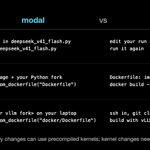
20/x the same idea on bare metal
on a rented B300 server, you handle the setup modal handled for you:
- install the nvidia driver; on an HGX server, also fabric manager + NVLSM for the gpu links
- install docker + the nvidia container toolkit
- run the same engine image and model across 4 B300s, keeping weights and compiled kernels on disk
- add https and api-key authentication; keep the engine port private
your provider may have done some of the setup already. check the gpus and connections before starting vllm.
in opencode, change the url and key. the laptop-to-model flow stays the same.
1
70
21/21 tldr:
- vllm runs deepseek v4.1 flash across 4 remote B300s
- modal handles the hosting and gives you an api url
- opencode runs on your laptop and calls that api
- on bare metal, you run the same engine and handle the server setup yourself
code + setup: github.com/Rigos0/deepseek-v…

59
17/x next: faster replies and more requests on the same gpus. to tune that, it helps to understand the two jobs vllm does:
- prefill: process your prompt before the answer can start
- decode: generate the answer, normally one token per step
the next settings control how vllm batches that work and uses gpu memory.
🤖 Made with AI

1
38
19/x another way to speed up replies: speculative decoding
- a small draft module guesses the next tokens
- the big model checks the guesses together and keeps the ones it accepts
- more accepted guesses means fewer steps through the big model, which can speed up replies
v4.1 flash already includes deepseek's dspark module. we set it to draft 5 tokens at a time.
modal trains and publishes separate drafters for other models, including kimi k3, glm 5.3 and qwen.

1
37
18/x these are the settings in our server file, and what each changes:
- --max-num-seqs 32: batch up to 32 sequences at a time
- --max-model-len 262144: cap prompt + output at 256K tokens
- --gpu-memory-utilization 0.92: give the engine 92% of gpu memory
- --kv-cache-dtype fp8: store the conversation cache in fewer bytes
- --tensor-parallel-size 4: split model computation across 4 gpus
for coding agents, our file also enables the deepseek_v41 parsers so vllm can return tool calls and reasoning.
1
27

14/x connect your coding agent
with opencode installed, copy the repo's opencode.json into your coding project (merge it if you already have one). it connects these three things:
- baseURL: your modal url + /v1
- apiKey: {env:MODAL_PROXY_TOKEN}
- model: deepseek-v4.1-flash
replace the example baseURL with your own. start opencode from the same terminal and select the model.
1
1
45
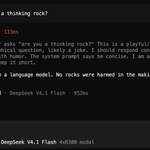
15/x now ask opencode to work on your project.
- opencode sends your prompt + relevant code to modal
- vllm runs deepseek across the 4 B300s and returns an answer or tool calls
- opencode runs the tools on your laptop and sends the results back
the agent is on your laptop. the model is on the remote gpus.
we tested the full loop: opencode fixed a python project and passed all 5 tests.

1
37
8/x where the weights live
hugging face: deepseek-ai/DeepSeek-V4.1-Flash. about 511 GB of weights.
vllm caches the download in ~/.cache/huggingface. local disk on your server, a persistent volume on modal. later starts reuse the cached files.
huggingface.co/deepseek-ai/D…

1
65
13/x the first request
modal run deepseek_v41_flash.py
our test function sends one chat message and retries until the server is ready.
- our first gpu startup took about 45 minutes, after downloading the weights
- later starts reuse the saved files, but still load the model again
wait for the test reply before opening opencode.

1
26
12/x give your laptop access
modal protects this endpoint by default. create a proxy token:
modal workspace proxy-tokens create
it returns an id and a secret. join them with a dot in your terminal:
export MODAL_PROXY_TOKEN="wk-YOUR_ID.ws-YOUR_SECRET"
that's the credential your coding agent will use.
1
26
11/x deploy it
create a read token at huggingface.co/settings/toke…, then:
modal secret create huggingface HF_TOKEN=hf_...
modal run deepseek_v41_flash.py --download-only
modal deploy deepseek_v41_flash.py
the middle command downloads the weights on a cpu worker before we start paying for gpus. deploy gives you the https url.

1
27
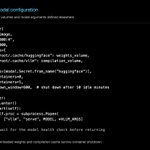
10/x the deployment file
the repo's deepseek_v41_flash.py tells modal:
- which engine image to run
- which 4 gpus to attach
- where to keep the weights and compiled kernels
then the file starts vllm serve.
github.com/Rigos0/deepseek-v…

1
38
9/x first, set up modal
create an account at modal.com. with python installed, run these on your laptop:
git clone github.com/Rigos0/deepseek-v…
cd deepseek-v4-flash-modal-starter
python3 -m venv .venv
source .venv/bin/activate
pip install -r requirements.txt
modal setup
modal profile current
modal setup opens your browser. choose the workspace with your credits, then check that modal profile current matches it.

1
45